3-6 Leeboy Model 8515D Conveyor Paver
Component Location
Left Control Panel
1
2
3
4
5
6
7
8
9
10
11
12
13
14
15
16
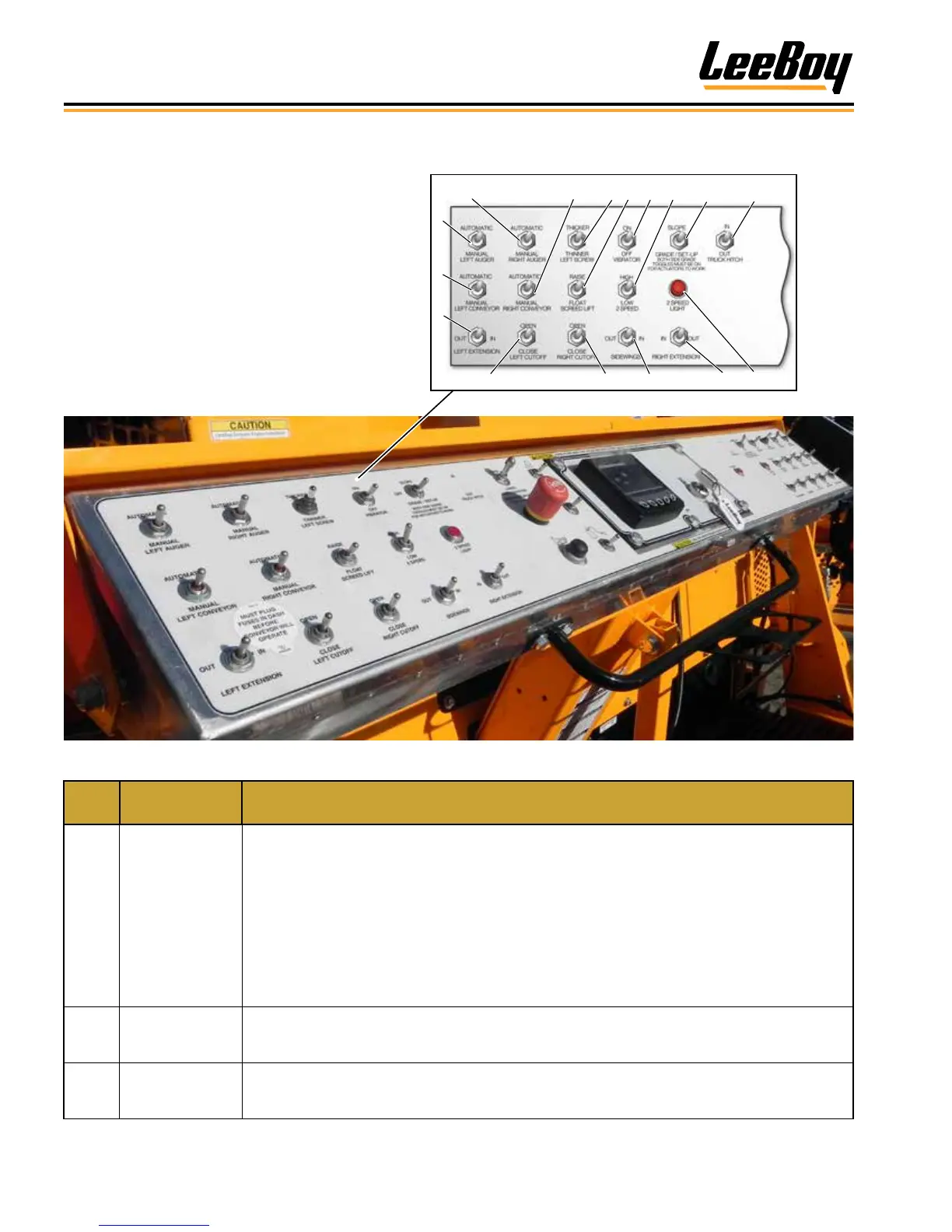
Figure 3-2. Operator Control Panel
ITEM
NO.
CONTROL
NAME
FUNCTION
1
Right Auger
Switch
Selects ON or OFF for automatic operation of right auger. Center position is OFF. Selecting
MANUAL position provides manual override.
NOTE: Set the left and right auger switches on the right control panel to the SLAVE position
when operating from the left side. (Figure 3-3)
NOTE: If using the sonic auger, ensure the left and right auger switches on the right control
panel are in the SLAVE position; and the left and right Auger AUTOMATIC/MANUAL
switches are set to the AUTO position (left control panel).
NOTE: The Auger On/Off switch on both remote control boxes must be set to the ON position.
(Page 4-26)
2
Right Conveyor
Switch
Selects automatic or manual mode for right conveyor. MANUAL position provides override.
Conveyor can be operated from either side of the control panel in the MANUAL mode. The center
position is OFF. For automatic operation, set switch to AUTOMATIC.
3
Left Screw
Thicker/Thinner
Switch
Sets the thickness of the asphalt. Operator can select either THICKER or THINNER as needed.
The Grade Control switch must be set to GRADE on both sides of the control panel to turn power
on for this feature.
The operator control console for the LeeBoy
8515D Conveyor Paver offers the convenience
of operating from either side depending upon
working conditions. The control panel has a cover
for protection from the elements.
While operators typically pave on the left side of
the machine, a complete set of controls on the
right control panel allows operators the exibility of
working from either side.



 To Next Page