3-10 Leeboy Model 8515D Conveyor Paver
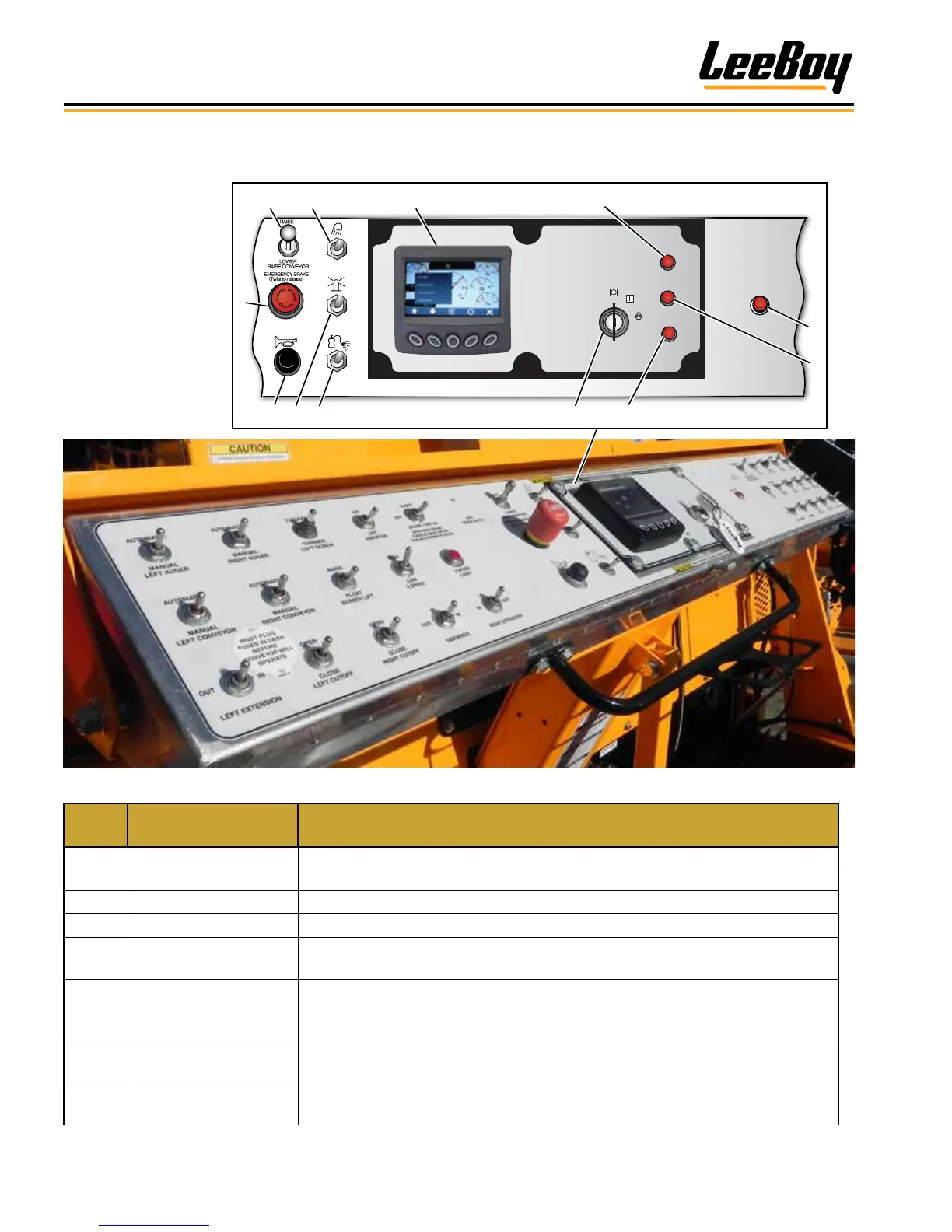
Component Location
Center Control Panel
ALTERNATOR
FAILURE
WAIT TO
START
PREHEAT
START
RUN
3 4 52
1
7
9 10 118
12
OFF
6
Figure 3-4. Center Control Panel
ITEM
NO.
CONTROL NAME FUNCTION
1 E-Stop
Immediately stops the paver engine and all electronic functions. Turn
clockwise to release E-Stop button.
2 Conveyor Raise/Lower Controls raising and lowering conveyor.
3 Work Light Switch Turns work lights on and off.
4 PV480 Digital Display
Displays paver setup and calibration information, engine operating
information, and engine and paver system fault information. (Page 4-5)
5 Preheat Light
In cool weather, a preheat cycle will begin when ignition switch is turned to the
RUN position. The preheat light will turn off when warm and engine start-up
can resume.
6 Plus One Fault Light
Illuminates to alert operator a fault code is present in the Plus One system that
needs attention. (Page 5-31)
7 Wait to Start Light
Illuminates for a few seconds during start-up. Starter will not engage until this
light turns off.
The center control
panel contains
general operating
controls, i.e.,
emergency stop,
horn, ignition, etc.
The PV480 Digital
Display controller
features numerous
controls for
machine and paving
operations. (Page
4-5)



 To Next Page