EasyManua.ls Logo

LevelOne DSS-1000 - Changing the Layout

LevelOne DSS-1000
134 pages
Print Icon
To Next Page IconTo Next Page
To Previous Page IconTo Previous Page
Loading...
DSS-1000 User Manual
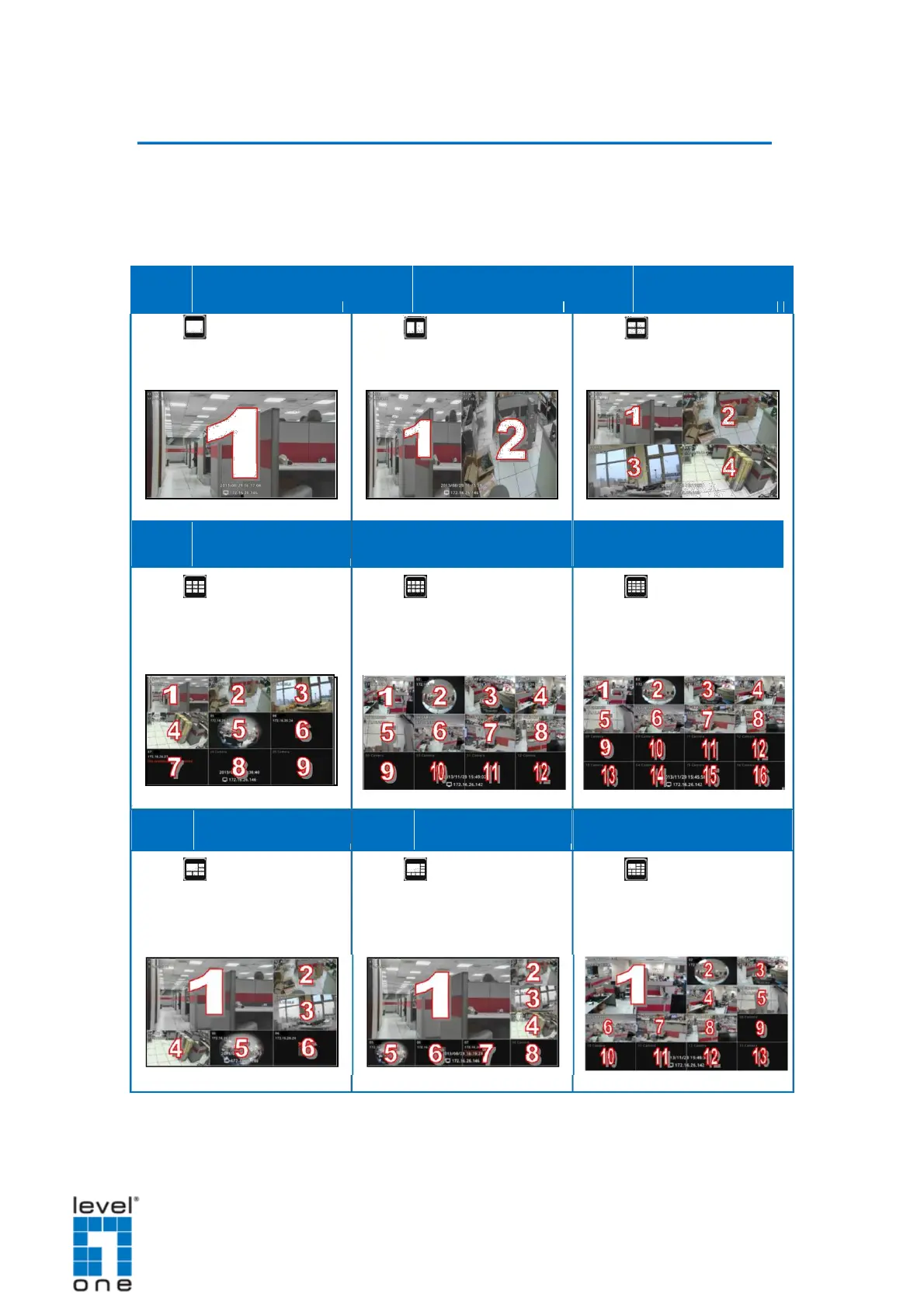
Changing the Layout
By default, the local Live View is displayed with a 9-channel layout. The layout can
be changed into a 1-channel, 2-channel, 1+7-channel display, etc. Available layout
varies depending on current channel mode (see Module on page 44).
Layout 1
Layout 2
Layout 4
Click
to display one
Click
to display 2
Click
to display 4
channel on full screen.
channels at a time.
channels at a time.
Layout 9
Layout 12
Layout 16
Click
to display 9
Click
to display 12
Click
to display 16
channels at a time.
channels at a time.
channels at a time.
Layout 1+5
Layout 1+7
Layout 1+12
Click
to display 6
Click
to display 8
Click
to display 13
channels at a time on a 1+5
channels at a time on a 1+7
channels at a time on a 1+12
layout.
layout.
layout.
29

Table of Contents

Related product manuals