960-0001-20 iGrowSeries 100 Installation and User Manual 39
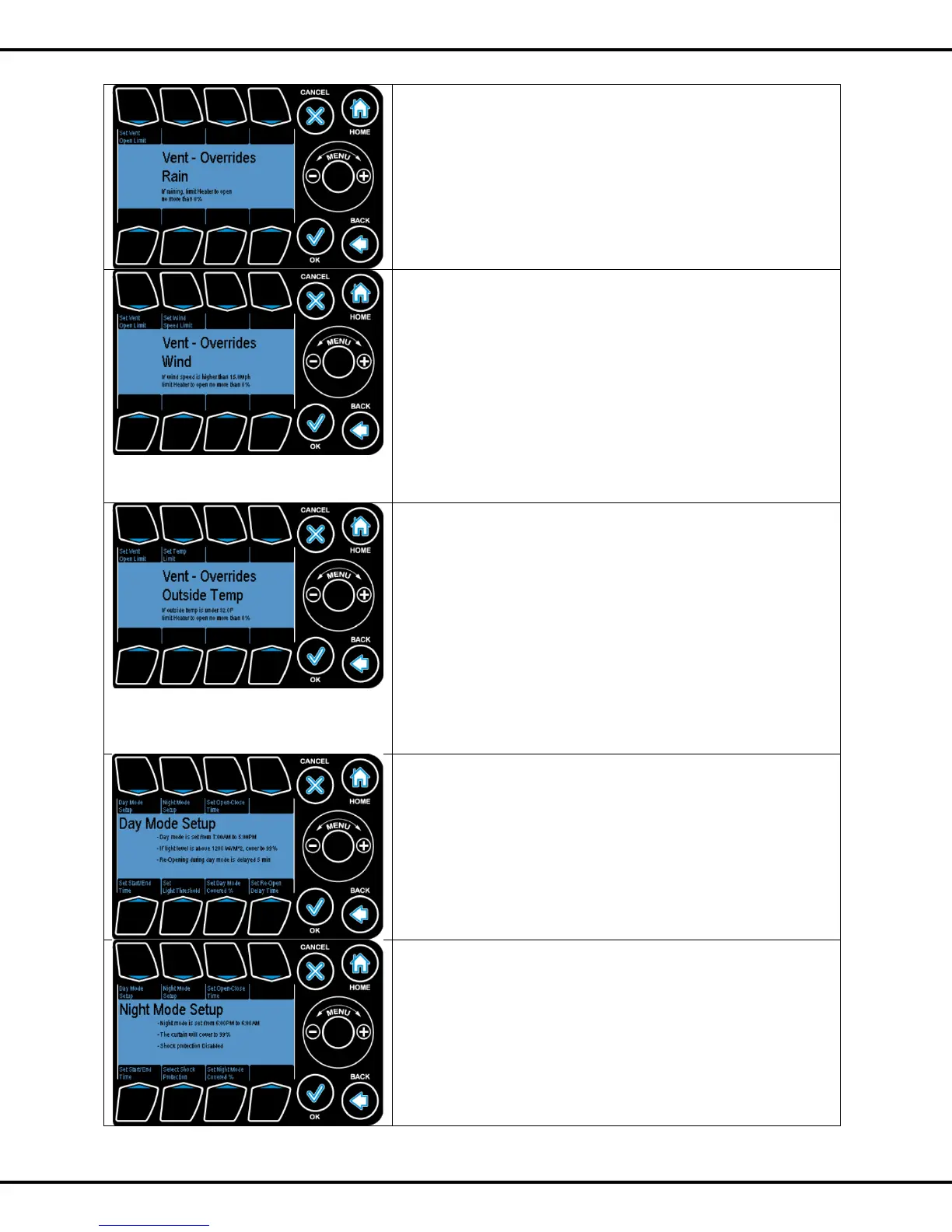
Rain Vent Open Limit: This is the maximum position the vent
can be open when the rain is detected.
The value can be changed by selecting Button #1 and the
Wheel can be used to modify the value.
Wind Vent Override
Set Vent Open Limit: This is the maximum position the vent
can be open when the wind is at or exceeding a user-specified
speed.
Set Wind Speed Limit: This is the user- specified wind speed
value which triggers the Vent Open Limit.
These values can be changed by selecting Buttons #1 and
#2. Wheel can be used to modify the value
Outside Temp Vent Override
Set Vent Open Limit: This is the maximum position the vent
can be open when the outside temperature is below the set
temperature limit.
Set Temp Limit: This is the user specified temperature value
which triggers the Vent Open Limit when temperature drops
below set value.
These values can be changed by selecting Buttons #1 and
#2. Wheel can be used to modify the value
The curtains are also a dual channel device and can only be
programmed starting on an odd channel. The curtain can be
programmed for the Day and Night mode. By pressing
Buttons #1, #2 users can to go to these options.
The duration for the start of each mode can be set using Set
Start/End Time. User can select this option by pressing
Button #5 and then OK.
Open Close Time: It is the time taken for the curtain to go
from full covered to full uncovered mode and vice versa.
By pressing Button #3 user can to go to this option.
Light Threshold: The light threshold value at which the
curtain should shade/ cover. By pressing Button #6 user can
to go to this option.
Reopen Delay Time: the time delay after which the curtain



 To Next Page