Page 8-96 LTV
®
1200/1150 Ventilator Service Manual p/n 18603-001, Rev. C
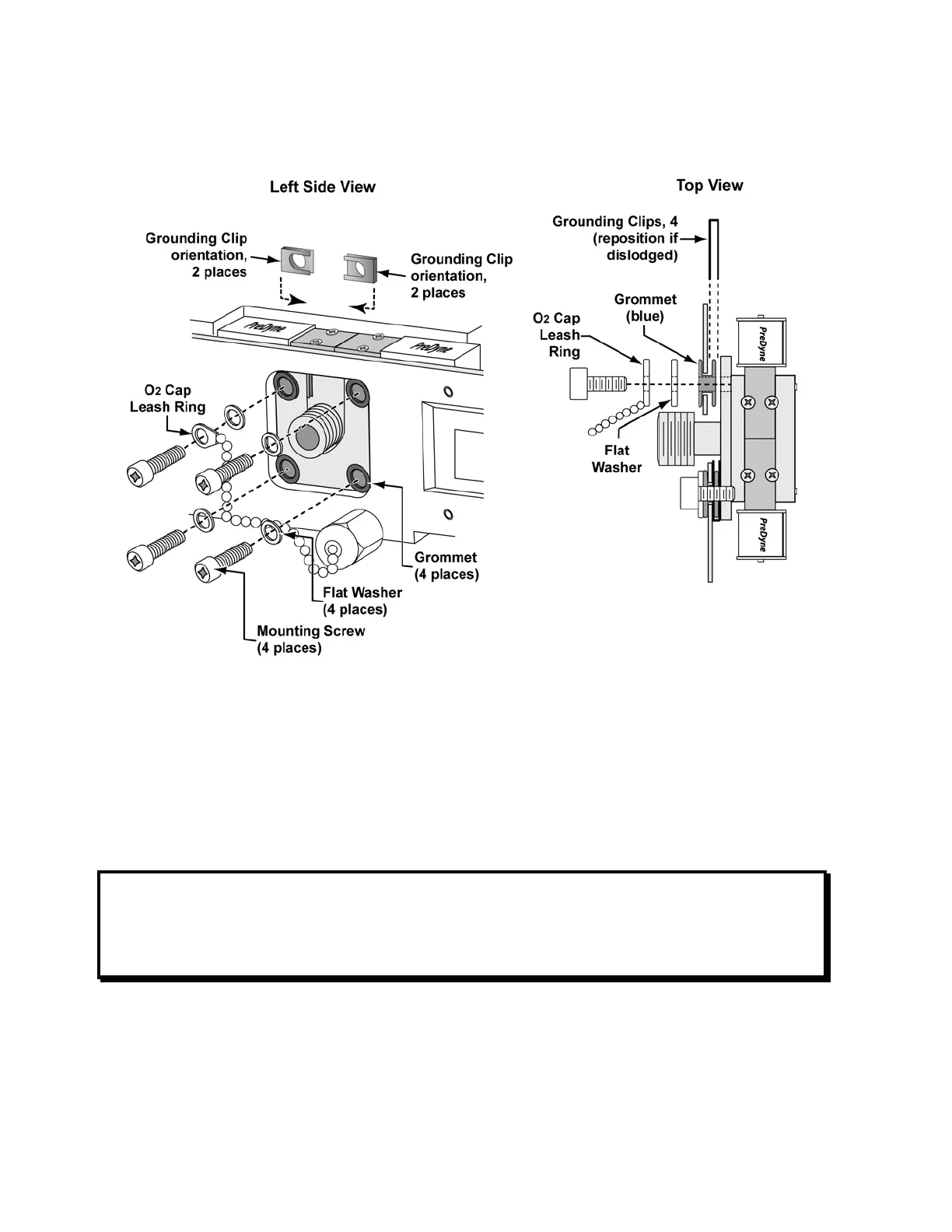
3) Check the blue rubber grommets (P/N 10630) and grounding clips (P/N 10752) on the
oxygen blender mounting (4 each) for wear and replace if necessary (LTV
®
1200 only).
4) For the LTV
®
1200: Replace the four (4) blender mounting screws (P/N 10176), O
2
blender cap, and four (4) flat metal washers (P/N 10594). The grounding clips should be
positioned over the inside lip of the grommets, aligned with the edge of the side panel
and oriented as shown in the illustrations. Screws should be torqued to 60 in-oz (0.42
Nm).
For the LTV
®
1150: Replace the four (4) O
2
Block mounting screws (P/N 10627), Green
O
2
port cap (P/N 14446), and four (4) plastic shoulder washers (P/N 10630). Screws
should be torqued to 60 in-oz (0.42 Nm).
NOTE
If the upper clips are not properly aligned with the edge of the side panel, the back panel of
the ventilator will not seat correctly. Use a straight edged screwdriver or pick to prevent each
grounding clip from turning as the mounting screws are tightened (LTV
®
1200 only).



 To Next Page