p/n 18603-001, Rev. C LTV
®
1200/1150 Ventilator Service Manual Page 8-129
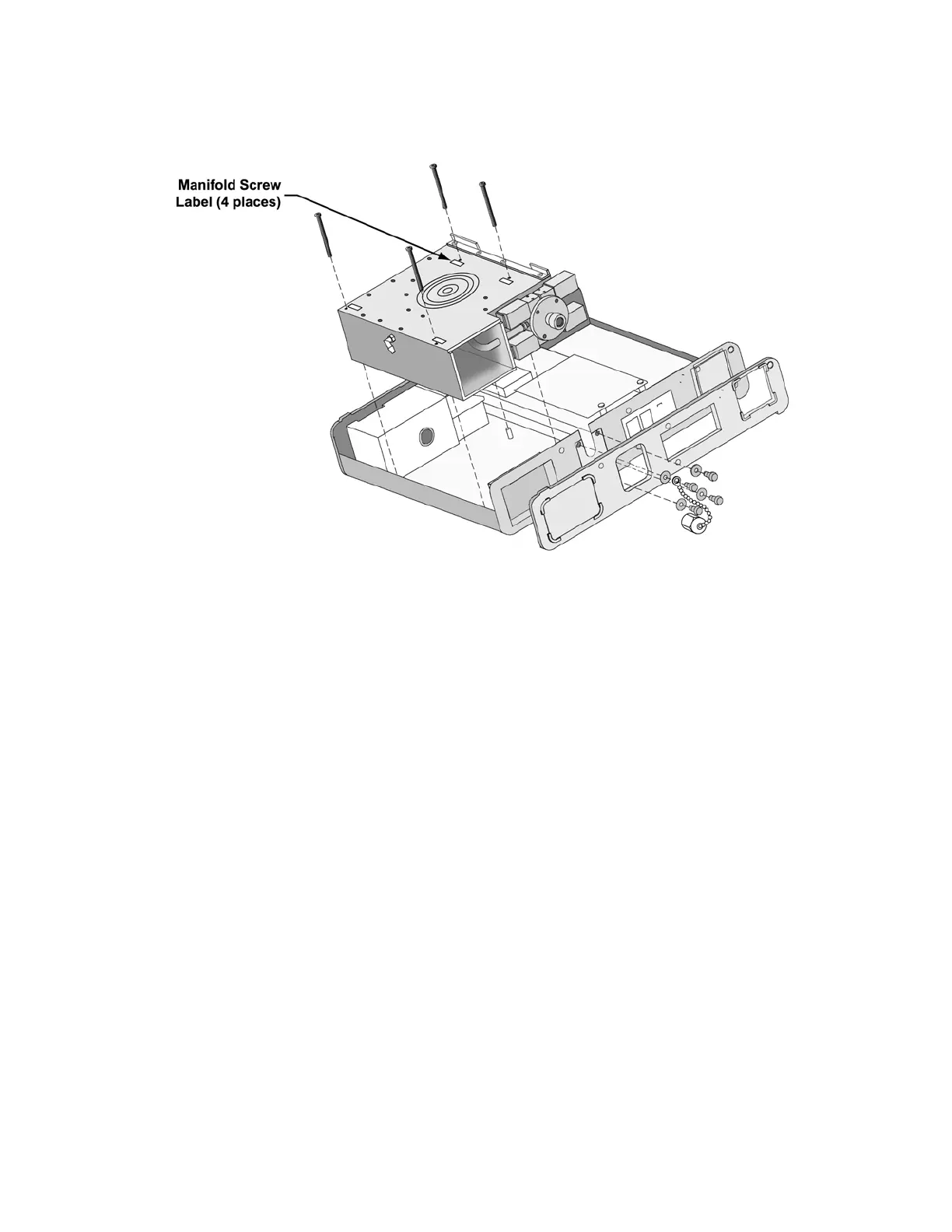
8) Remove the four (4) black screws from the turbine manifold.
9) Remove the four (4) blender / O
2
Block mounting screws and washers from the left side
of the ventilator.
10) Remove the oxygen blender (LTV
®
1200) or O
2
Block (LTV
®
1150), turbine manifold and
interior inlet filter. Be careful not to dislodge the grounding straps and grommets that are
between the oxygen blender and the side of the ventilator case.
11) The thermo conductive pad beneath the turbine may adhere to the turbine when it is
removed, or may remain attached to the case. If the Thermo Conductive Pad remains
attached to the case, check it for damage or hardening and replace it if necessary. If the
pad comes out with the turbine, replace it with a new pad.
To replace the thermo conductive pad:
1) Peel the thermo conductive pad off.
2) If there is adhesive residue left on the inside of the upper weldment or the turbine
assembly, remove it by washing with a mild cleaner.
3) Remove the protective backing from the smooth side of the new thermo conductive
pad and center it on the turbine surface.
4) Remove the protective cover from the thermo conductive pad.



 To Next Page