OPERATOR'S STATION
Header Controls
NOTE: Some
of
these controls are not used
for all types of headers. Some are optional
equipment and may not be present
in
your
unit.
For others, while
the
switch
may
be
installed, it will be non-functional for certain
headers
.
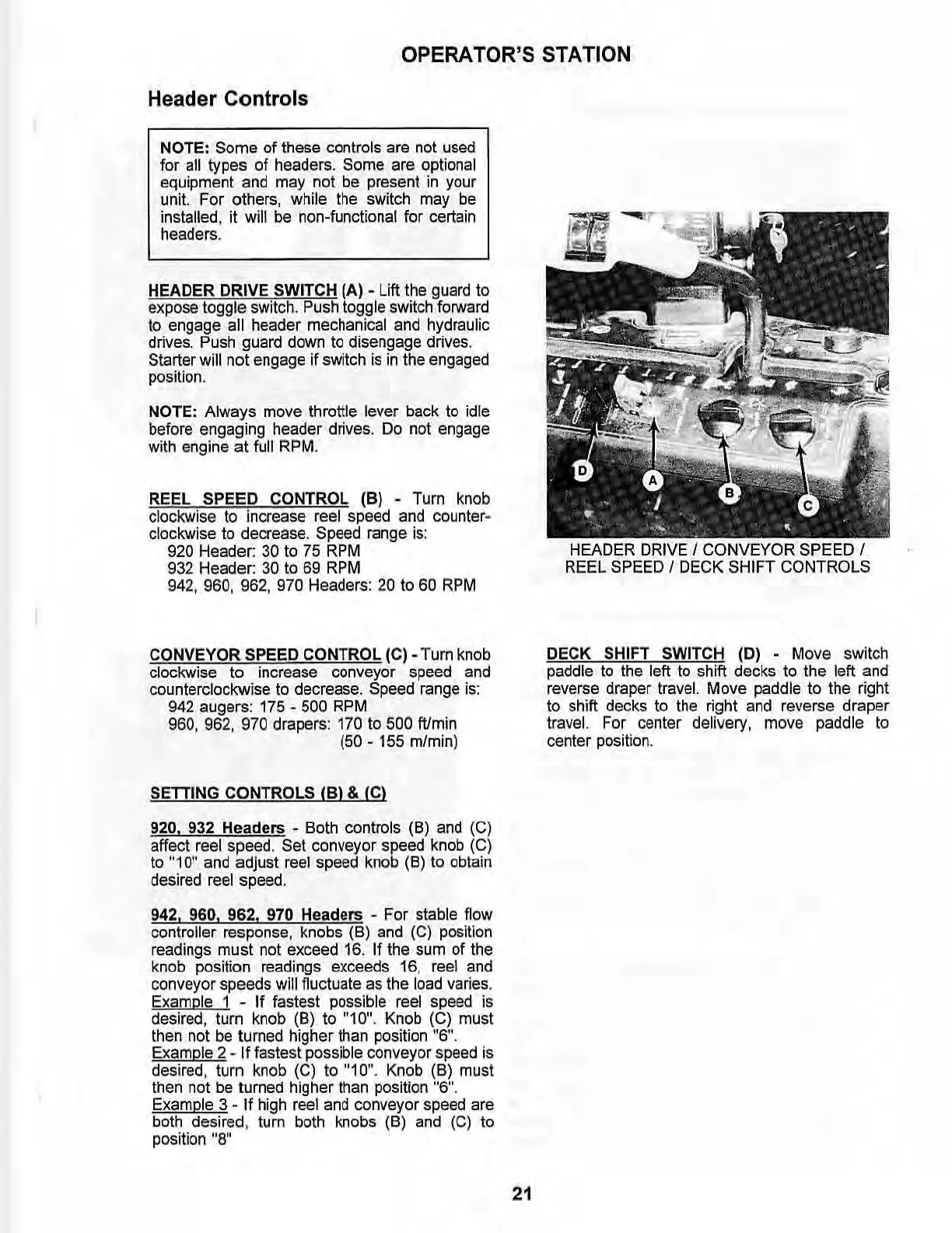
HEADER DRIVE SWITCH (A) -
Lift
Ihe guard to
expose
toggle
switch
.
Push
toggle
switch
fOl"lNard
to engage all header mechanical and hydraulic
drives. Push guard down to disengage drives.
Starter will not engage if switch
is
in
the engaged
position
.
NOTE: Always move throttle lever back to
id
le
before engaging header drives. Do not engage
with engine
at
full RPM.
REEL SPEED CONTROL (B) - Turn knob
clockwise to increase reel speed and
counter
~
clockwise to decrease. Speed range is:
920 Header:
30
to 75
RPM
932 Header:
30
to
69
RPM
942, 960, 962, 970 Headers:
20
to
60
RPM
CONVEYOR SPEED CONTROL (C) - Turn knob
clockwise to increase conveyor speed
and
counterclockwise to decrease. Speed range is:
942 augers: 175 -
500 RPM
960, 962, 970 draper
s:
170 to 500 ftlmin
(50 - 155 mlmin)
SETTING CONTROLS
IB}
& IC}
920. 932
Headers·
Both controls (8)
and
(C)
affect reel speed. Set conveyor speed knob (C)
to "10" and adjust reel speed knob
(8)
to obtain
desired reel speed.
942, 960,
962.
970
Headers · For stable
flow
controller response, knobs
(8)
and (C) position
readings must not exceed
16.
If
the sum of the
knob
position readings exceeds
16
,
reel
and
conveyor speeds will
flu
ctuate as the load varies.
Example 1 - If fastest possible
reel
speed
is
desired, tum
knob
(8) to "10".
Knob
(C)
must
then not be turned higher than position "6".
Example 2 - If fastest possible conveyor speed
is
de
s
ired
, turn
knob
(C)
to
"10
",
Knob
(8)
must
then not be turned higher than position "6".
Example 3 -
If
high reel and conveyor speed are
both desired, turn both knobs (8) and
(C)
to
positi
on
"8"
21
HEADER DRIVE I CONVEYOR SPEED I
REEL SPEED I DECK SHIFT CONTROLS
DECK SHIFT SWITCH
(D) - Move switch
paddle to the
left to shift decks to the left and
reverse draper travel. Move paddle to the right
to shift decks to the right and reverse draper
travel. For center delivery, move paddle to
center position.



 To Next Page