215620 160 Revision A
DANGER
Ensure that all bystanders have cleared the area.
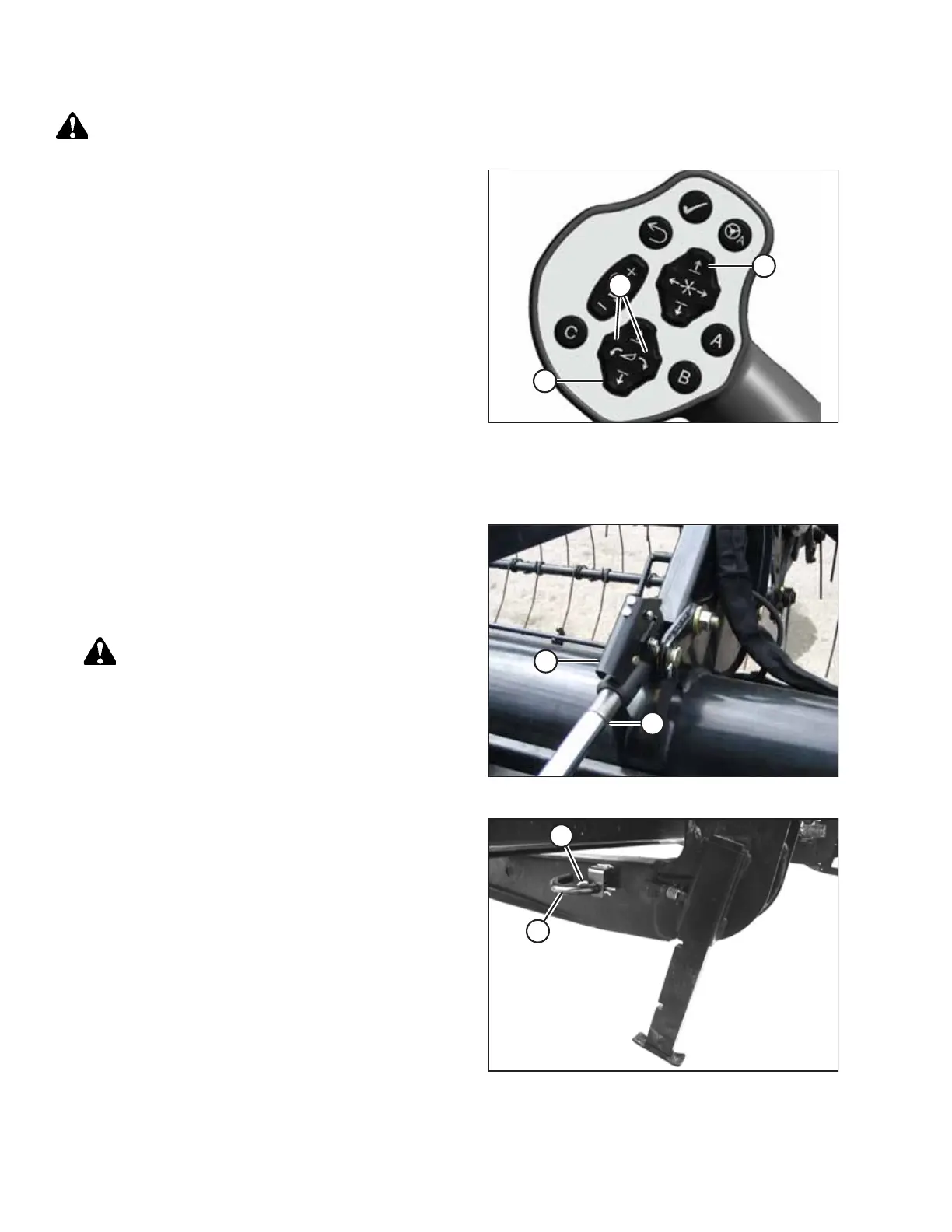
Figure 5.77: GSL
22. Start the engine.
23. Remove header float when prompted by the Harvest
Performance Tracker (HPT).
NOTE:
If not prompted by the HPT to remove float, remove float
manually.
24. Lower the header to the ground with HEADER DOWN
switch (A).
25. Press HEADER TILT switches (B) as required on GSL to
release load on center-link.
26. Windrowers with self-aligning center-link:
a. Press REEL UP switch (C) to disengage center-link from
header.
b. Proceed to Step 28, page 160.
Figure 5.78: Hydraulic Center-Link
27. Windrowers without self-aligning center-link:
a. Shut off the engine and remove the key.
b. Disconnect center-link by lifting release (B) and lift
hook (A) off header.
DANGER
Ensure that all bystanders have cleared the area.
c. Start the engine.
Figure 5.79: Header Stand
28. Back windrower away from header.
29. Reinstall pin (A) into header leg, and secure with
hairpin (B). Repeat this step on the other header leg.
ATTACHING A HEADER TO THE WINDROWER



 To Next Page