.
Select the Enable extraction check box and specify the extraction period.
This can begin before alignment, before the background measurement or at
the start of measurement (with a delay of up to 10 seconds if required). It
can continue for up to 60 seconds after the measurement if required; select
Elapsed time in the Stop list and set a time. Click Next.
.
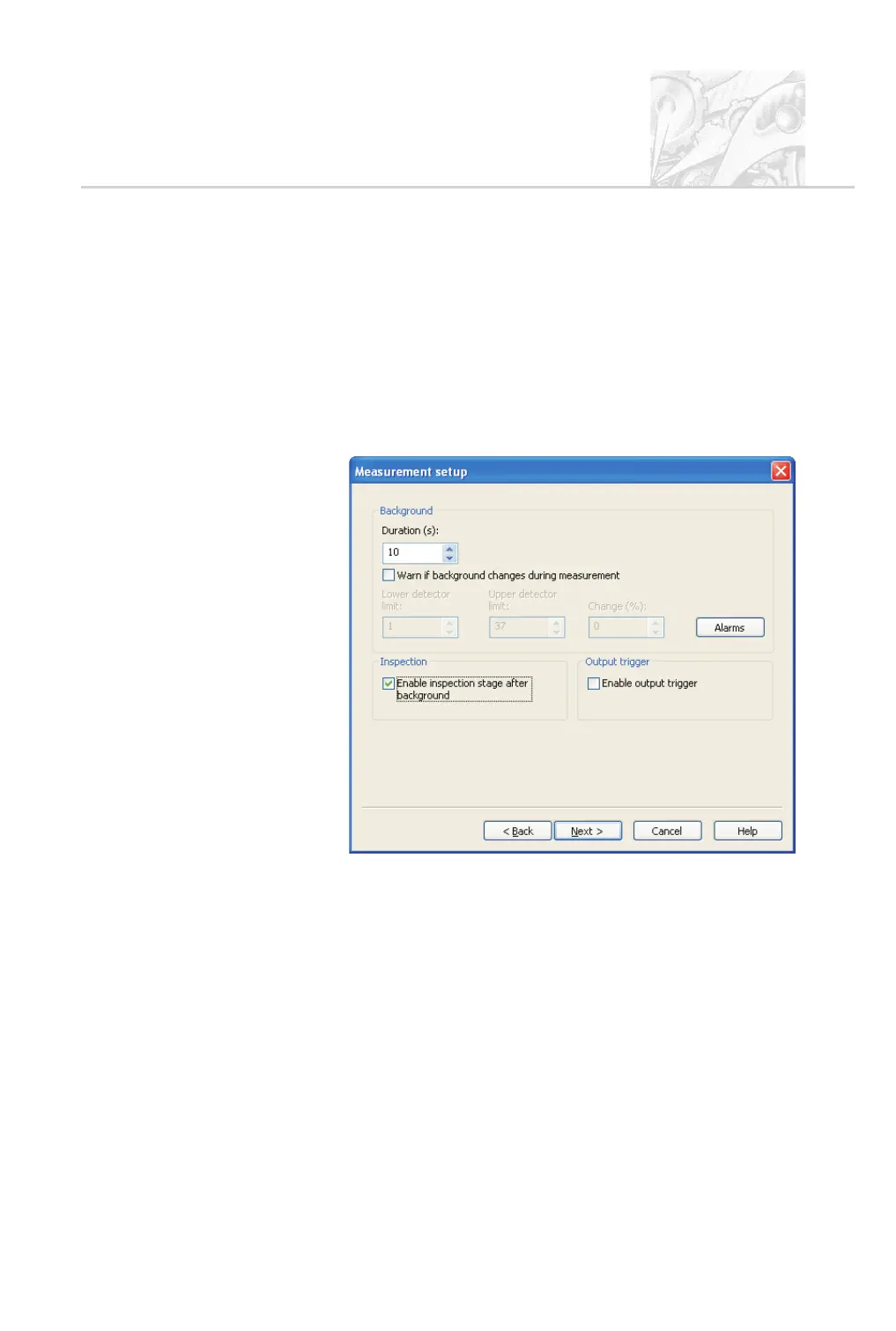
The Measurement setup dialogue shown below appears. At the bottom of
the dialogue select the Enable inspection stage... check box. This pauses
the measurement after the background measurement and allows a trial
spray before measurement starts so pre-measurement checks can be per
-
formed. There’s no need to set up an output trigger so leave that check box
deselected.
.
Use the Duration box to specify how long the background measurement
will run for before moving to the next measurement stage.
Significant changes in the background may indicate spray deposition on the
optics during the measurement, reducing the accuracy of the results. To
check for these, select the Warn if background changes during
measurement check box. This makes two further options available:
Lower Detector Limit and Upper Detector Limit – set the range of
detectors that should be monitored as part of the background check.
Change (%) – sets the maximum allowable percentage change in the
average signal measured across the specified detector range which is
CHAPTER 5
Spraytec Page 5.15



 To Next Page