AIRCONDITIONINGANDAUDIOSYSTEMS
Connecting/DisconnectingaUSBStorage
Device
InsertingaUSBStorageDevice
ConnectaUSBdevicetotheUSBportforconnection.
RemovingtheUSBStorageDevice
Checkandconrmthatthereisnodatabeingaccessed,
thenpullouttheUSBstoragedevice.
Note:IfanydatalossorbreachoccurswhilsttheUSB
storagedeviceisinsertedorbeingused,itwillgenerally
beunrecoverable.MGMotoracceptsnoresponsibility
foranydatalossorbreach.
Note:SomeUSBstoragedevicesmaybe
unidentiable.
Note:TheInfotainmentsystemmaynotachieveits
optimumperformancewhenusingsomeUSBstorage
devices.
Note:UsingaUSBhuborextensioncablemayresult
intheUSBdevicenotbeingrecognised.
Radio
T ouchthe[Radio]cardinthemaininterfacetoenterthe
Radiointerface.
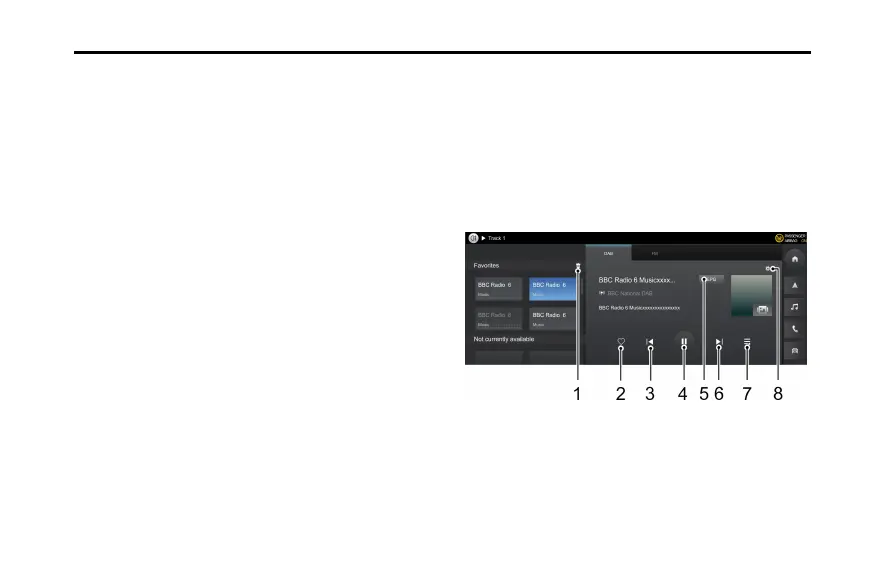
T ouch[DAB]/[FM]atthetopofthescreentoenterDAB
orFMRadiointerface.
DAB
1Clicktoemptythefavorite.
2AddaStationto/RemoveaStationfromFavorites.
3PreviousStation.
4Pause/play.
102



 To Next Page