© Microhard Systems Inc. 111
4.0 Configuration
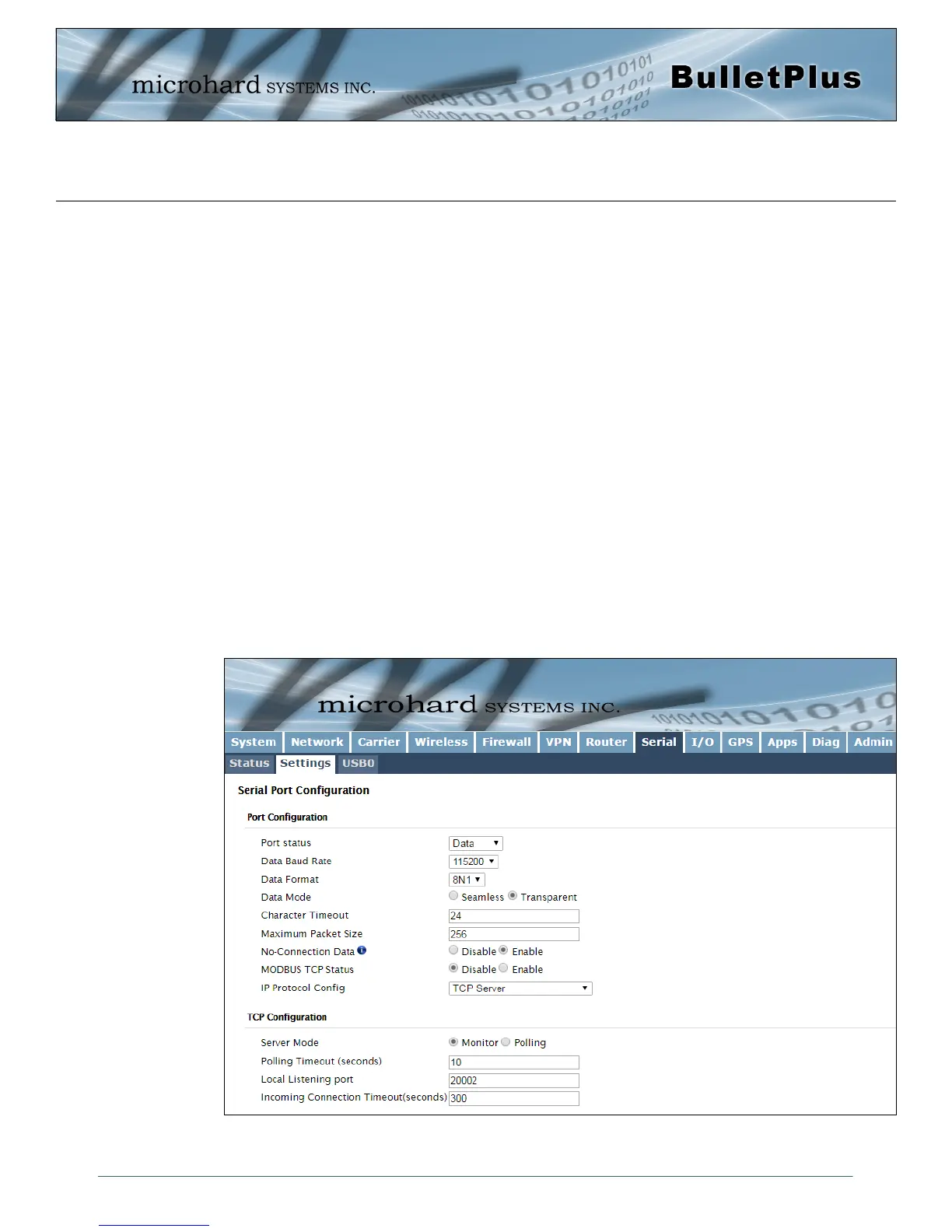
Image 4-8-2: Serial > Settings Configuration
4.8.2 Serial > Settings
This menu option is used to configure the serial device server for the serial communications port. Serial
device data may be brought into the IP network through TCP, UDP, or multicast; it may also exit the
BulletPlus network on another BulletPlus serial port. The fully-featured RS232 interface supports hardware
handshaking.
The BulletPlus is equipped with 2 Serial Communication Modes as described below:
Data - The primary RS232 data port for end devices. This port supports full handshaking.
Console - The default mode for this port is to be configured as a console port and is used for
diagnostics and configuration using a AT Command set. (115200/8/N/1)
USB
The BulletPlus supports the use of USB-to-Serial converters and new tabs for the USB configuration will
appear once a converter has been connected to the USB port of the BulletPlus. At this time only specific
generic FTDI and Prolific drivers are supported.
Although the BulletPlus can be connected to a USB hub and multiple USB ports can be utilized as
additional serial ports, this is not practical as each time a device is connected (or the BulletPlus is
restarted) it is assigned a port number and there is currently not a dependable way to ensure this port will
be the same each time.
The USB ports support basic TCP/UDP serial port settings are discussed for the RS232 serial port.



 To Next Page