© Microhard Systems Inc. 124
4.0 Configuration
4.10.4 GPS > GpsGate
The BulletPlus is compatible with GpsGate - GPS Tracking Software, which is a 3rd party mapping solution
used for various GPS services including vehicle and asset tracking The BulletPlus can communicate with
GpsGate via Tracker Mode and TCP/IP. (UDP reporting can also send information to GpsGate, see the
GPS > Report - UDP Reports)
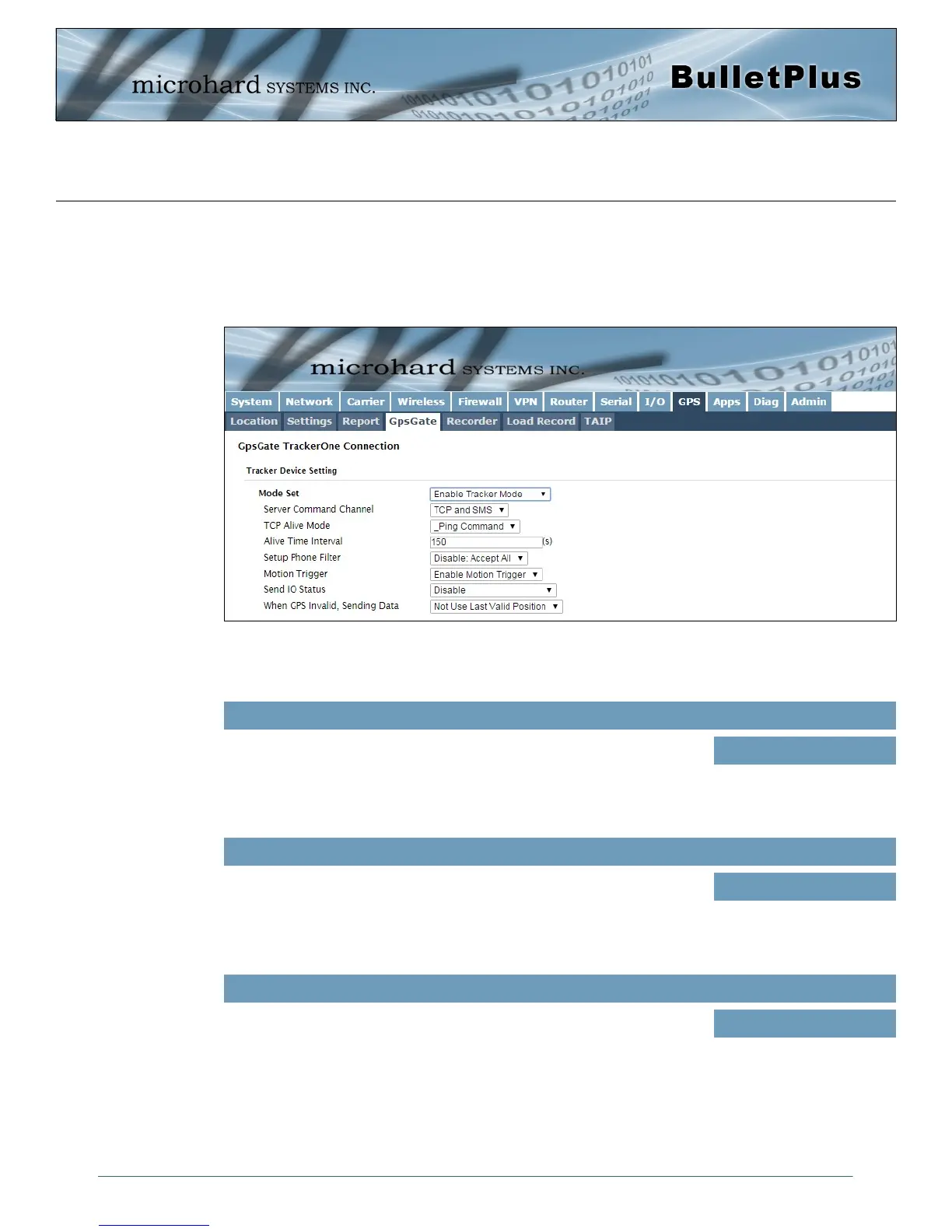
Image 4-10-4: GPS > GpsGate Tracker Mode
Mode Set
Enable GpsGate Tracker Mode or TCP modes. In tracker mode The
BulletPlus and GpsGate software will communicate via TCP/IP, however if
a connection is not available it will attempt to use SMS messaging.
Values (selection)
Disable
Enable Tracker Mode
Enable TCP Send Mode
Server Command Channel
By default BulletPlus and GpsGate will use TCP and SMS to ensure
communication between each other. It is also possible to specify TCP or
SMS communication only. Initial setup in Tracker mode must be via SMS.
Values (seconds)
TCP and SMS
TCP Only
SMS Only
TCP Alive Mode / Alive Time Interval
TCP alive mode will keep TCP connection alive if tracker is not enabled or
the tracker interval is too long. The default is 150 seconds.
Values (seconds)
150
GpsGate - Tracker Mode



 To Next Page