© Microhard Systems Inc. 46
4.0 Configuration
4.2.7 Network > VRRP
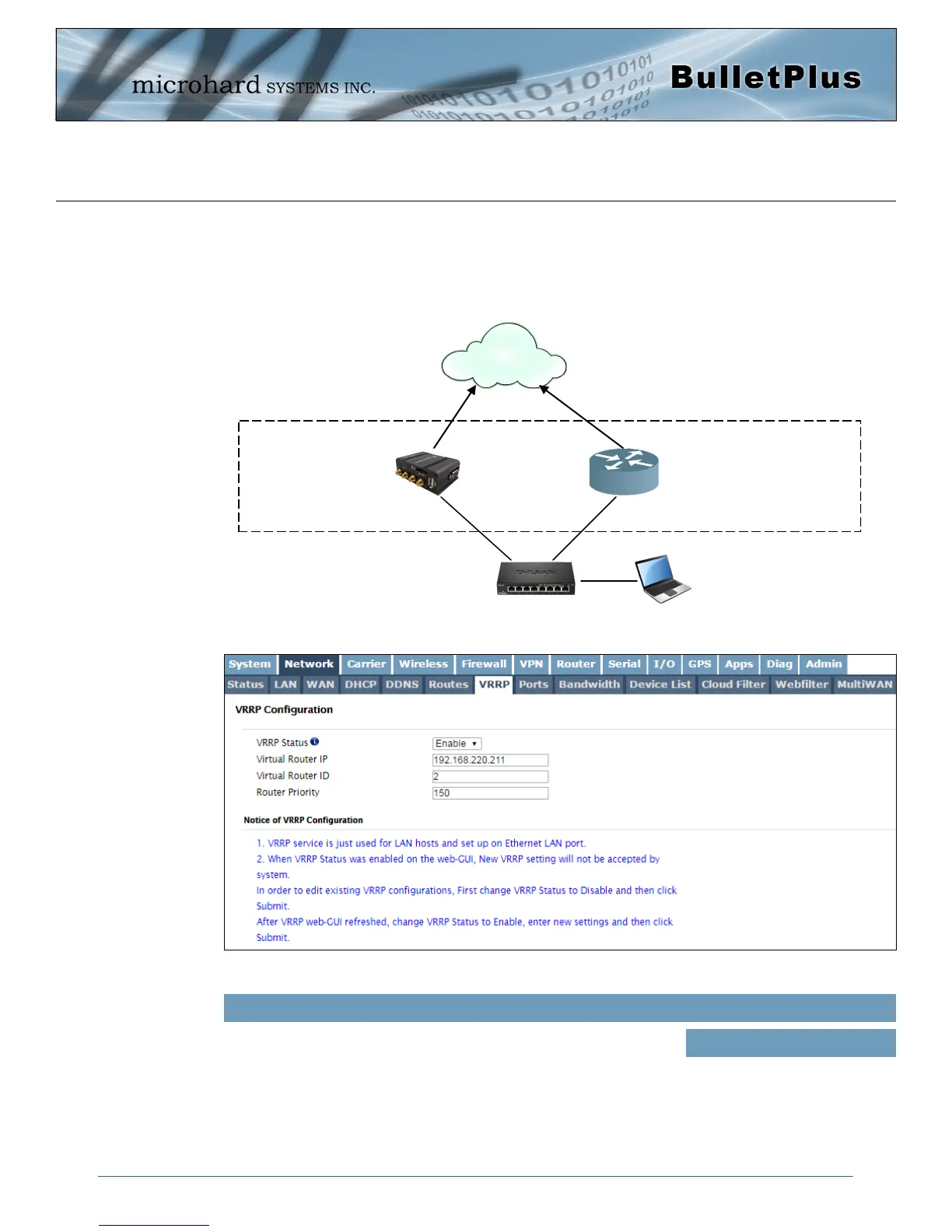
The BulletPlus when paired with other VRRP enabled devices (another BulletPlus or compatible devices)
can provide redundant internet access for LAN devices by using VRRP (Virtual Router Redundancy
Protocol) as illustrated below. If a connected device needs to access the internet it will use whichever
virtual router has the highest priority, if that device is not available the next router with the higher priority
will router the traffic.
Image 4-2-10: Network > VRRP
Internet
BulletPlus
LAN: 192.168.220.11
VRRP Router
LAN: 192.168.220.12
Switch
Virtual Router IP:
192.168.220.211
PC/LAN Device
LAN: 192.168.220.50
Gateway: 192.168.220.211
Enable or disable the VRRP service on the BulletPlus. To change
settings the VRRP service must be disabled (then submitted) and then
re-enabled.
VRRP Status
Values (Selection)
Enable / Disable



 To Next Page