© Microhard Systems Inc. 221
Appendix F: Port Forwarding with IP-Passthrough (Page 1 of 2)
When the BulletPlus is set into IP-Passthrough mode the modem passes all traffic onto the connected
device with the exception of WebUI, SNMP and internal port forwarding rules. The following example
shows how to use Port Forwarding to utilize the internal Iperf capabilities of the modem while retaining the
remaining features of IP-Passthrough.
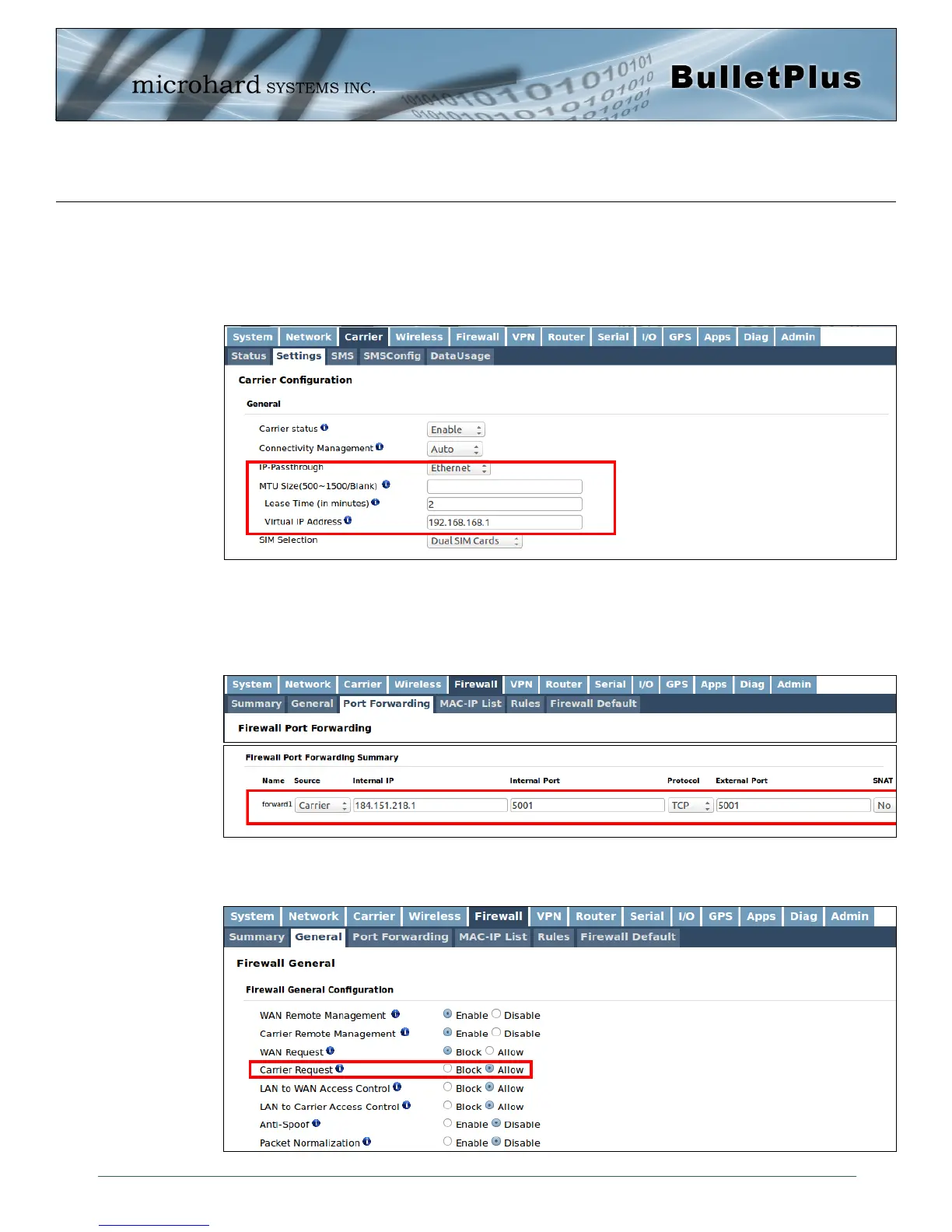
Step 1: Enable IP-Passthrough
After IP pass-through mode is enabled the IP address of LAN network is changed to 184.151.218.1
Step 2. Add Port Forwarding
A) Specify the internal IP and port of port forwarding. We are demonstrating forward port 5001 which is
Iperf's default port.
Use the LAN interface's IP address as internal server IP.
B) Allow incoming traffic. Method 1: Allow all incoming traffic on carrier. (Not recommended)



 To Next Page