© Microhard Systems Inc. 146
4.0 Configuration
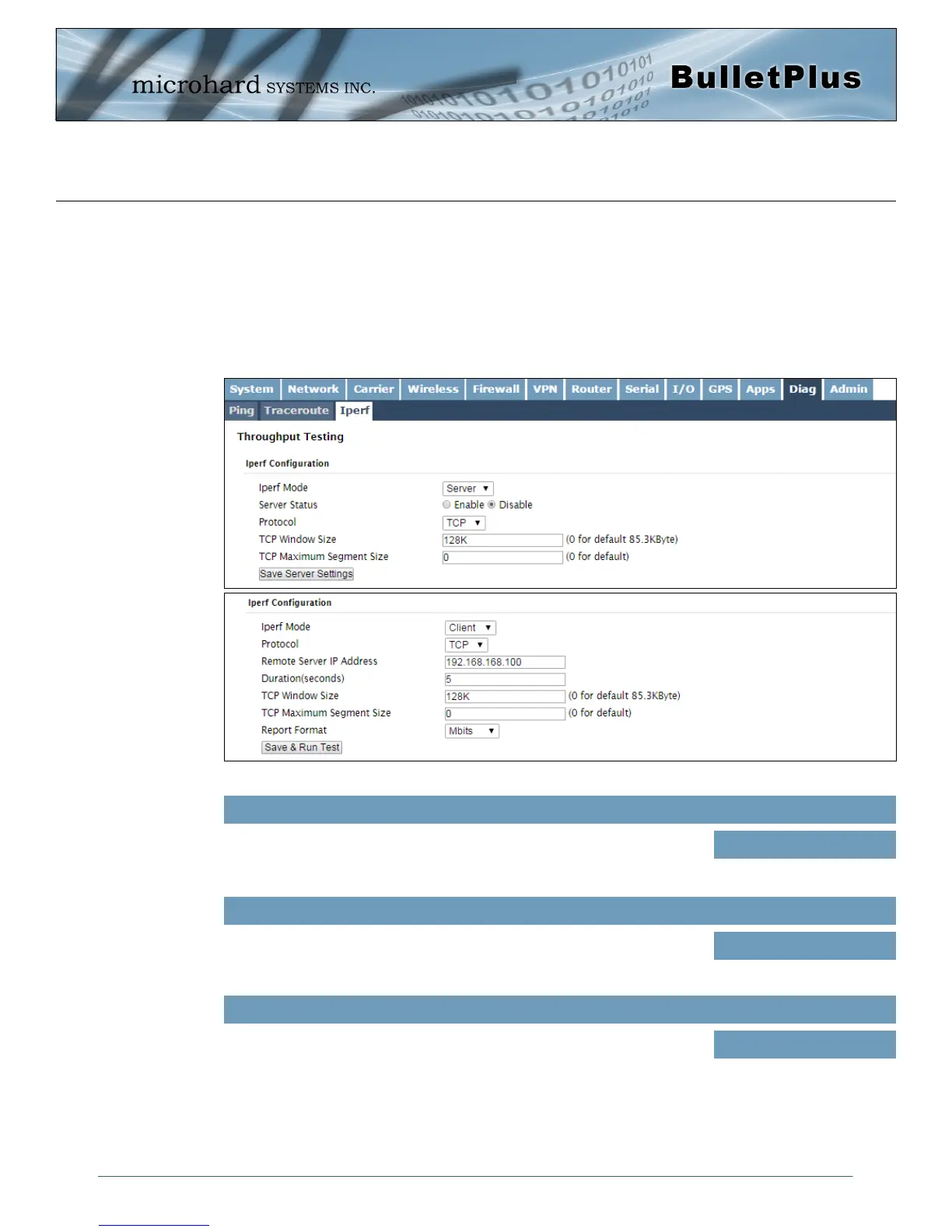
Image 4-12-3: Diag > Iperf
4.12.3 Iperf
The BulletPlus features an integrated Iperf server/client to use to measure and analyze throughput of TCP/
UDP packets to and/or from the BulletPlus. Iperf is a 3rd party utility that can be loaded on any PC to
measure network performance. For additional information about Iperf, please visit the Iperf website.
The BulletPlus can be configured to operate as a Server, listening for an incoming connection from another
device (with Iperf), or PC running an Iperf client. If set to Iperf client, the BulletPlus will connect to or send
packets to a specified Iperf server.
Iperf Mode
Select between an Iperf Server (listens for incoming connections) and
client (initiates a connection with a server)
Values (selection)
Server / Client
Server Status
If the Iperf mode to set to Server, this Server Status allows a user to
Enable or Disable the server.
Values (selection)
Enable / Disable
Protocol
Select the type of packets to be sent to test the throughput. TCP packets
are connection oriented and require additional overhead for the
handshaking that occurs, while UDP is a connectionless, best effort
oriented protocol.
Values (selection)
TCP / UDP



 To Next Page