© Microhard Systems Inc. 24
4.0 Configuration
4.1 System
The main category tabs located at the top of the navigation bar separate the configuration of the BulletPlus
into different groups based on function. The System Tab contains the following sub menu’s:
Summary - Status summary of entire radio including network settings,
version information, and radio connection status
Settings - Host Name, System Log Settings, System Time/Date
Services - Enable/Disable and configure port numbers for SSH, Telnet, HTTP
and HTTPS services
Keepalive - Configure System keep alive to ensure network/internet access.
Maintenance - Remote firmware Upgrades, reset to defaults, configuration backup
and restore.
Reboot - Schedule reboots and/or immediately reboot the system.
4.1.1 System > Summary
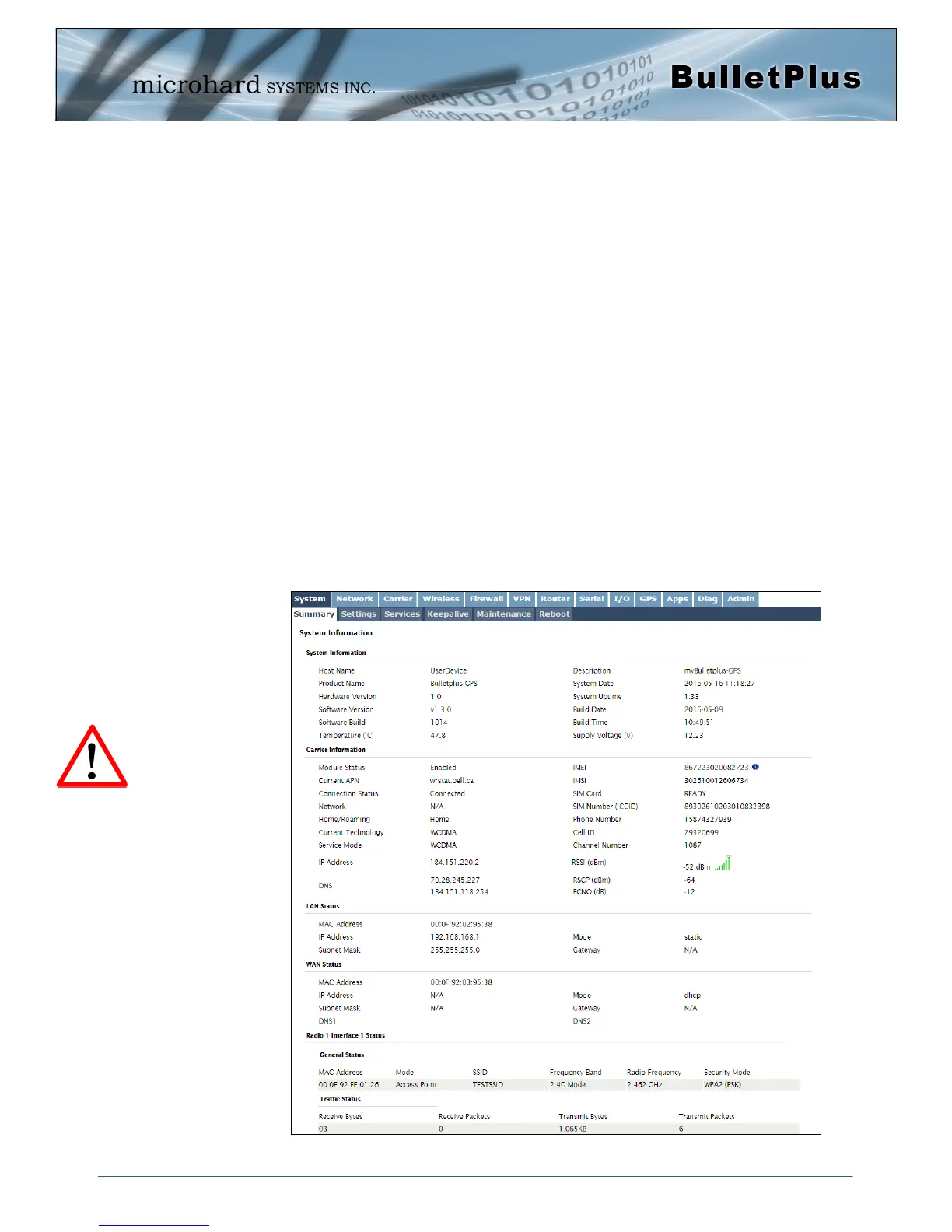
The System Summary screen is displayed immediately after initial login, showing a summary and status of
all the functions of the BulletPlus in a single display. This information includes System Status, Carrier
Status, Cellular & LAN/WAN network information, version info, etc.
Image 4-1-1: System Info Window
The System Summary page
will Auto Refresh, each time
this happens a small amount
of data is used. If viewing
over the Cellular Network this
data could add up to a
significant amount over a long
period of time.



 To Next Page