107
7.6 Yearly
Call your service support for preventive maintenance contract.
7.7 How to start the remote assistance
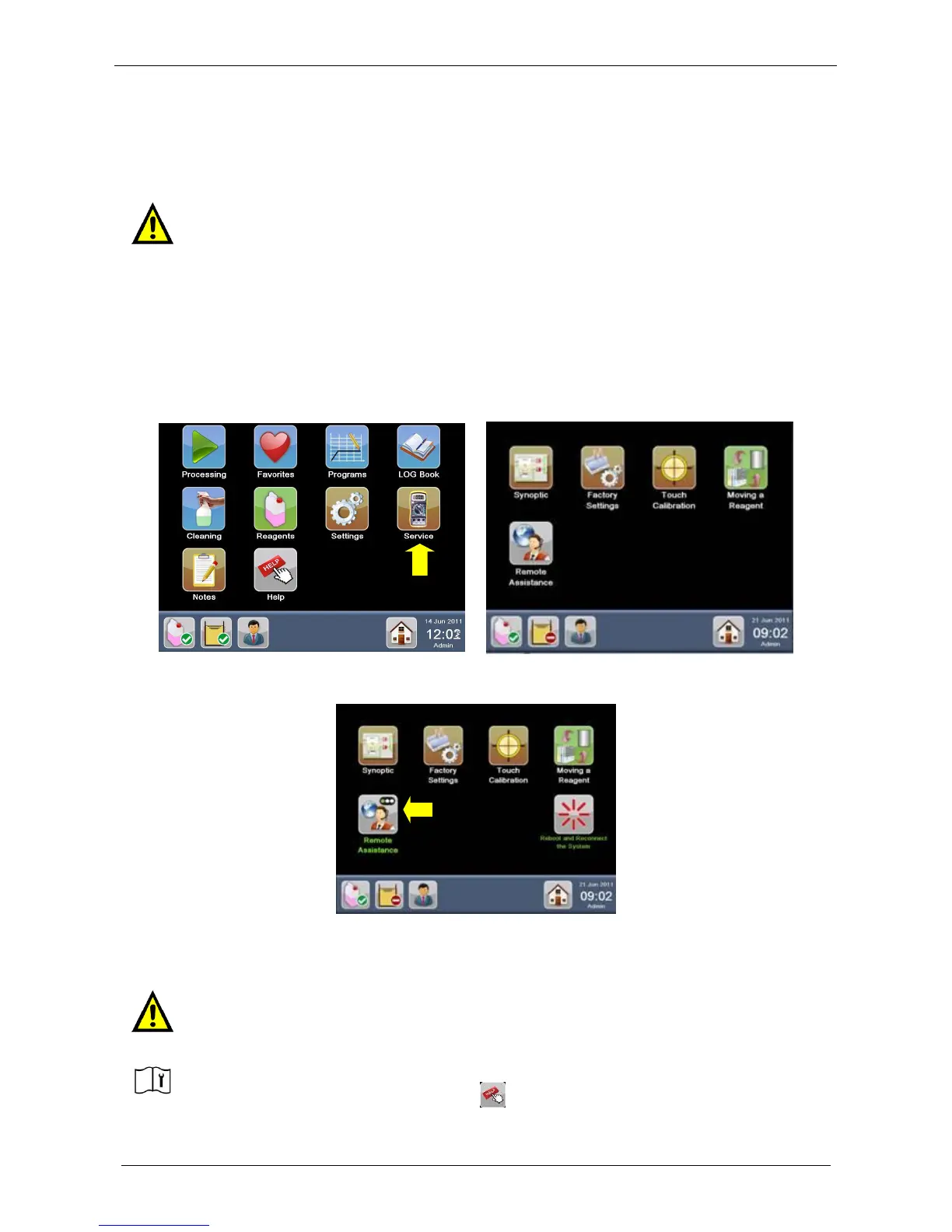
This procedure explains how to activate the Remote Assistance in case of request by Service Department.
It is necessary to connect LOGOS ONE to Internet in order to allow Remote Assistance services (for further
details see the chapter 2.8).
In administrator screen, press “Service” icon to get Service Screen.
Press “Remote Assistance” to start the connection:
At this point remote service works with your instrument.
The Remote Assistance will be disabled by remote service.
ALWAYS COMMUNICATE THE SERIAL NUMBER (S.N.) OF THE UNIT.
MILESTONE CANNOT CONNECT TO UNIT WITHOUT THE S.N.
THE SERIAL NUMBER IS AVAILABLE IN “ HELP” ICON IN MAIN SCREEN.



 To Next Page