60
3.2.5 Run a DELAYED PROGRAM
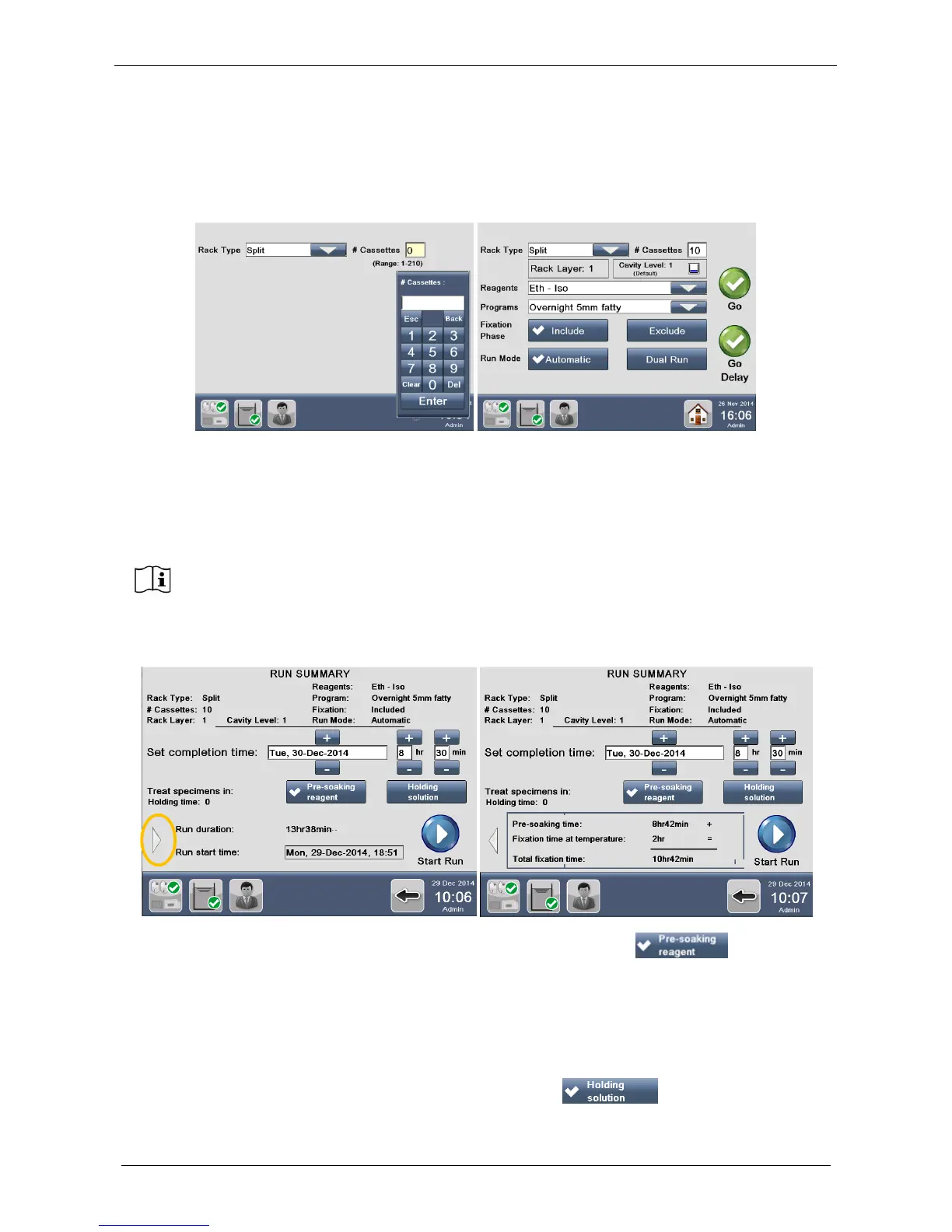
The window below appears, if either a Favorite program (see chapter 3.2.1) or a Standard program (see
chapter 3.2.2) is selected. Enter the exact number of cassettes in the box, choose if fixation phase must be
excluded or not, select the Run Mode and press “Go delay”.
The following window appears: set the completion time. In fact, “Delay Start” function allows setting when the
program has to finish, without modification of the existing protocol. The system keeps samples immersed in:
• Pre-soaking reagent (formalin at room temperature)
OR
• Holding reagent (flushing mix at room temperature)
By default Pre-soaking reagent is selected, if you want to keep the specimens immersed in Holding solution,
select its icon.
If you leave selected “Pre-soaking” (see above that is thicked by the arrow ) as reagent to
keep the specimens: the “Holding time” is zero.
If you press the grey arrow (figure above, yellow circle), the fixation protocol details are displayed:
• “Pre-soaking time”: it depends on the starting time to complete the processing as set by user.
• “Fixation time at temperature”: the duration of the heated fixation phase of the protocol.
• “Total fixation time”: the sum of the two times above.
If you select “Holding” (see below that is thicked by the arrow ) as reagent to keep the
specimens:



 To Next Page