61
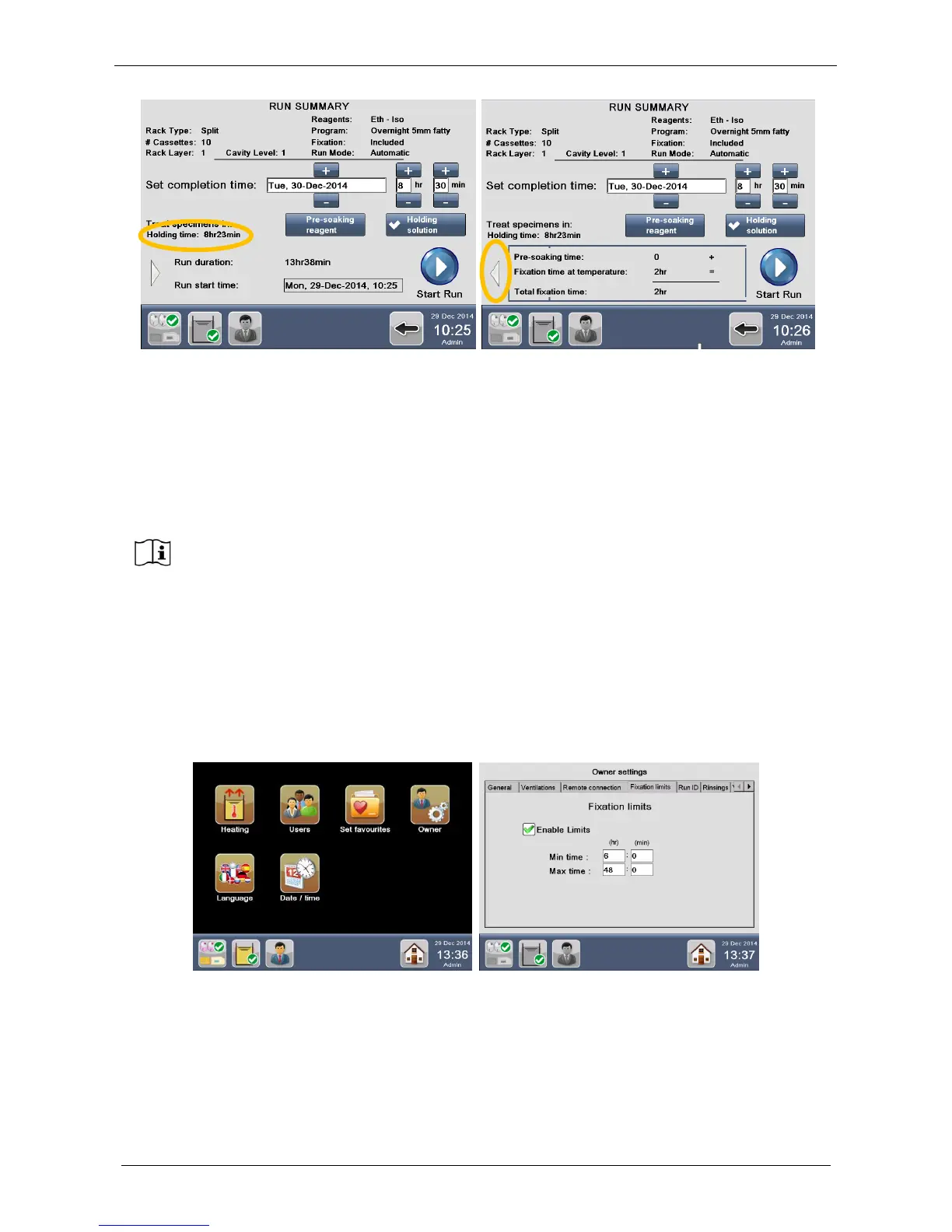
the “Holding time” is NOT zero (as the previous case), but it depends on the starting time to complete the
processing as set by user. The “Holding time” is indicated by the figure above left, yellow circle.
If you press the grey arrow (figure above right, yellow circle), the fixation protocol details are displayed:
• “Pre-soaking time”: it is zero because “holding” is the reagent set to keep the specimens, not pre-
soaking.
• “Fixation time at temperature”: the duration of the heated fixation phase of the protocol
• “Total fixation time”: the sum of the two times above.
By selecting “Enable Limits” and entering Min and Max fixation times (see chapter 2.16 and figure below
right), when starting a program the system calculates the time necessary to keep samples in HOLDING
SOLUTION (default reagent Flushing MIX).
In fact, on the base of the:
-external time in fixative (value entered by user, requested only if fixation limits are enabled)
-fixation time at temperature (value set in the program)
the software calculates by difference the necessary pre-soaking time to reach the Max fixation limit set.
Moreover software keeps samples in HOLDING SOLUTION up to the start of the program.
When enabling the control of the “Total Fixation Time” in “Owner Settings”, the
specimens will be automatically kept in pre-soaking reagent and, only in case the Total
fixation time is exceeded, the holding reagent will be used, as explained below in detail.



 To Next Page