MM098-002 – LOGOS ONE – Operator Manual
78
3.7.3 Modify a main cavity cleaning program
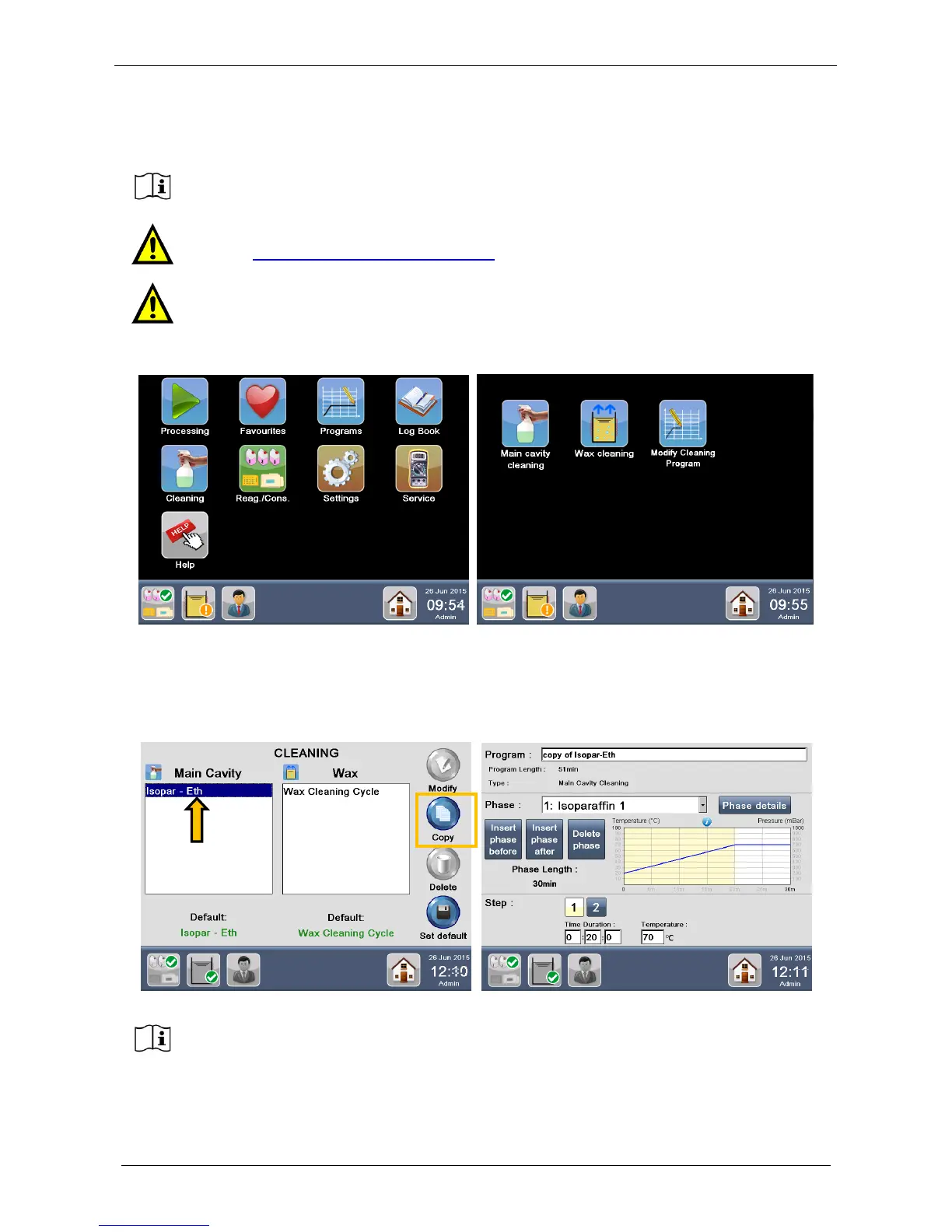
Select Cleaning from the MAIN FUNCTIONS screen, then press Modify Cleaning Program.
The following screen appears (figure below left), showing all existing programs for the MAIN CAVITY (on the
left) and for the WAX (on the right): default protocols as well as protocols created by the USER (if any).
Choose the program of your interest (figure below right, arrow). Press Copy button (figure below right,
rectangle), re-name the program and modify the fields.
This function is NOT to create a NEW PROGRAM. For this, it is necessary to choose the
default program that most fits your requirements, make a copy and modify its details.
Before making any modifications to a cleaning program, please contact our Application
support: application@milestonemedsrl.com.
For optimum CLEANING RESULTS, Milestone strongly recommends using the CLEANING
default programs.
For safety reasons, the factory pre-stored protocols cannot be directly modified or
deleted.



 To Next Page