63
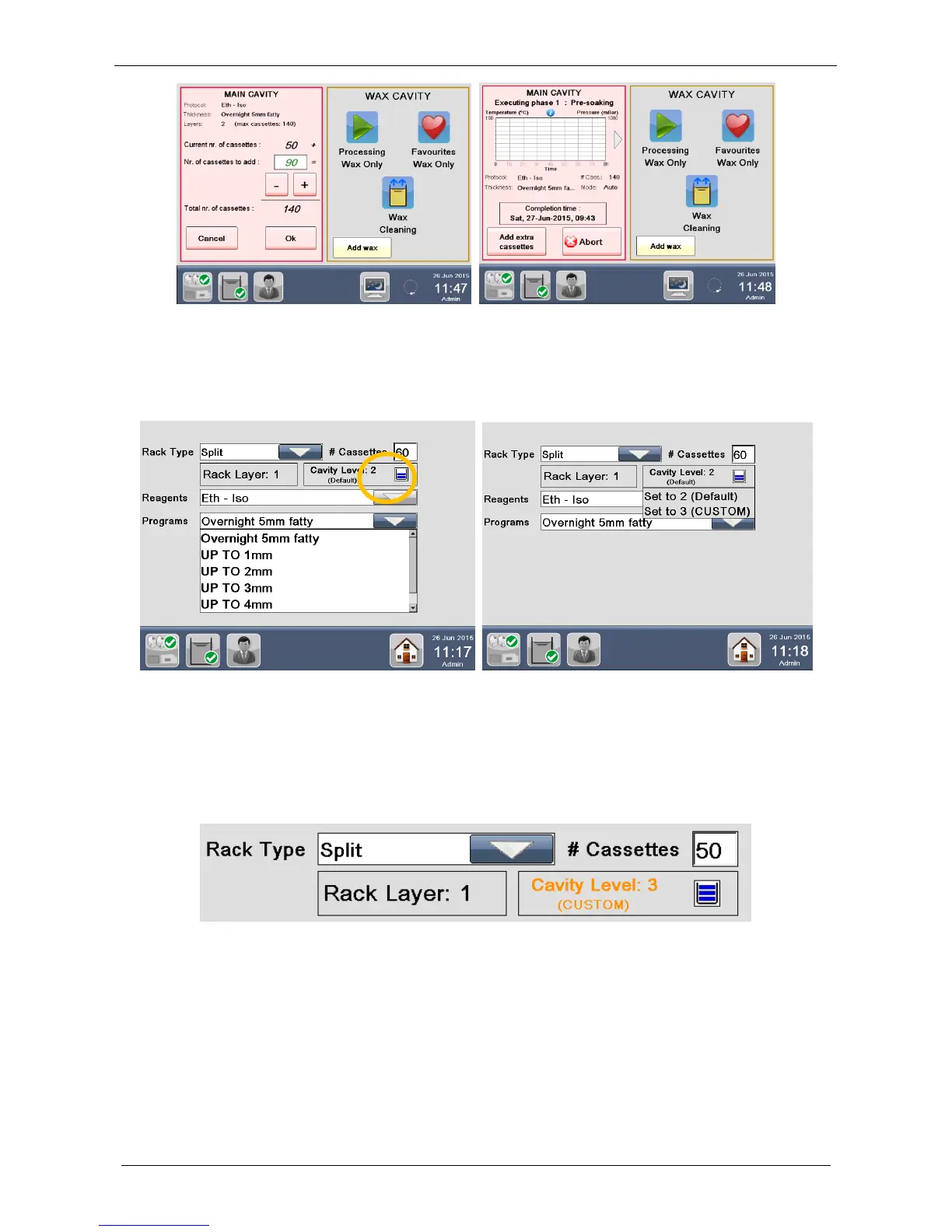
At the start of a program it is possible to force an upper cavity level, if more cassettes are required to be
inserted, press the Cavity icon, as shown in the circle below. The following screen appears.
Refer to chapter 9.6 Presoaking guidelines.
Refer to chapter 3.2.2 for how to force an upper custom level at the start of a program.
If you press “Set to 2 (CUSTOM)”, the process will be executed with 2 levels of reagents and so it will be
possible to add cassettes to fill 2 layers of the rack. The tag “CUSTOM” means that the cavity level
chosen (“2” in this case) does NOT correspond to the rack layer.
If you press “Set to 3 (CUSTOM)”, the process will be executed with 3 levels of reagents and so it will be
possible to add cassettes to fill 3 layers of the rack. The tag “CUSTOM” means that the cavity level
chosen (“3” in this case) does NOT correspond to the rack layer.
3.2.6 Add WAX
While the wax cavity is not active there is a button ADD WAX, in case the level of wax is low, it is possible to
add it.
Pressing also the button ADD WAX a timer of 20 minutes starts allowing the new wax added melting.
The wax icon change the color from RED (low level) to YELLOW (melting time) to GREEN when the 20
minutes melting time is reached. If already totally melted before the end of the 20 minutes, it is possible to
set it AS READY having immediately the green color.



 To Next Page