62
Please refer to chapter 4.1.1 for how to set the reagent to be used as PRESOAKING and HOLDING.
3.2.5.1 Add extra cassettes
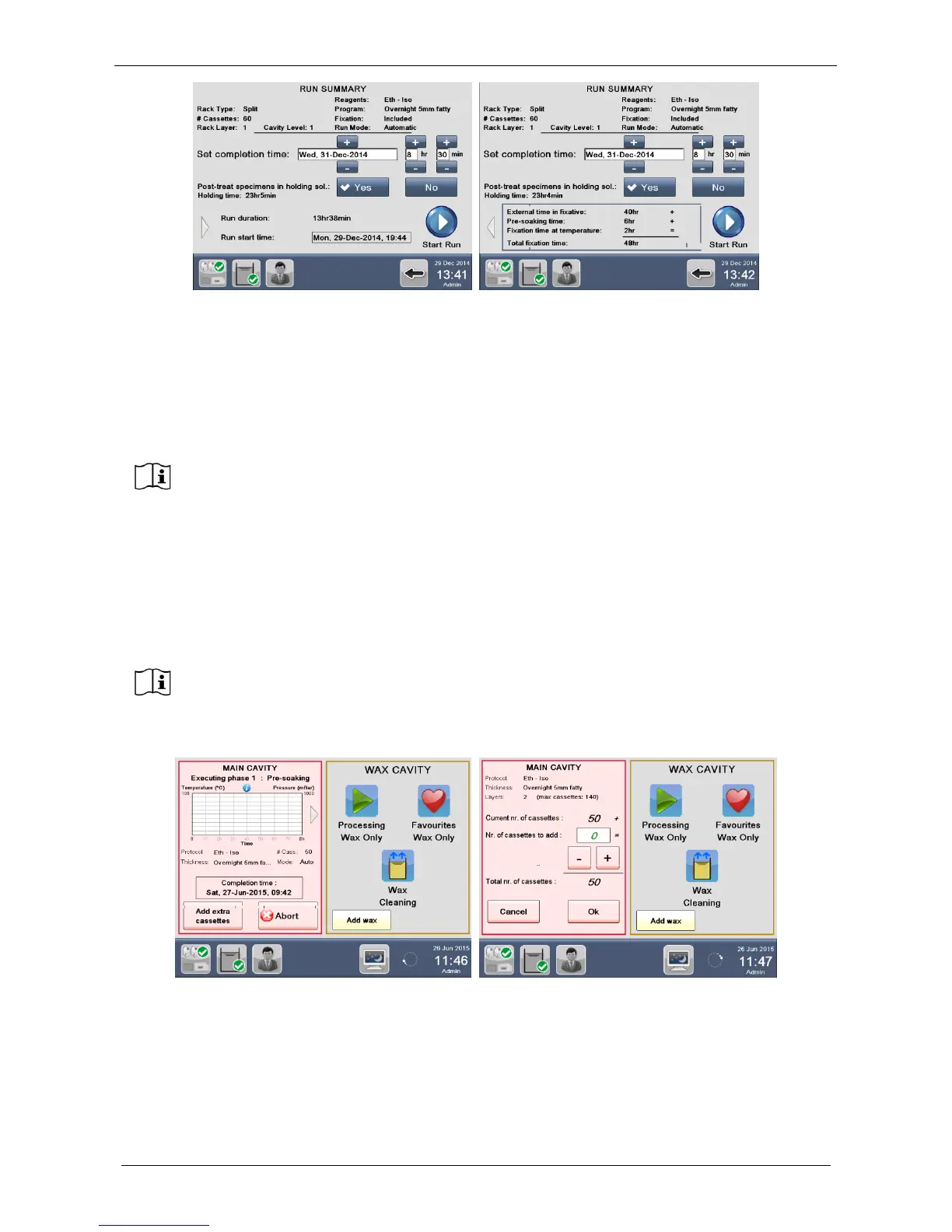
When starting a program in “Delay Mode”, it is possible to add extra cassettes during the pre-soaking or
holding phase, as explained in the chapter 3.2.5.
The number of cassettes, that is allowed to add, depends of the “Cavity level” of the process.
In the example reported in this chapter, the “Cavity level” is “2” and so it will be possible in the pre-soaking or
holding phase to add cassettes up to 140 cassettes (here 50 cassettes have been selected and so only 90
cassettes is allowed to add to arrive at 140 cassettes).
Pressing “Add extra cassettes”, the right screen appears: enter number of cassettes to be added and press
OK to continue processing.
Failure to press the OK button, automatically the software will continue the processing after 30 minutes of
pausing adding the cassettes entered.



 To Next Page