EasyManua.ls Logo

Milestone LOGOS One - Set up LOGOS ONE with Reagents

Milestone LOGOS One
132 pages
Print Icon
To Next Page IconTo Next Page
To Previous Page IconTo Previous Page
Loading...
Milestone s.r.l.
MM098-002 LOGOS ONE Operator Manual
33
2.14.1 Set up LOGOS ONE with reagents
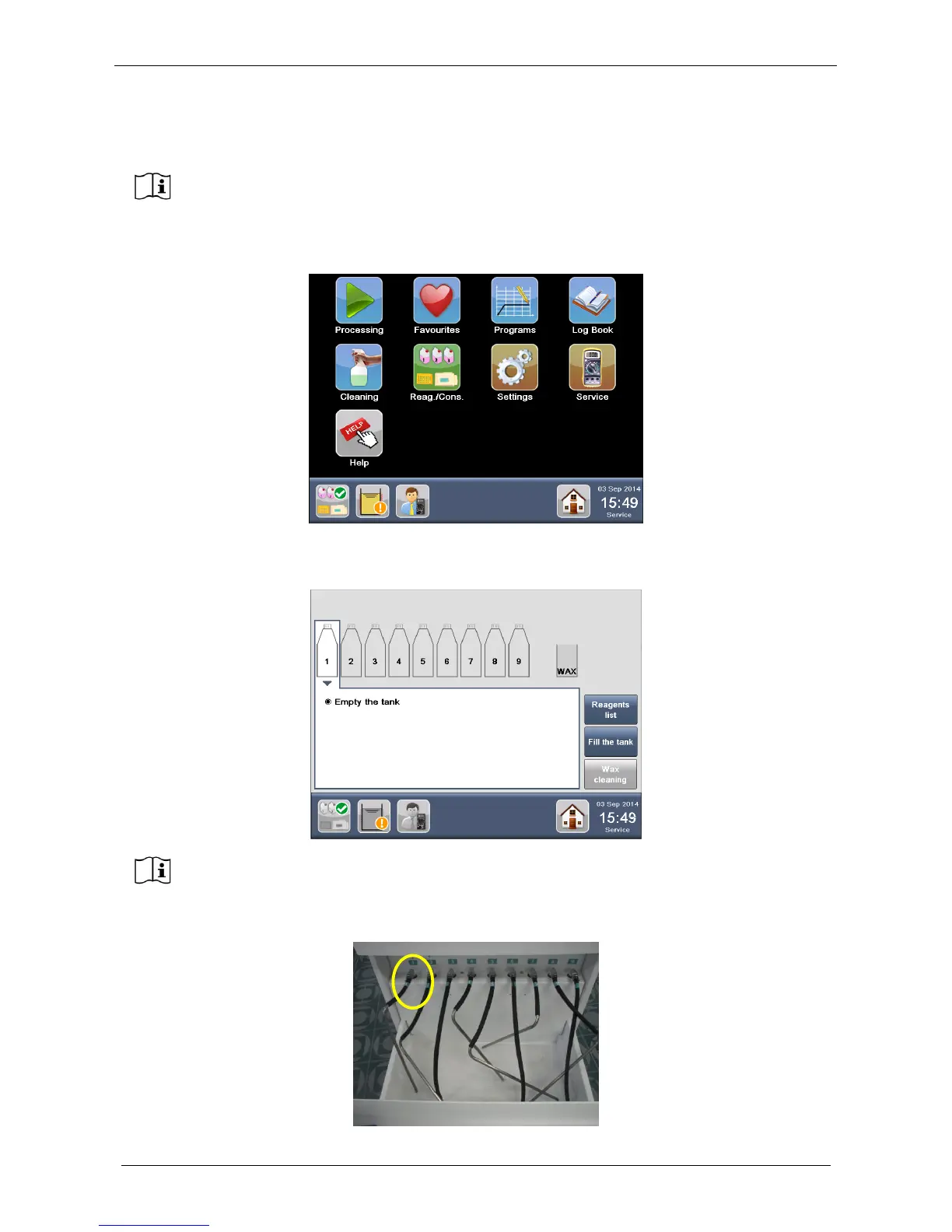
Select “Reag./Cons.” from the MAIN FUNCTIONS screen. In alternative, press directly the “Reagents status”
icon on the STATUS BAR of the HOME PAGE.
The REAGENTS CONFIGURATION screen appears (figure below), showing the default settings of the
tanks. Select the tank in position NUMBER 1.
Start set up of the tanks from hose number 1, as shown below.

It is necessary to first load the tanks with reagents before operating the unit.
Before continuing with next operations, open the drawer where the processing tanks
have to be inserted.

Table of Contents

Related product manuals