81
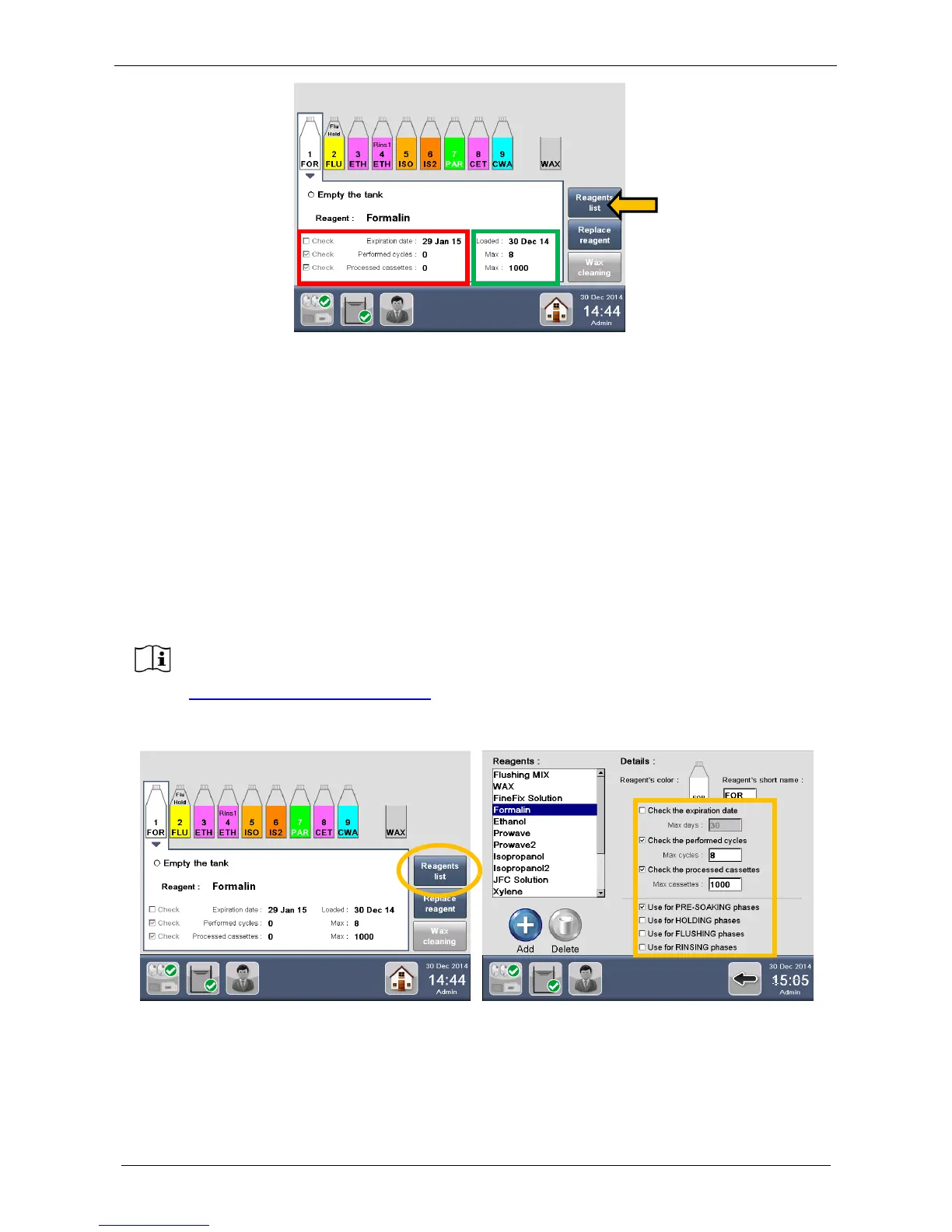
The REUSE LIFE (red square, figure above, for further details see the chapter 4.1.1) of the reagent can be
checked by:
1. Expiration Date. This date shows the reagent EXPIRING DATE, according to requirements set into the
Reagent List.
2. Performed cycles. This field automatically shows the cycles already completed.
3. Processed cassettes. This field automatically shows the cassettes already processed.
Additional information is shown on the right side of the windows (green square) and refers to the REAGENT
SETTINGS edited into the “Reagent list” (figure above, arrow).See chapter 4.1.1 for further clarifications.
4.1.1 Reagents settings
From the REAGENT CONFIGURATION, select the “Reagent List” icon: the LIST of preset reagents appears.
Default reagents settings of LOGOS ONE (expiration date, max number of cassettes and
max number of cycles) refer to use of tanks of 5 liters/US gallons capacity and to
processing without papers and sponges. In any other case, like use of different tanks
capacity or use of sponges, please contact our Application Dept at
application@milestonemedsrl.com to get proper instructions.



 To Next Page