69
3.5 Run a cleaning cycle of the WAX
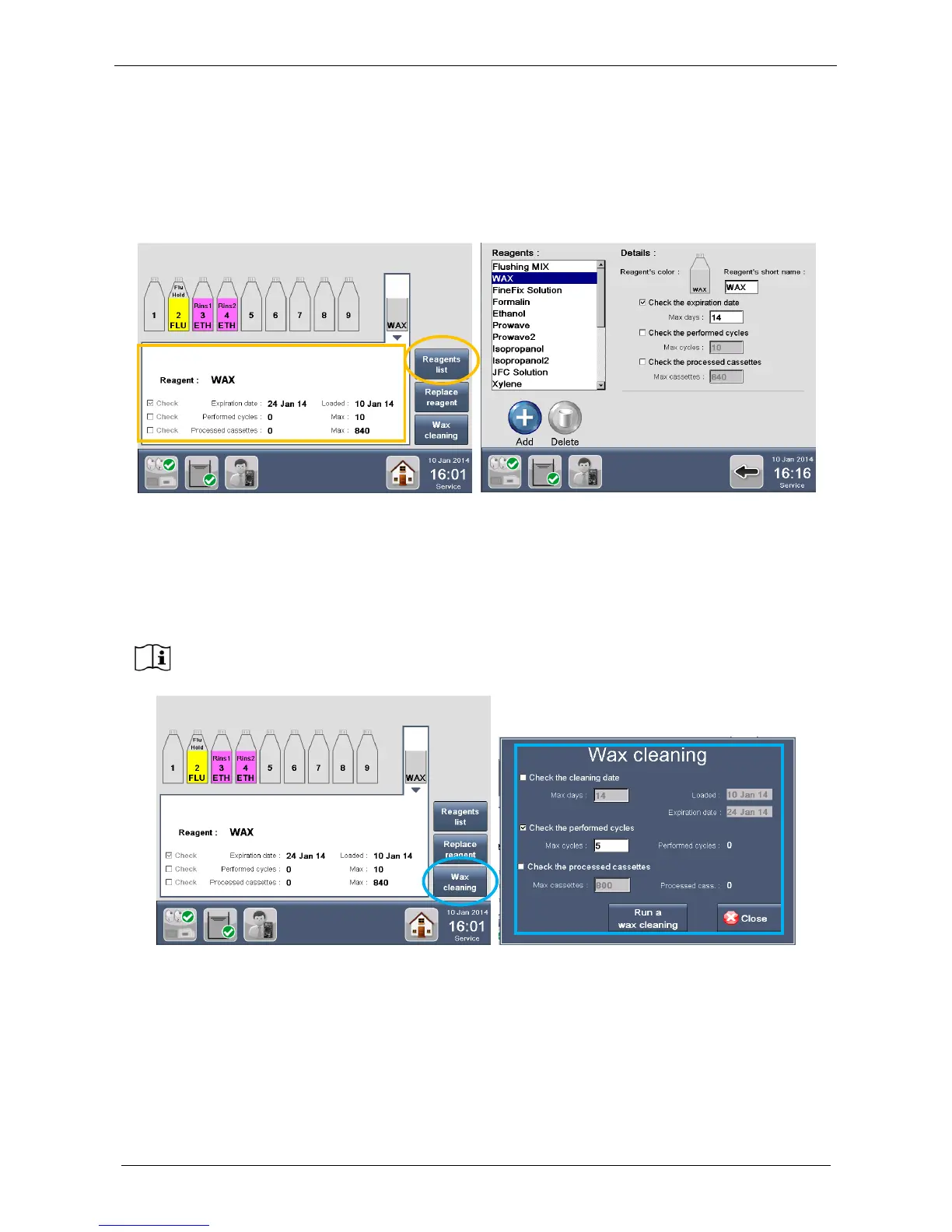
WAX for expiration is controlled using the REAGENT LIST.
By default it is checked for “Expiration date”: 14 days, but the Administrator can change the setting in the
Wax settings of the reagents list.
WAX for cleaning is controlled under the icon WAX CLEANING. From this icon there are the WAX cleaning
setting and also the possibility to run the cleaning cycle.
By default WAX for cleaning is checked for “Performed cycles”: 5 cycles, but the Administrator can change
the setting in the WAX cleaning window.
The cleaning cycle will block the starting of a processing run, if the cleaning setting limits are reached.
There are the “traffic lights” colors for cleaning or expiration, green, yellow and red, but the message on the
WAX cavity will be different, TO CLEAN when the WAX reaches the CLEANING limit (it takes 90 minutes):



 To Next Page