3-CONTROLSANDINSTRUMENTS
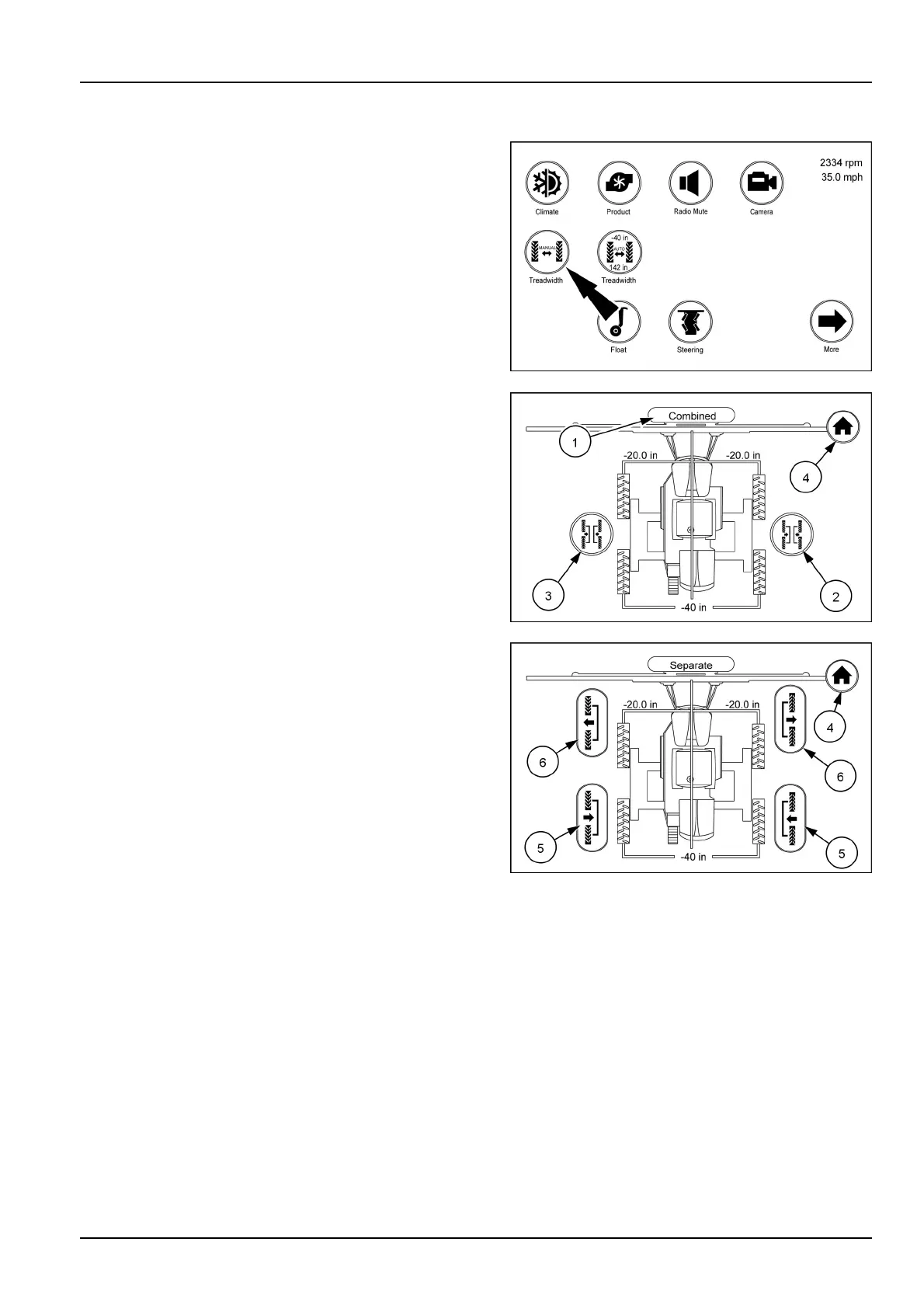
Treadwidth(manual)iconandscreens
Fromthearmrestdisplayrsthomepagetouchthetread
width(manual)icon.Thiswillbringupthescreenwhich
isthecombined(1)treadwidthscreen.
NOTE:Theiconswillremaingrayedoutuntilmovement
ofthevehiclehasstarted.Theiconswillturntotheap-
propriateinoroutoncemoving.
Fromthisscreenyoucanmovebothsidesinoroutat
thesametime.Theiconswillbegrayedoutindicatingno
vehiclemovement.WhilemovingslowlytouchtheINicon
(2)tomovebothsidesinatthesametime.Thevalueswill
changeasthewheelsmoveinward.
NOTE:Dimensionsarefromcentertothecenterofthe
tires.
WhilemovingslowlytouchtheOUTicon(3)tomoveboth
sidesoutatthesametime.Thevalueswillchangeasthe
wheelsmoveout.
NOTE:Dimensionsarefromcentertothecenterofthe
tires.
Touchthecombinedicon(1)atthetopofthescreento
changetotheseparateadjustmentscreenortouchthe
homeicon(4)intheupperright-handcornertoreturnto
thehomepage.
Atthisscreenyoucanmoveeachsideinoroutseparately.
Thevalueswillchangeasthatsidemovesinorout.
NOTE:Themachinemustbemoving0.8–8km/h(0.5–
5mph)whileadjustingthetreadwidth.
Touchtheinicon(5)oneithersidetomovethatsidein.
Touchtheouticon(6)oneithersidetomovethatsideout.
NOTE:Dimensionsarefromcenterofmachinetothecen-
terofthetire.
Touchthehomeicon(4)intheupperright-handcornerto
returntothehomepageortouchtheseparateicontogo
backtothecombinedscreen.
RAIL17SP00184AA1
RAIL17SP00774AA2
RAIL17SP00773AA3
3-67



 To Next Page