3-CONTROLSANDINSTRUMENTS
Spargeincrease
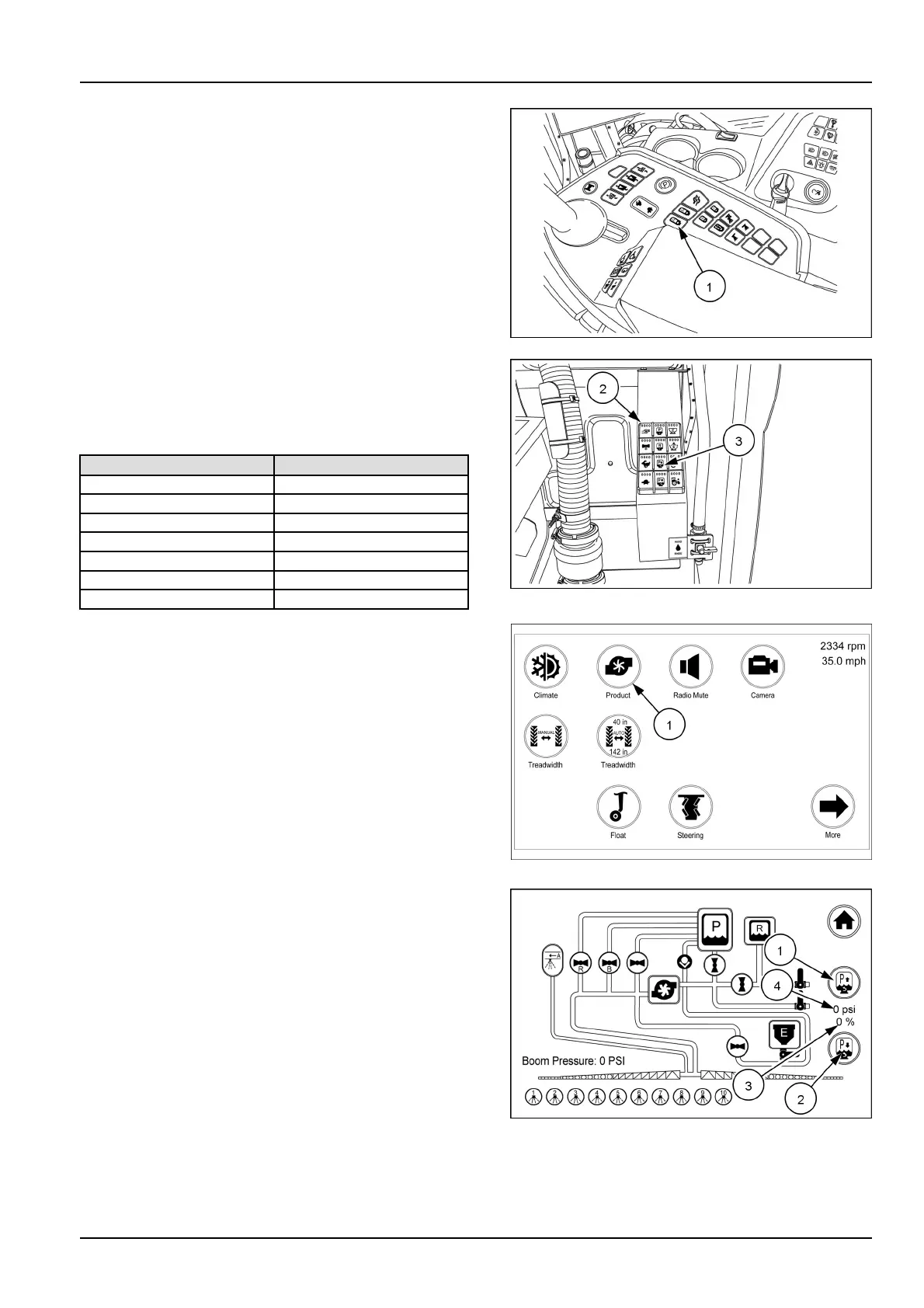
Theproducttankspargeowiscontrolledbytwosepa-
rateswitches.Pressandholdthespargeincreaseswitch
(1)toincreasethespargeow.Asthespargeincreases
thefourledlightswillilluminateindicatingthepercent-
ageofsparge.Refertothetablethatfollowsforlight
combinationtopercentageofsparge.Releasetheswitch
whencorrectspargeisreached.Theproductpumphas
toberunningforthespargesystemtooperate.Adjust
thespargeasneededtokeepthechemicalinsuspension
withoutcreatingfoamintheproducttank.Eachtankis
equippedwithseveralspargeinletandoutletlocations.
Theselocationskeeptheproductinsuspensionthrough
circulationoftheproducttankutilizingtheproductpump.
Thespargecanalsobeadjustedremotelyfromoutside
thecabusingtheremotekeypad(2)locatednexttothe
chemicaleductor/fastlls.Holdthespargeincreasebut-
ton(3)toincreasethesparge.
Lightcolorcombination
Percentageofsparge
Red
0–6%
RedandYellow
7–23%
Yellow
24–41%
YellowandGreen42–58%
Green59–77%
GreenandBlue78–99%
Blue
100%
RAIL17SP00287AA10
RAIL17SP00873AA11
Fromtherstarmresthomepage,touchtheproducticon
(1)tobringuptheproductcircuitscreen.
RAIL17SP00108FA12
Thespargecanbeincreasedordecreasedfromtheprod-
uctcircuitscreen.Touchthespargeincreaseicon(1)or
spargedecreaseicon(2)toadjust.Observethesparge
percentage(3)orspargepsi(4),increaseordecreaseas
thevalveisopenedorclosed.
RAIL17SP00183AA13
3-17



 To Next Page