Getting started
• Number of missed calls
• Phone lock status
• SCA Caller IDs
• XML-related text
• Network status
Softkeys
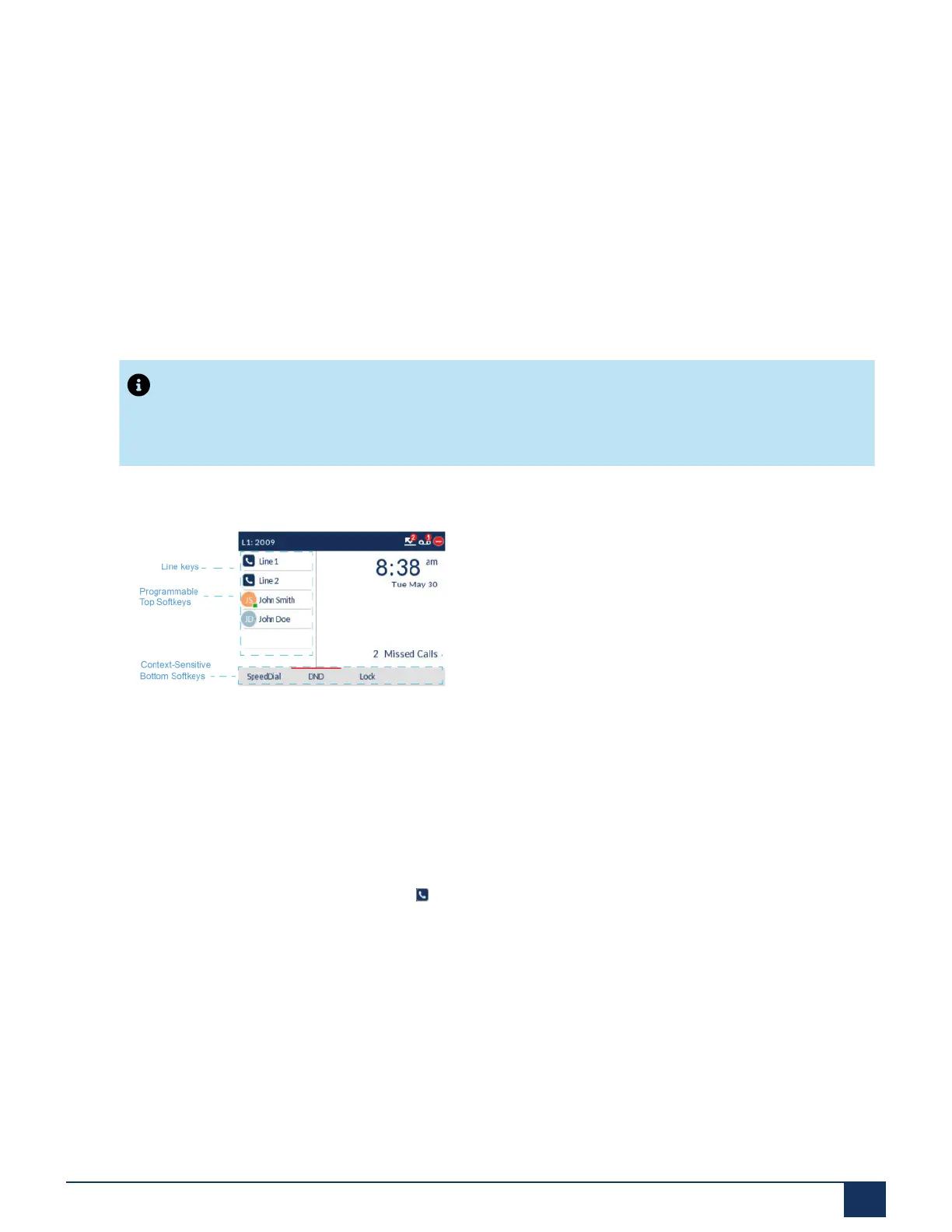
Six top softkeys and 4 bottom state-sensitive softkeys are always displayed on the Home screen. You can
configure the top softkeys with up to 10 functions and configure the bottom softkeys with up to 9 functions
as required.
Note:
For more information about configuring the left and bottom softkeys, see “Configuring Softkeys”.
Contact your System Administrator for details on what features are available to be programmed
through the Mitel call server.
The state-sensitive softkeys change depending on the state of the phone and are used to perform different
functions when the phone is in an idle, connected, outgoing, or busy state.
If you or your Administrator have configured softkey functions on your phone, the labels for those functions
display on the screen. For example, in the illustration above top softkeys 3 and 4 were configured as
Busy Lamp Field (BLF) and Speeddialkeys respectively. The bottom set of softkeys were configured as
SpeedDial, DND (Do Not Disturb), and Lock/Unlock respectively.
When your phone is in an idle state, your (Line Key) icon is solid blue.
Off-Hook and Dialing Screen
When you pickup the handset on the Home screen, the screen displays as follows:
Version 1.0
User Guide 18



 To Next Page