Call-up function
[11] Call-up function
In the sewing data input mode, you can call up the sewing data from the internal memory, and
can combine the called-up data with the currently-created data to create a new sewing data.
You can determine whether the first and final feed data should be deleted.
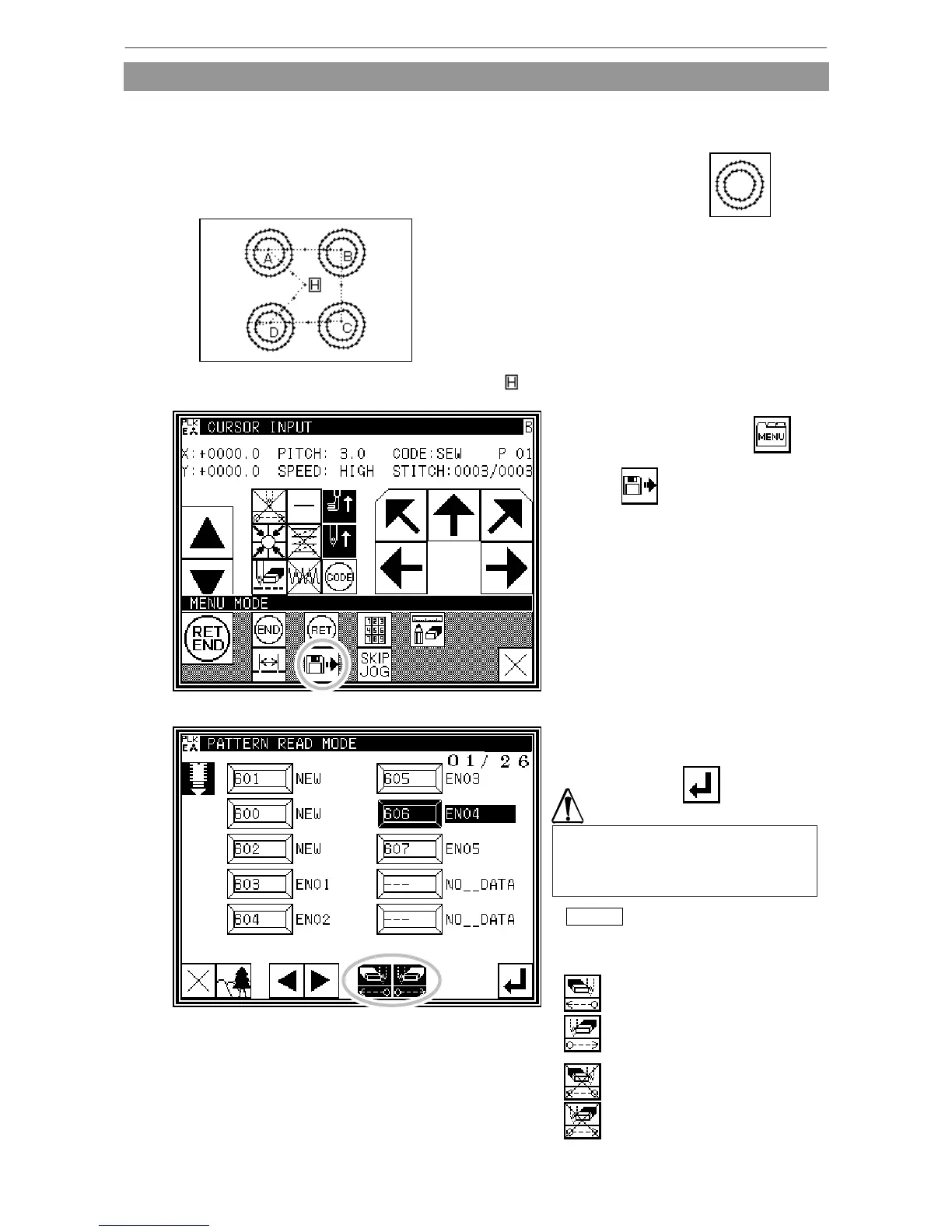
[Example of call-up function]
To create the following sewing data, preliminarily create the double circle data ( ), and
then use the feed data and call-up functions.
(1)Creation of data on feed data from home position to point A
(2) Display of call-up screen
* Press the data entry mode .
* Press in the menu.
(3) Selection of call-up data
* Select data to be called up,
and then press .
Memo After calling up "feed" data,
you can modify the original "feed"
data as follows
: The feed data at the sewing
start point can be deleted.
: The feed data at the sewing end
point can be deleted.
The work holder will automatically
move in accordance with the called-up
data. If the needle is lowered, be
careful not to get injured.
: The feed data at the sewing start
point can be left undeleted.
: The feed data at the sewing end
point can be left undeleted.
(4) For B, C, and D, call up the data in the same way, and complete the data.
[11]-1



 To Next Page
 Loading...





