Methods of creating stitching data
(7) Code data input
Operation points
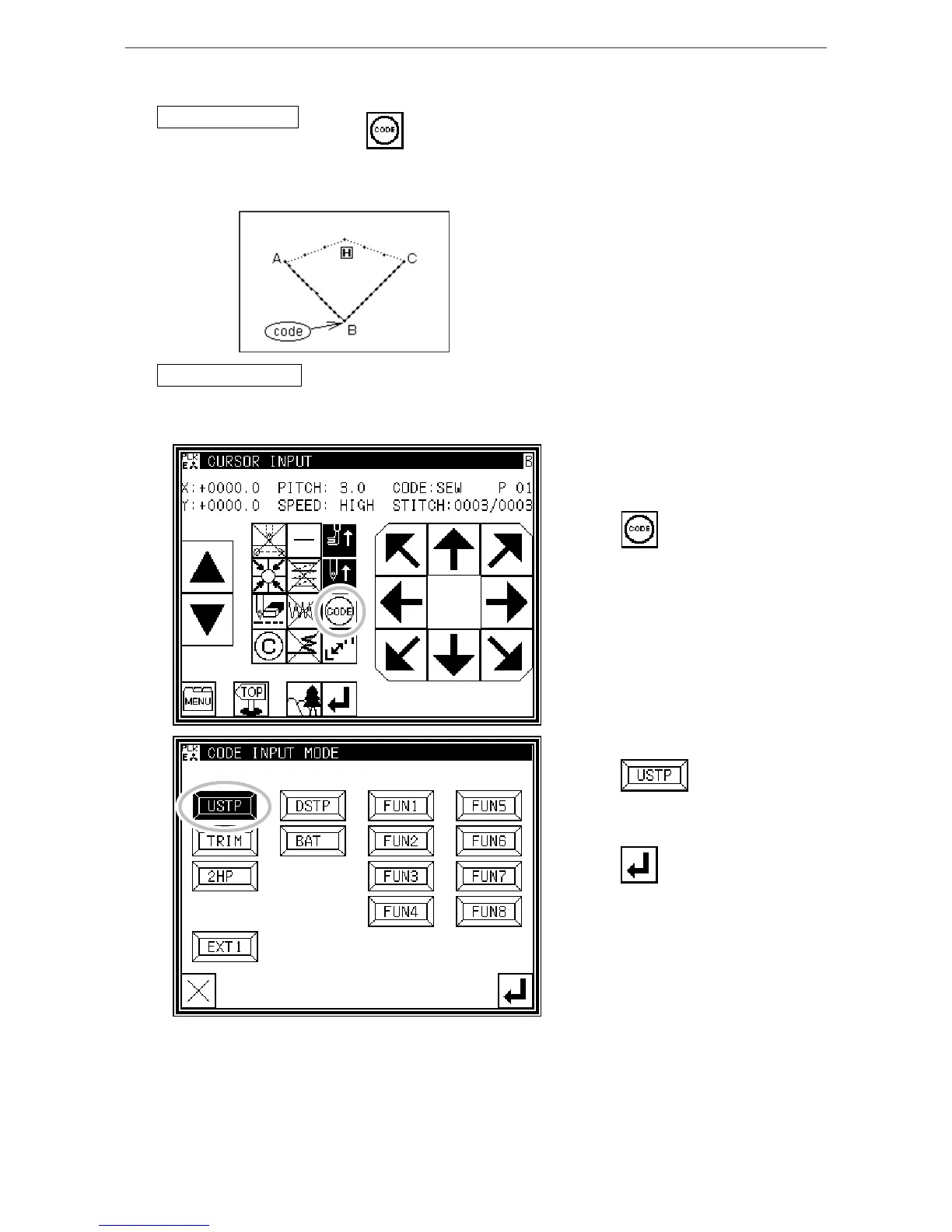
* Designate code data input( )
* Select and input the code data from the code data list
[Example] The following type of pattern data will be created.
Input the "NEEDLE UP HALT" code at the B point
between the A-B point linear line and B-C linear line.
[Memo] Code data cannot be inserted when inputting
with a linear, circle, arc, curve or polygonal line. To
input, add the code data with the modification mode.
(Input between the linear lines is possible as shown
in the example.)
Operation details
1. Inputting a linear line from A point to B point
* Input a linear line from the A point to B point using the linear input procedures.
2. Inputting the code data (NEEDLE UP HALT)
* Press .
* Press .
(Refer to the code list given later.)
* Press to set the code.
(The "NEEDLE UP HALT" code will be
created.)
* The system will return to the arrow
input screen.
3. Inputting a linear line from B point to C point
* Input a linear line from the B point to C point using the linear input procedures.
4. Inputting the return/end code
[9]-23



 To Next Page
 Loading...





