MSENSE
®
DGA 9 7045899/02 EN – 11.2020 Page 116
6.10.4.5.3.1 General
The RS232 interface is needed for service purposes only. This requires a special connection cable.
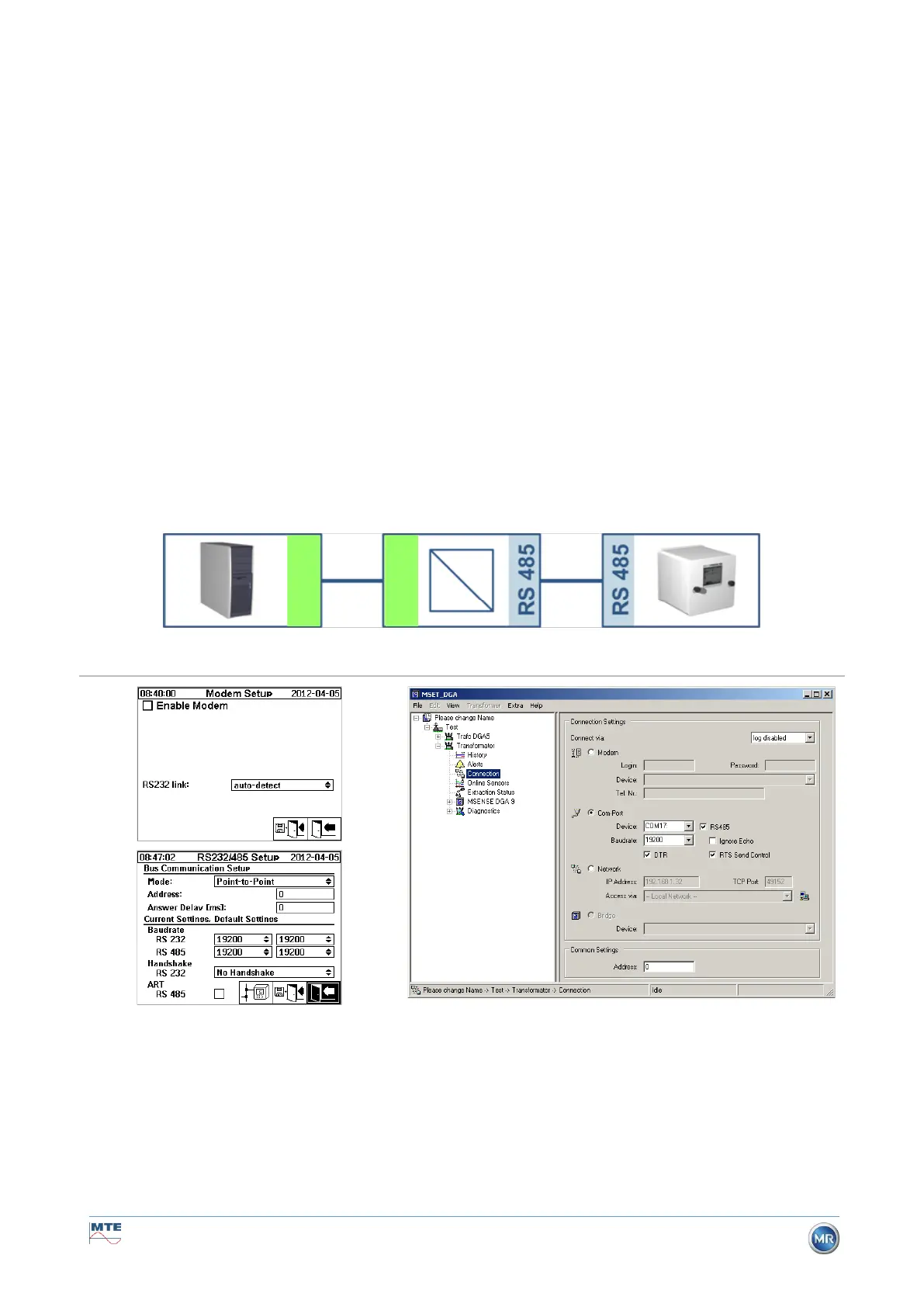
The following chapters show how to configure MSENSE® DGA 9 and the MSET DGA software. Some
comments and tips relate to the screen shots.
The device settings must be read out manually.
Remark: The MSET DGA software is described in detail in separate operating instructions.
6.10.4.5.3.2 Point-to-point
The point-to-point connection has the simplest setting. The PC is connected directly to a device. For
this connection, the RS232 interface (for service purposes only), the RS485 interface or the modem
can be used. The point-to-point connection is the standard setting for MSENSE® DGA 9 and MSET
DGA.
Point-to-point – RS485
The RS485 interface can be used for long connections (up to 1,000 m). This consists of a two-wire
interface with half-duplex and software handshake.
Please ensure that the baud rate and the COM interface in MR MSET DGA are set correctly and that,
when necessary, ART RS485 is selected in the “Settings – Bus communication” menu (in the standard
settings, ART is not selected). An RS485 adapter may require additional settings in the MR MSET
DGA “Connection” menu (ignore echo, RTS Transmit Control).


 To Next Page