MSENSE
®
DGA 9 7045899/02 EN – 11.2020 Page 109
6.10.4.5 Communication / Interfaces
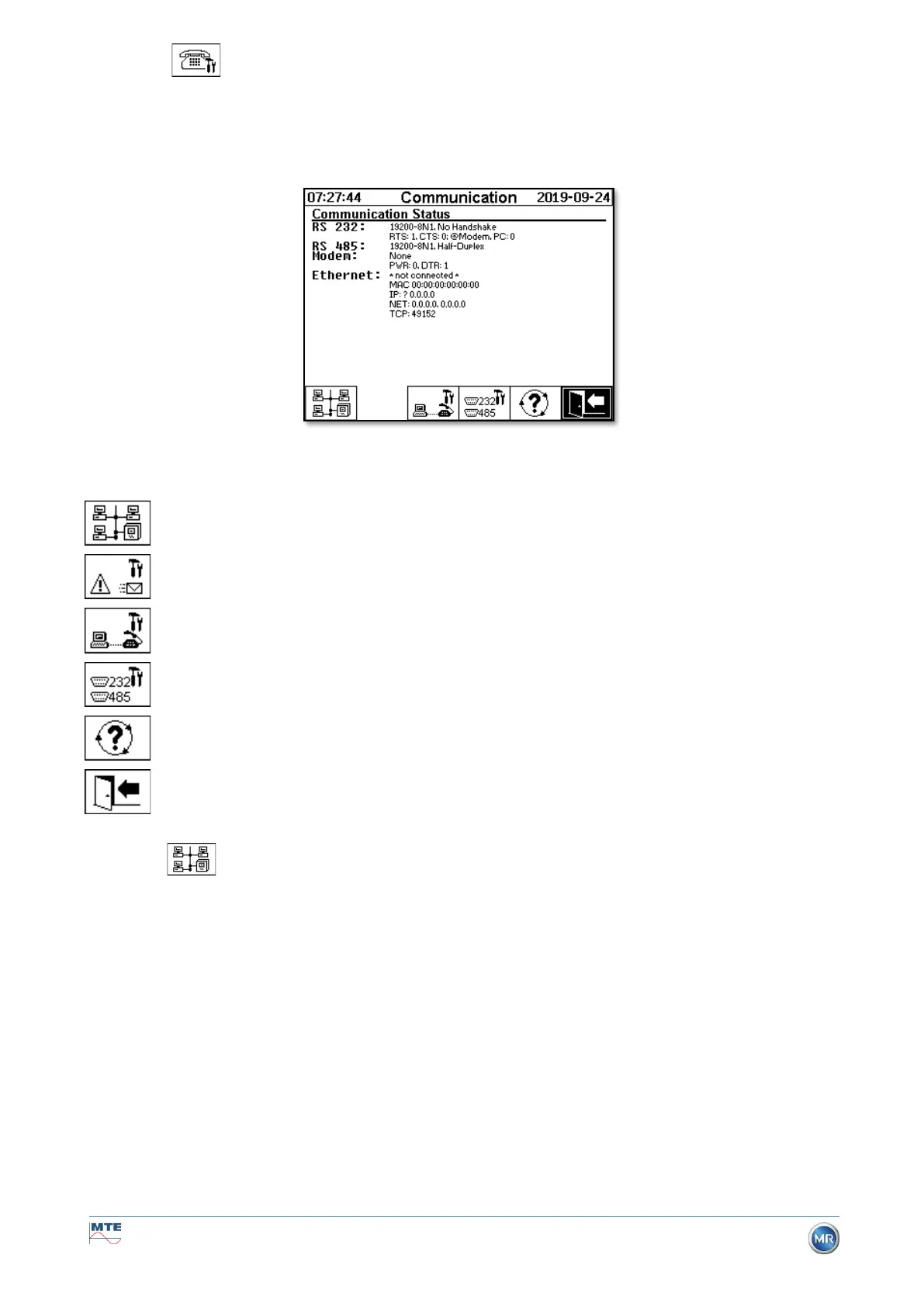
In the Communication menu, the interfaces are configured and the current status information of the
corresponding interfaces (RS232, RS485, modem and Ethernet) is displayed.
The following sub-menus can be selected in the “Communication / Interfaces” menu:
Network settings (6.10.4.5.1)
Alarm SMS settings (not available)
Modem settings (6.10.4.5.2)
RS232 / 485 settings (6.10.4.5.3)
Updating the status information
6.10.4.5.1 Network settings
The device is equipped with an Ethernet interface. It can be integrated into a TCP / IP network and
supports both static and dynamic integration. The way in which the device is to be integrated into the
network on site remains the responsibility of the respective network administrator.
6.10.4.5.1.1 Static IP
The network administrator must provide the following information. This must then be entered in the
corresponding fields in the network sub-menu:
• IP address When selecting IEC 61850 modem, in addition:
• Network mask ● IP address IEC 61850
• Standard gateway


 To Next Page