MSENSE
®
DGA 9 7045899/02 EN – 11.2020 Page 47
4.4.3 Initial start-up
As soon as the device is connected to a power source, a short beep will sound and the LCD screen
will show the main menu after a brief moment. To begin with, the time and date have to be set and
then the device must be activated / initialized by the operator.
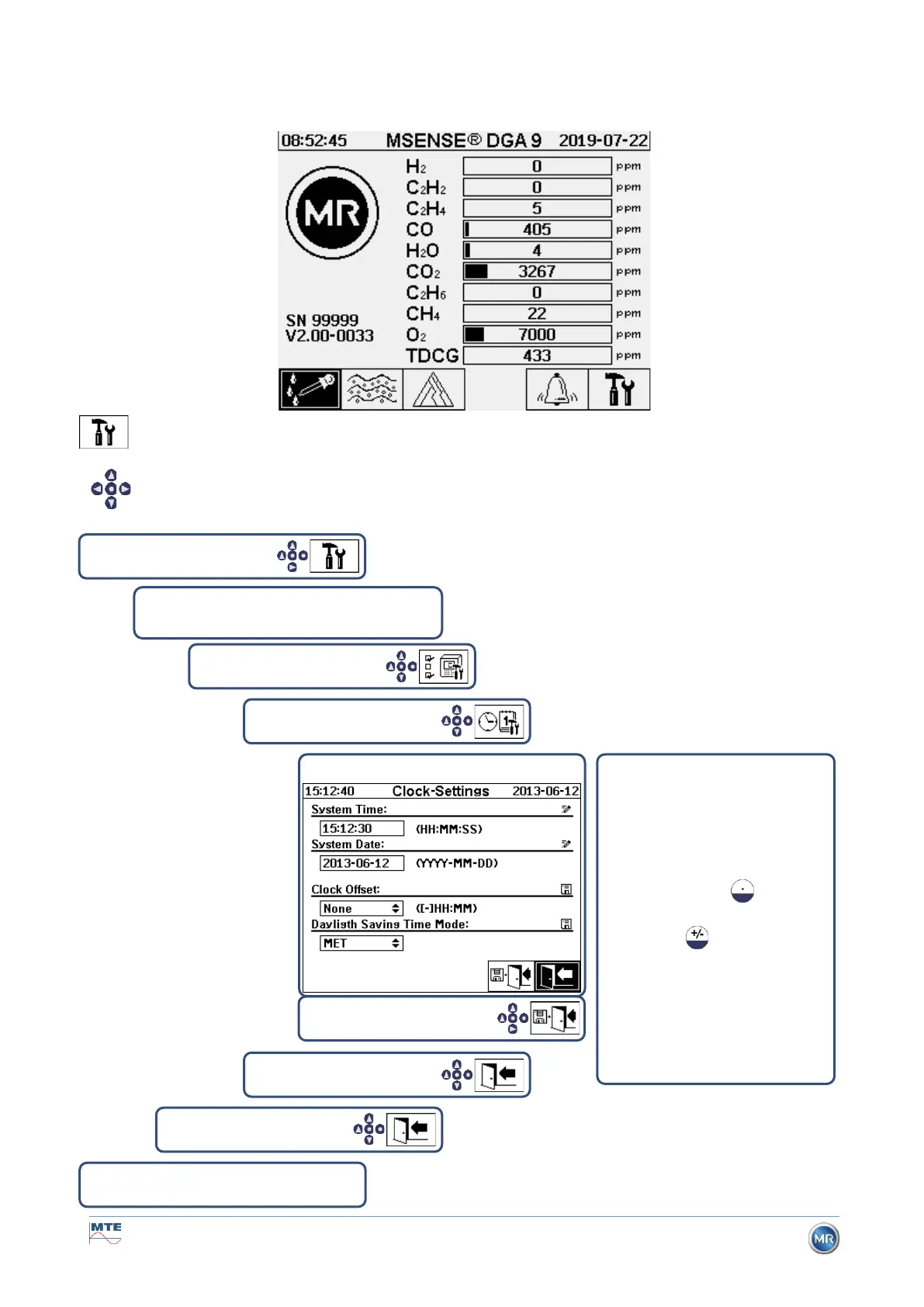
Setting the time and date under “Device Settings”
The user can navigate through the individual menus by using the arrow keys. The active
field / menu is highlighted in black and can be selected by pressing the Enter key.
To enter the sub-menu “Date, time, clock settings”, please select the following sub-menu symbols.
Date, time, clock settings
The time and date are entered us-
ing the device keyboard. It con-
sists of an alphanumeric keypad,
the arrow and the enter key. The
numbers must be entered com-
pletely with separators (e.g.
15:12:30). The colon is en-
tered using the key and
the minus sign is entered
The entry
is then completed with the
Finish making the entries by
pressing the “Save and exit menu”
key



 To Next Page