Setting Up the GALAXY GX2
GALAXY GX2
41
US
Alarms Tab
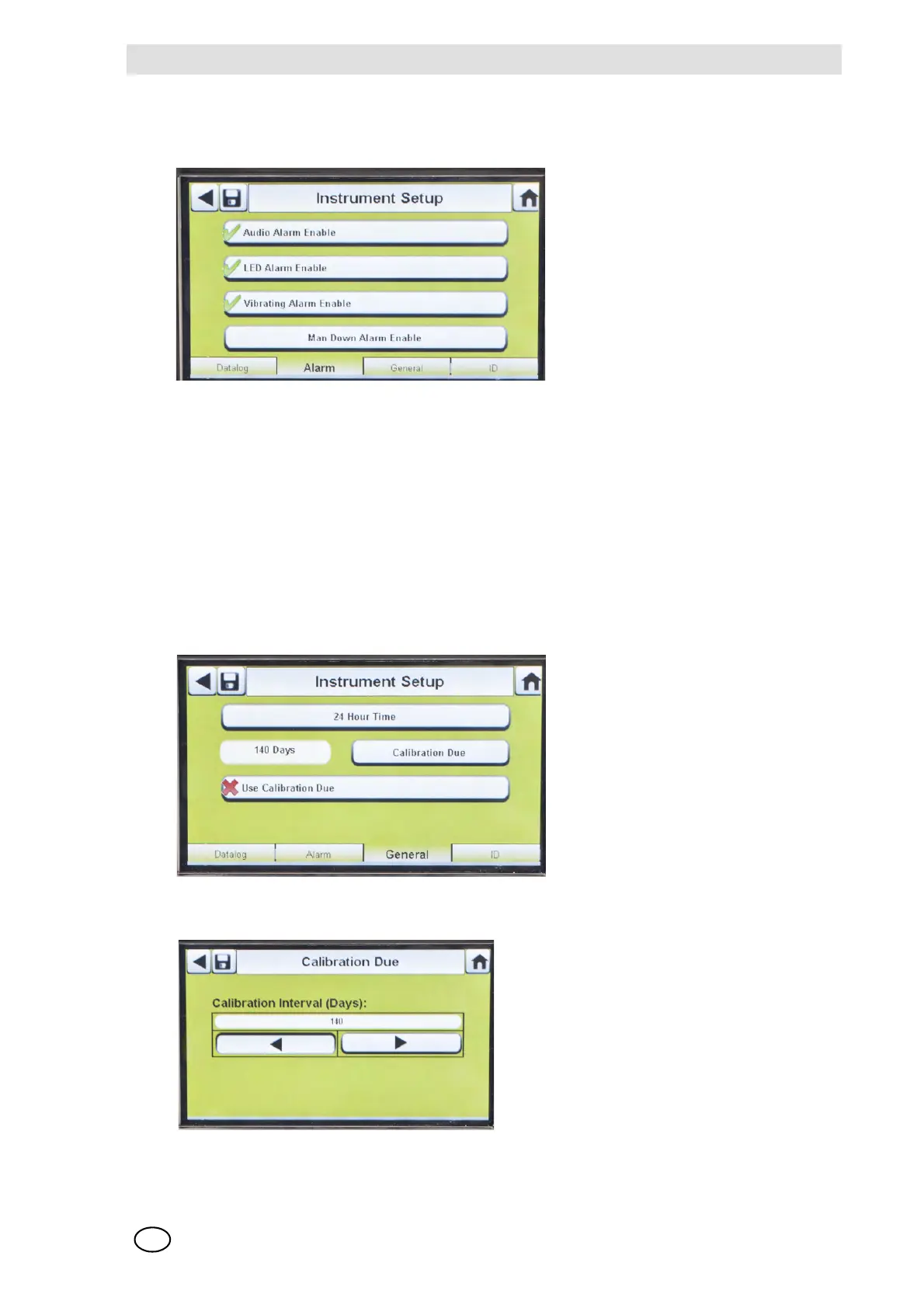
Select the Alarm tab to set the instrument alarm functionality.
Fig. 20 Instrument Setup - Alarm
- Audio Alarm Enable (3) sets the instrument to emit a beeping sound in an alarm condition.
- LED Alarm Enable (3) sets the instrument to flash its LEDs in an alarm condition.
- Vibrating Alarm Enable (3) sets the instrument to a vibrating alarm in an appropriate condition.
- Man Down Alarm Enable (if applicable) will activate the Audio and LED alarms if the instrument
does not detect motion for 30 seconds (select gas detectors equipped with this feature).
General Tab
Select the General tab to set the instrument calibration interval. The user can select a 24-hour
Time or 12-hour Time standard.
Fig. 21 Instrument Setup - General
(1) Select 24-Hour Time to set that stand-
ard. If not selected the instrument will
function in the default 12-Hour Time
standard.
(2) Select Calibration Due to set calibration
interval for the instrument.
Z This Calibration Interval screen dis-
plays.
(3) Set the Calibration Interval (Days).
(4) Select Save.



 To Next Page