Setting Up the GALAXY GX2
GALAXY GX2
29
US
Instrument Records
Provides the most recent calibration and/or bump record for each instrument in the Test Stand
bank. This button is only active on the Master Test Stand. All other Test Stands will report their
data to the Master Test Stand for display.
4.4 General Setup
The following settings can be changed from their default values after entering the password.
Select
GX2 Configuration from the Home screen. The Administrator screen displays.
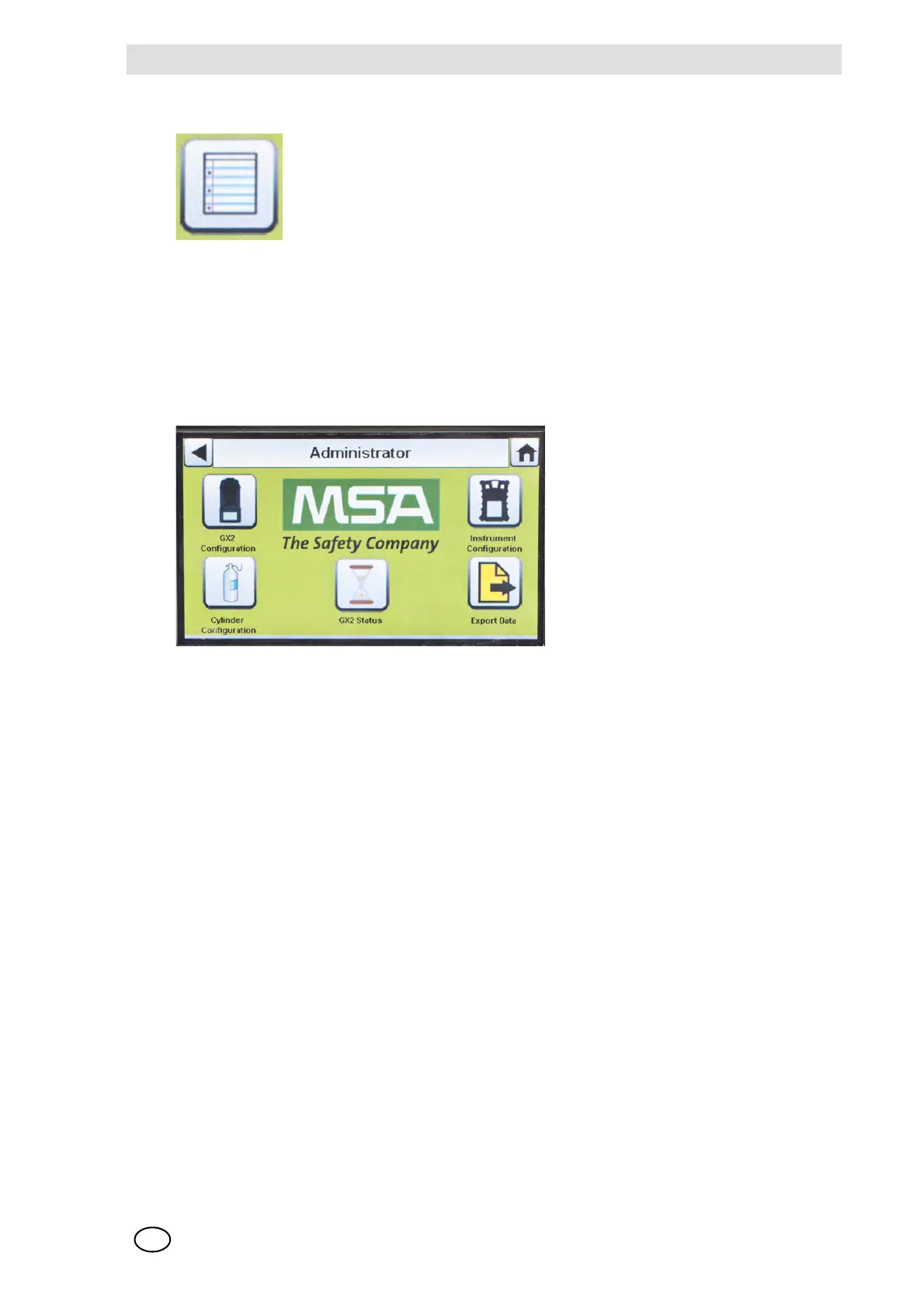
Fig. 15 Administrator screen
The Administrator screen provides configuration options for the Test Stand (1), instrument (2) and
test gas cylinders (3).
The GX2 Status selection (4) provides detailed information about the Test Stand that can be used
to troubleshoot identified errors.
The Export Data selection (5) is used to upload instrument settings to a docked gas detector.
4.5 GX2 Configuration
To configure the settings for the GALAXY GX2 select GX2 Configuration [ Fig. 15] on the
Administrator screen.
1 GX2 configuration for Test Stand [ chapter 4.5] 4 GX2 Status selection
2 Instrument configuration [
chapter 4.6] 5 Export Data selection
3 Test gas cylinder configuration [
chapter 4.7]



 To Next Page