Setting Up the GALAXY GX2
GALAXY GX2
47
US
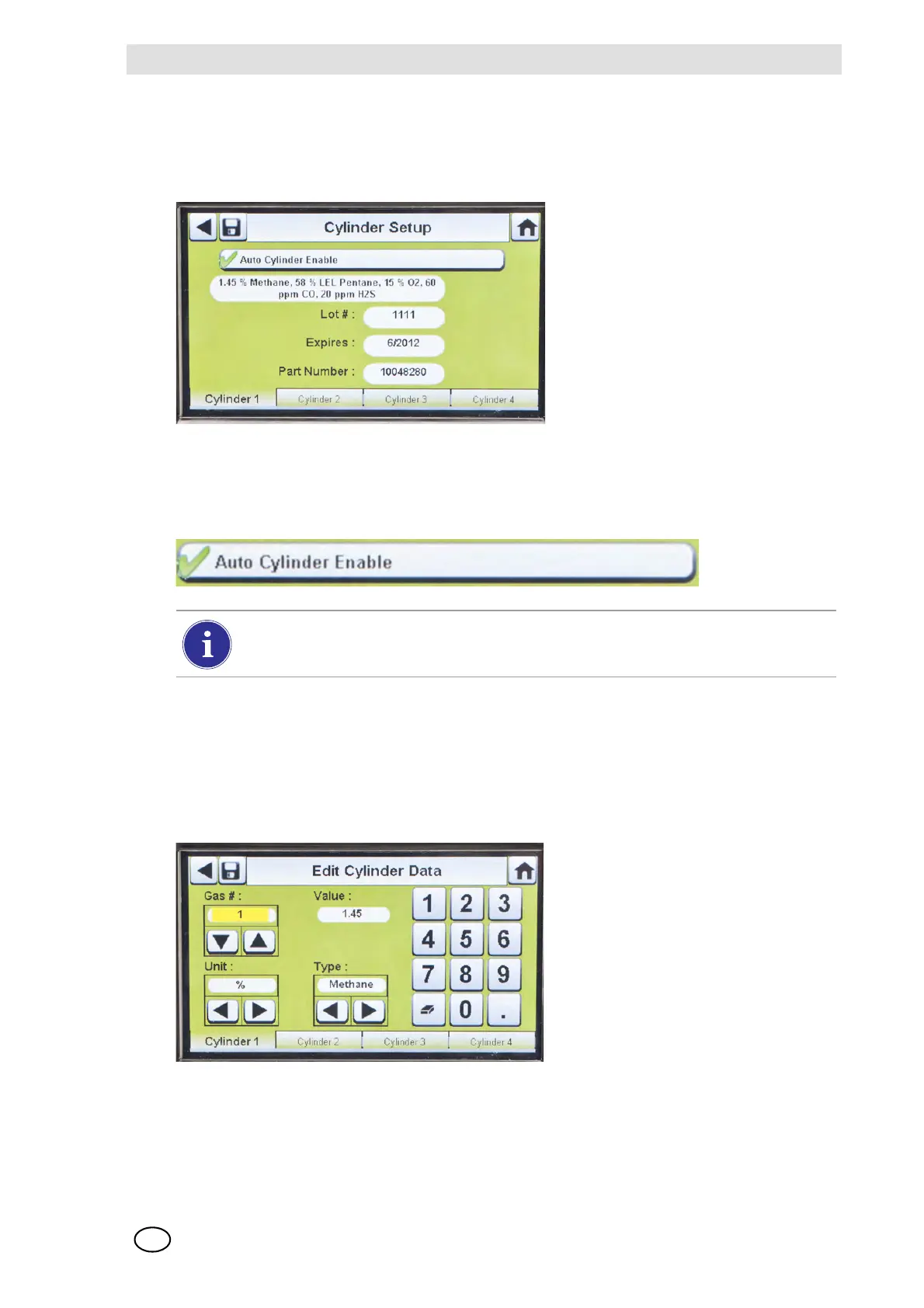
Cylinder Setup
Select Cylinder Setup.
Z The Cylinder Setup screen displays for Cylinder 1, which is the cylinder closest to the
Test Stand.
Cylinder Tabs
Cylinder data will populate automatically when using the electronic cylinder holder and a test gas
cylinder with RFID tag. This feature is enabled when this button appears as shown:
To enter cylinder data, if not using an electronic cylinder holder:
(1) Select "
2" on the Auto Cylinder Enable button for manual entry.
(2) Select Edit on the Cylinder Setup screen.
(3) The user will be prompted to Save Changes? Select Yes.
Z The Edit Cylinder Data screen displays.
(4) Set the Gas # by selecting either the up or down arrows. If there is one gas in the cylinder,
select 1. For additional gases in the same cylinder (gases 2-6), enter the gas parameters.
Example: if Cylinder 1 contains quad gas, four sets of gas parameters should be entered
(gases 1, 2, 3, and 4). To remove a gas from the list, set the Value to zero (0), Units and Type to
None, and then select Save.
The Lot # and Expires fields cannot be manually entered. They are populated only
when using an electronic cylinder holder.



 To Next Page