MAINTENANCE MANUAL
VC2E-MM-00
41
Factory Default Parameter
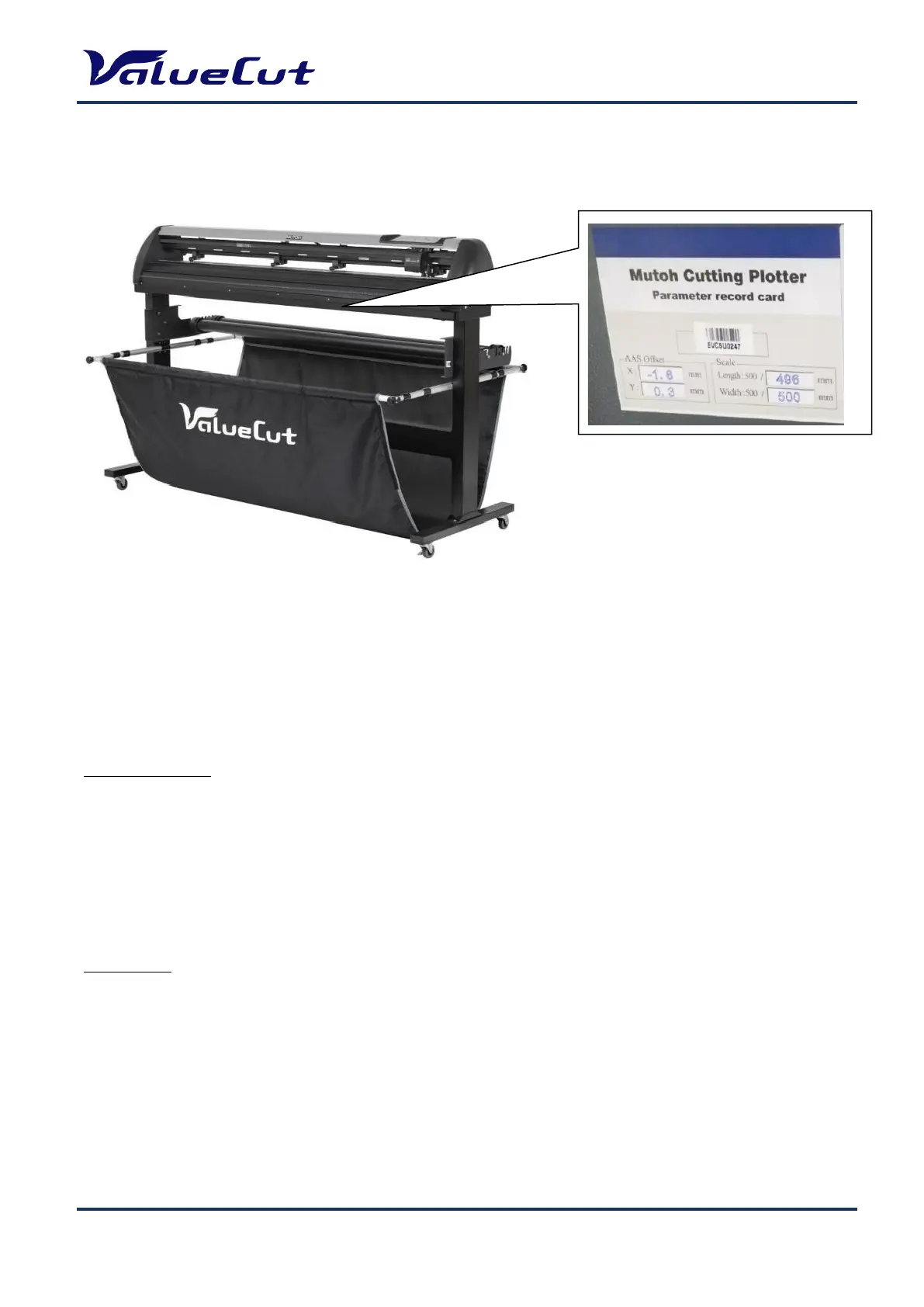
Factory default parameter information is attached under the machine.
Below are the items for setup. Numbers shown in each parenthesis below are the example numbers of
this machine (Serial# EVC5U0247).
AAS Offset (X= -1.6, Y= 0.3)
Scale Length (Length: 500 / 496 mm)
Width Length (Width: 500 / 500 mm)
AAS Offset Setup
Step 1. Press the MICS key in Offline mode to enter Setup menu.
Step 2. Click [< or >] key to display “AAS Offset”, and press the Enter key.
Step 3. Enter the X value shown on the Parameter Record Card.
Step 4. Click [>] key, and enter the Y value shown on the Parameter Record Card.
Step 5. Click Enter.
Scale Setup
Step 1. Press the MICS key in Offline mode to enter Setup menu.
Step 2. Click [< or >] key to display “Scale Length X (Y)”, and press the Enter key.
Step 3. Click [<] key, and change the left number to [500].
Step 4. Click [>] key, and change the right number to the value shown on the Parameter Record Card.
Step 5. Click Enter.
Note: The machine setting conditions may have been changed from the factory default, please check the
On-line data to confirm the final machine settings.










 To Next Page