Loading media 35
[8]
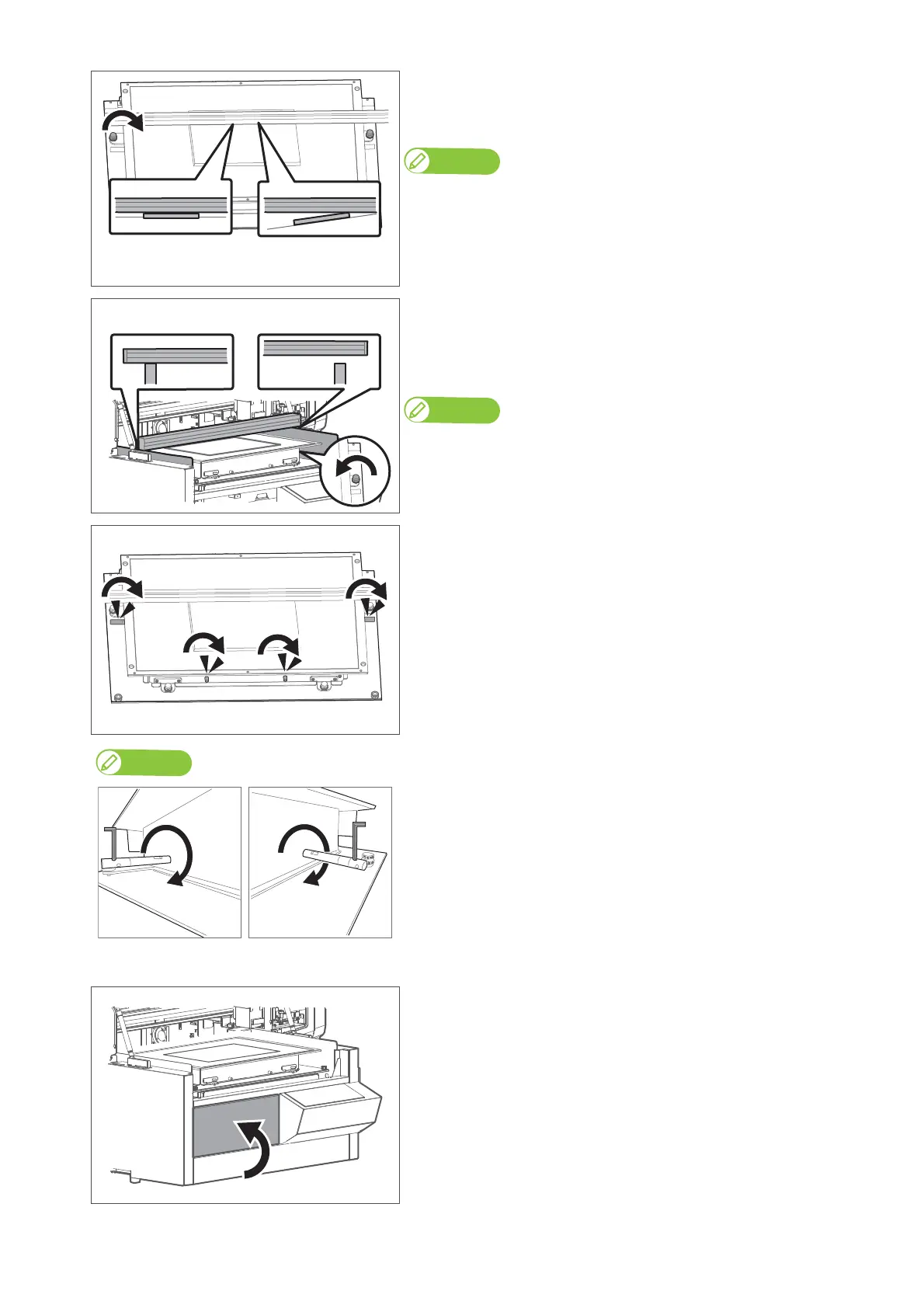
Rotate the thumb screw of the adjuster on the side with gap to raise the table.
• Rotate it clockwise.
• Raise the table until no gap is present in between.
Note
• In the example “Not good” on the left figure, use the adjuster on the left side to level
the table.
• Be sure not to raise the table too high.
[9]
Check that no gap is present between the media height guide and side plates
on both sides.
• If gap exists, use the adjusters on the side where gap is present to lower the
table.
Note
• In the example “Not good” on the left figure, use the adjuster on the right side to
level the table.
• Rotate them anti-clockwise.
[10]
Tighten four table height fixing screws.
• Rotate them clockwise to tighten.
• If the height fixing screws on the side of the table do not rotate easily, use
the hexagon wrench to loosen.
• When looking from the front of the printer, turn the screw on the left side
to the front (clockwise).
• Turn the screw on the right side to the back (clockwise).
[11]
• Remove the media height guide.
• Close the PG handwheel cover.














 To Next Page