116 Agitating ink
Steps
[1]
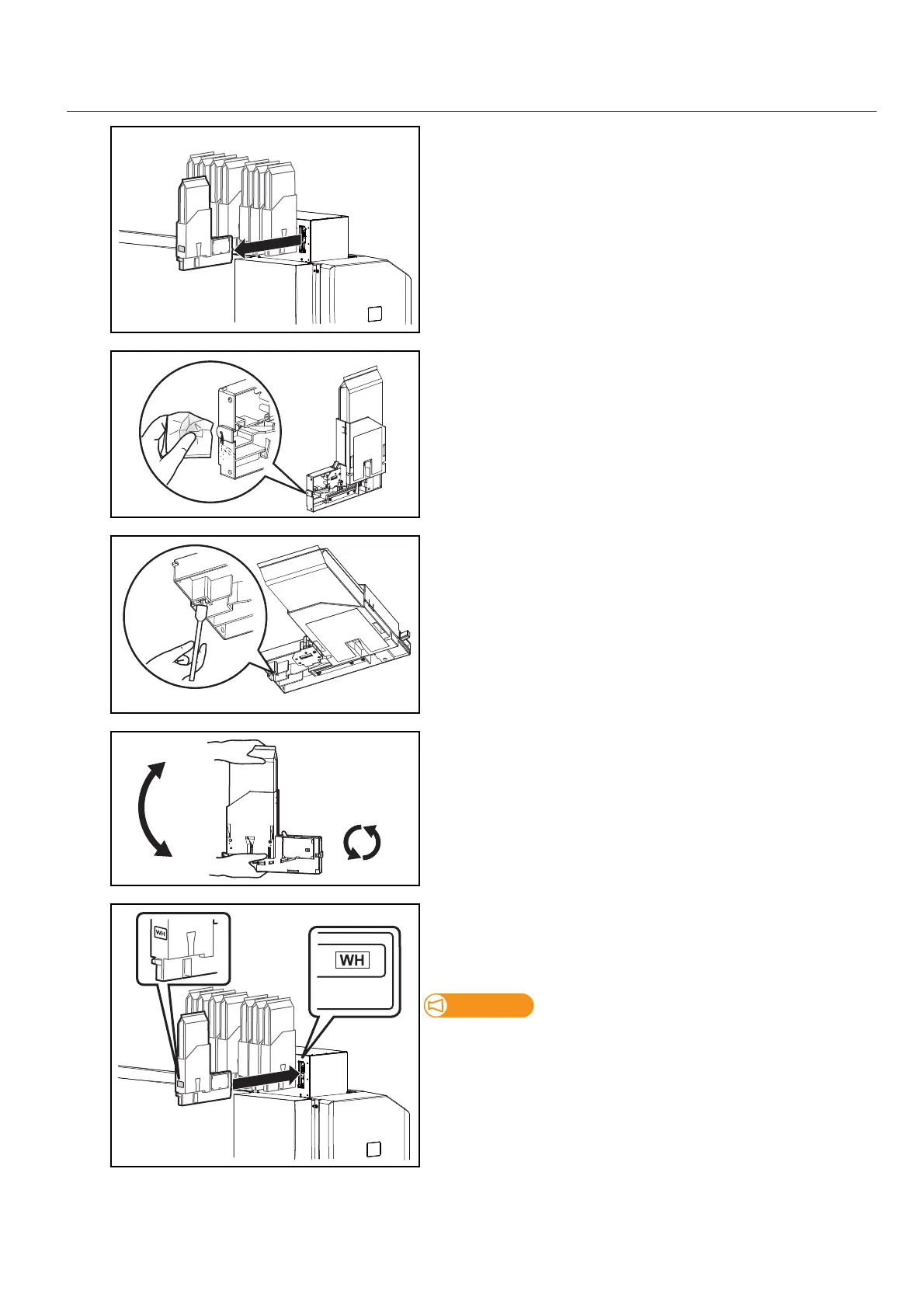
Remove high-capacity ink pack adapters from the ink slots.
[2]
Using the paper towel provided with the printer to wipe off the ink
attached to the insertion point for high-capacity ink pack adapters.
[3]
Tilt high-capacity ink pack adapters, use cleaning stick provided with
the printer, and absorb the ink collected around the tube connectors.
• Tilt high-capacity ink pack adapter so that the caution label is facing
down.
• Tilt high-capacity ink pack adapter so that the insertion point is
lowered a little.
[4]
• To prevent the ink bag and the high-capacity ink pack adapter from
separating, hold one hand against the top of the ink bag. Rotate the
plug of the ink bag vertically and hold for 3 seconds.
• Then, invert the ink bag with the adapter and hold for 3 seconds.
• Repeat that 10 times.
[5]
Re-insert the high-capacity ink pack adapters into Ink slots.
• Make sure to match the ink pack color with the label of this printer.
• Insert all the way to the end.
Make sure you insert the high-capacity ink pack adapters into the
original slots. Even when you have the same color ink packs, do not
switch and insert them into different slots.



 To Next Page