166 Troubleshooting
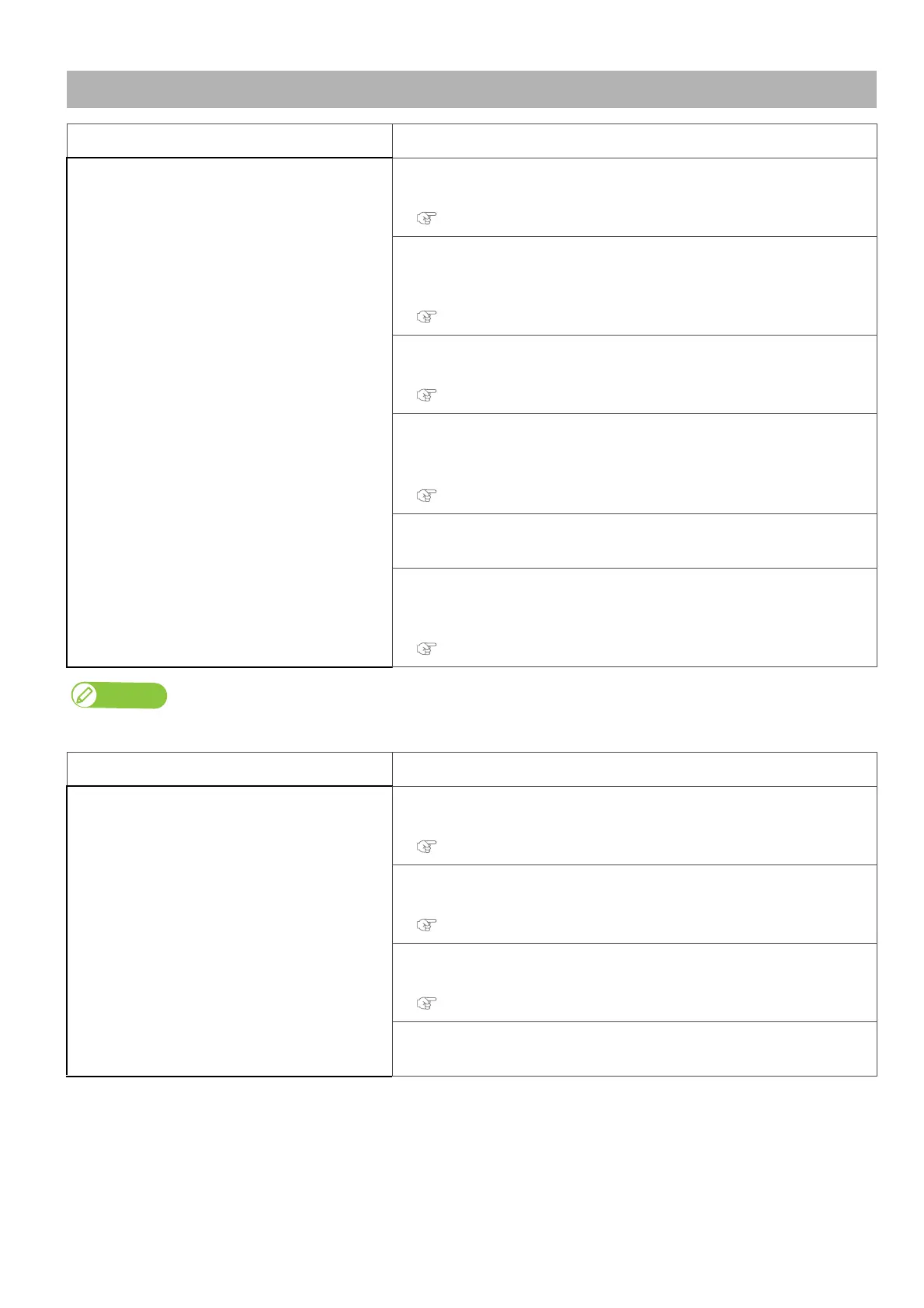
Media-related troubleshooting
Symptom Possible cause and Remedy
The media slips, is torn /crumpled during
initialization.
Is the media loaded correctly?
• Load the media correctly.
"Loading a roll media" P. 22
Are there any foreign materials such as torn paper attached to Pressure
rollers?
• Clean Pressure rollers.
"Inside cleaning" P. 135
Do you use the printer within recommended environmental conditions?
• Make sure to use the printer within the specification range.
“Ensuring a suitable place for installation” of the “Startup Guide”
Are any curls or warps present on your media?
• Set the edge holder at both edges of the media.
• Check that you select the appropriate vacuum fan setting.
"After loading the media..." P. 29, "**>7: Vacuum Fan" P. 74
Are you using creased, damaged, torn or curled media?
•Replace the media.
Is holddown pressure adequate for the roll media?
• Use the slide lock lever on the individual pressure rollers to reduce or cancel
the pressure.
"Canceling or reducing pressure rollers individually" P. 41
If the media is jammed or torn, remove it according to "The media is jammed" P. 172
Symptom Possible cause and Remedy
The printer does not detectthe media.
Is the media loaded correctly?
• Load the media correctly.
"Loading a roll media" P. 22
Is the media loaded at an angle?
• Load the media straight.
"Loading a roll media" P. 22
Do you use the printer within recommended environmental conditions?
• Make sure to use the printer within the specification range.
“Ensuring a suitable place for installation” of the “Startup Guide”
Did you load the media which has been printed before?
•Use a new media.



 To Next Page