Emptying waste ink tank 121
3 Emptying waste ink tank
In the following cases, drain waste ink in the waste ink tank into a container to empty the tank.
• When the waste ink tank is more than half full.
• When “Full WasteInkTank” is displayed on the front panel.
Display messages
Emptying waste ink tank
The waste ink tank is full. Empty the tank immediately.
• The printer will stop operation until you empty the waste ink tank.
1. Drain waste ink into a container
Waste ink collected from this product is classified as industrial waste. Dispose of waste ink according to the local waste
disposal regulations.
Wear protective equipment (gloves, goggles or eye protection, protective mask, protective clothing) when
handling ink.
Be cautious that ink does not get into your eye or make a contact with your skin.
When ink gets into your eye or make a contact with your skin, wash with water immediately. If left as it is,
it may cause red eye or light inflammation. If it is necessary, please see your doctor immediately.
[1]
Prepare a container to collect waste ink.
Important!
The capacity of the waste ink tank is 2,000 ml. Make sure to prepare a container with at least 2,000 ml capacity.
[2]
Cover the floor just under the waste ink tank using a paper that you do not use.
[3]
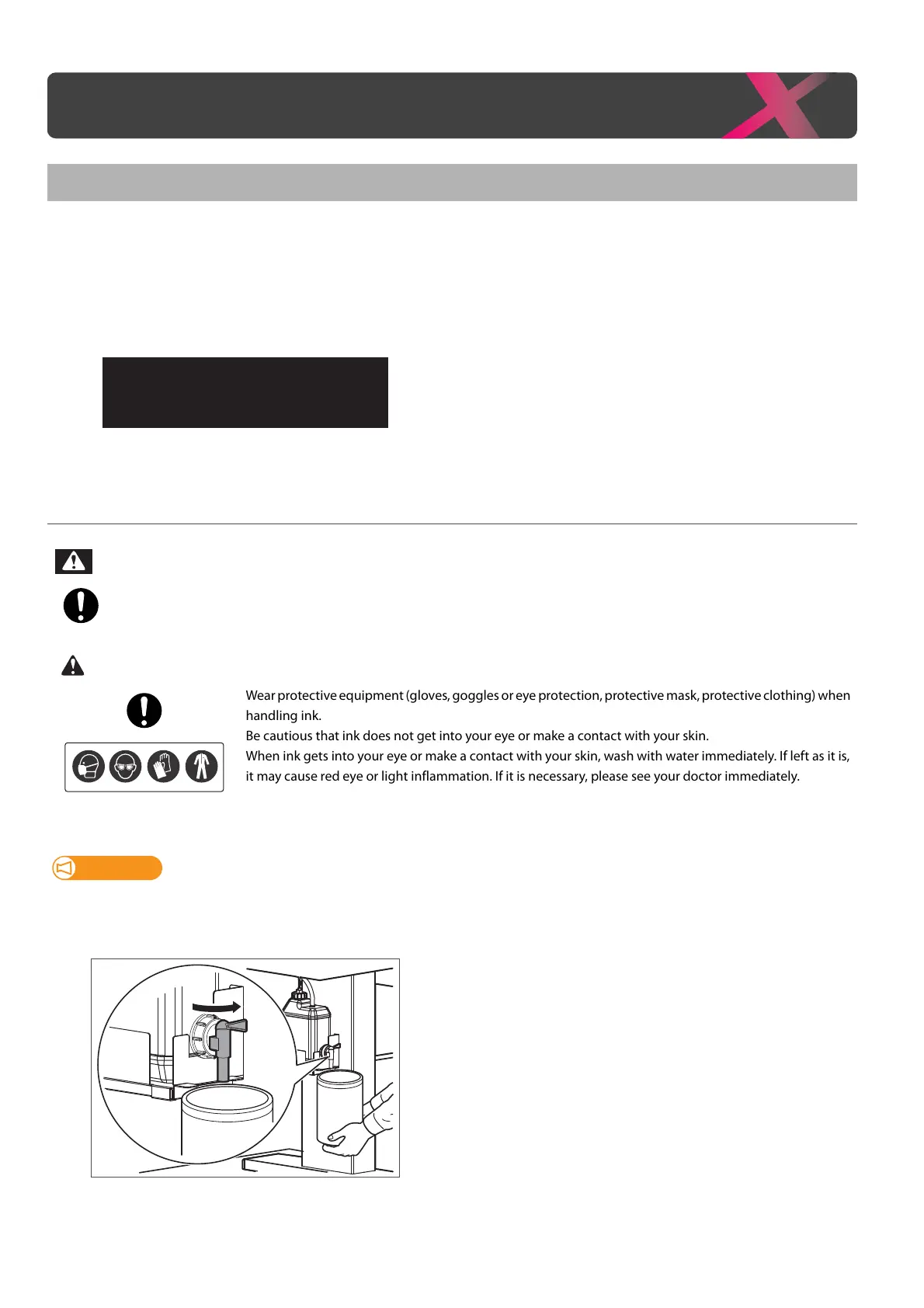
Open the waste ink valve and drain waste ink into the container.



 To Next Page