48
EN
hyperion - TECHNICAL MANUAL
2.2.9 Connection beetwen PC and X9
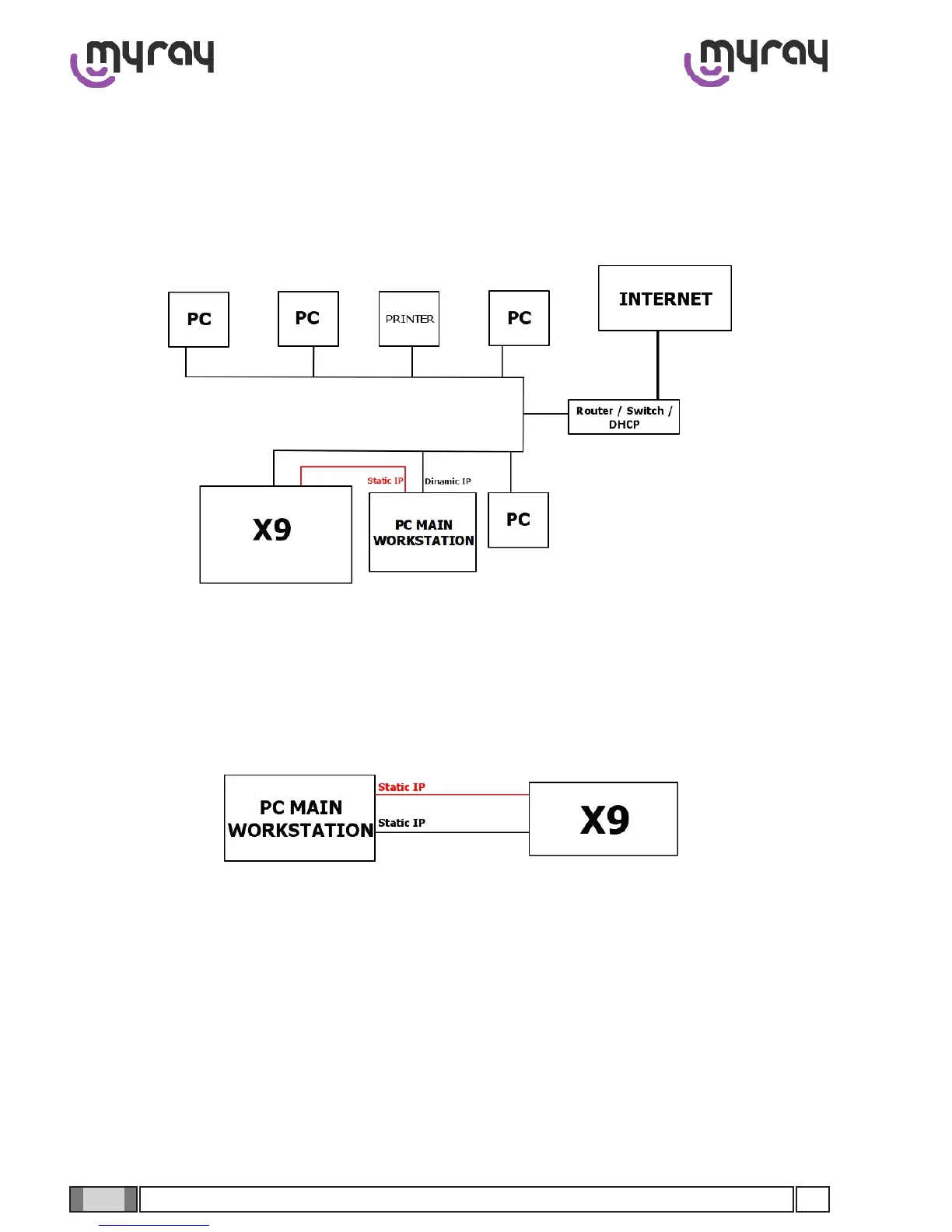
ThePCisconnectedtotheX9with2networkleads.Therstisforcommunication(whichcanpassthroughRouter,
Switch etc), the second for the 3D panel (which must be point-to-point). Depending on the situation, it will be neces-
sary to set the IP addresses of the PC correctly. If there is a LAN with a DHCP server, you can connect both the PC and
the X9 to the local network and both will automatically be assigned correct IP addresses to allow communication. It will
onlybenecessarytosetthestaticIPaddressoftheIntelPRO1000forconnectiontothe3Dpanel(inredinthegure):
In this scenario both the PC and X9 can be left in DHCP, setting only the static IP on the INTEL PRO 1000 network
board.
If there is a direct connection between PC and X9 also for communication (or if there is a LAN without DHCP), it will be
necessary to act by entering a static IP in the network communication board.
ConsideringthedefaultIPaddressoftheX9is192.168.1.160,thePCwillhavetobeconguredwithacompatibleIP
address (es. 192.168.1.150).
To set a static IP address on a network board it is necessary to click on the Start button, type “ncpa.cpl” and press Enter.
The Network connection window will open:



 To Next Page