224 NetApp AltaVault Cloud Integrated Storage Administration Guide
Beta Draft
System maintenance AVA-400, AVA-800 Replacing system DIMMs
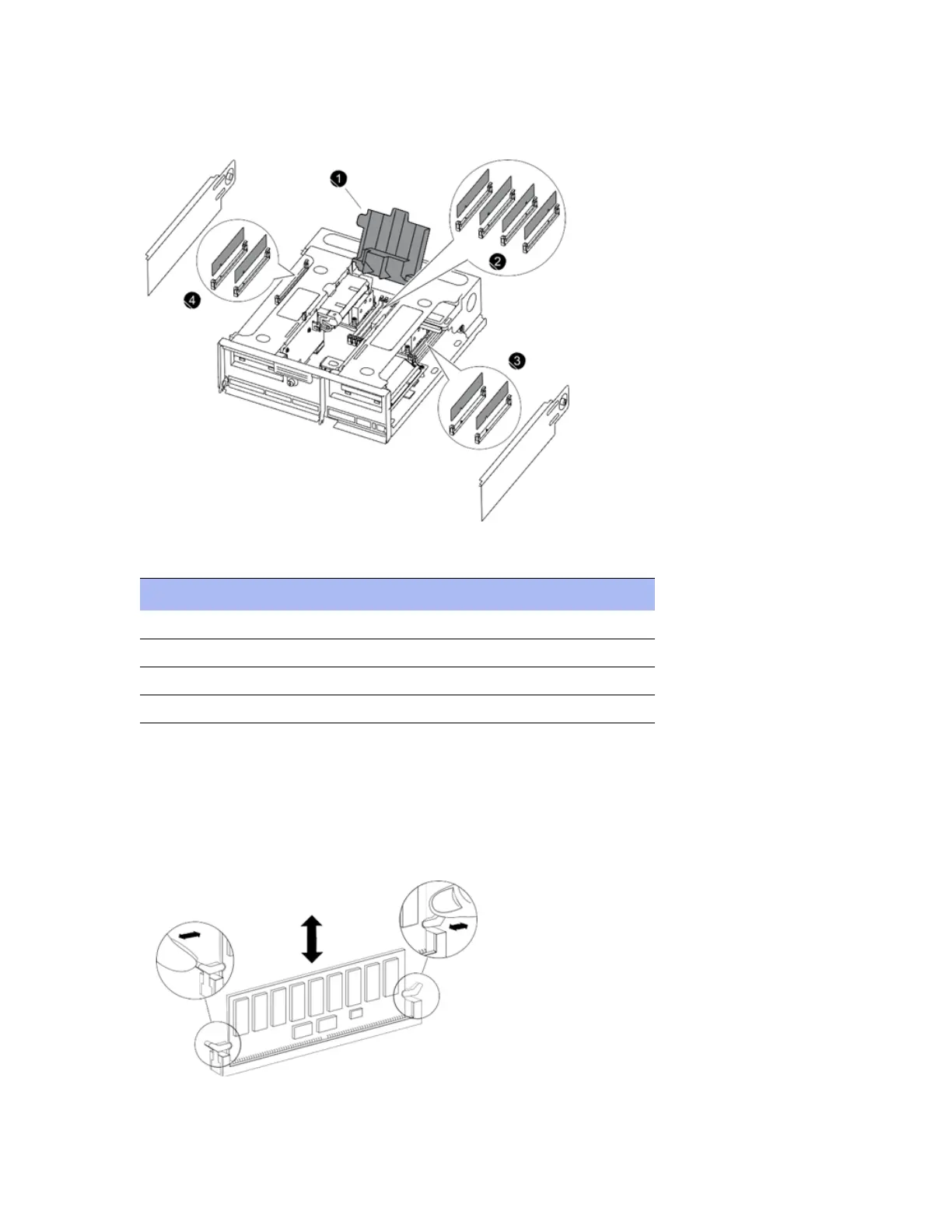
3. Locate the DIMM that needs to be replaced.
Figure 16-1. Locating system DIMMs
4. Identify DIMM components as described in this table:
5. Note the orientation of the DIMM in the socket so that you can insert the replacement DIMM in the proper
orientation.
6. Press down simultaneously on the two DIMM ejector tabs on either side of the DIMM to eject the DIMM from its
slot, and then carefully lift it out of the slot.
All system DIMMS have white ejector latches, shown in the image below.
Component Description
1 CPU cover
2 DIMM 6, DIMM 5, DIMM 1, DIMM 2 (left to right)
3 DIMM 4, DIMM 3 (left to right)
4 DIMM 7, DIMM 8 (left to right)


 To Next Page