NetApp AltaVault Cloud Integrated Storage Administration Guide 257
Recovering data from Amazon Glacier Best practices for Amazon Glacier
Example 2: Time-based datastore prepopulation
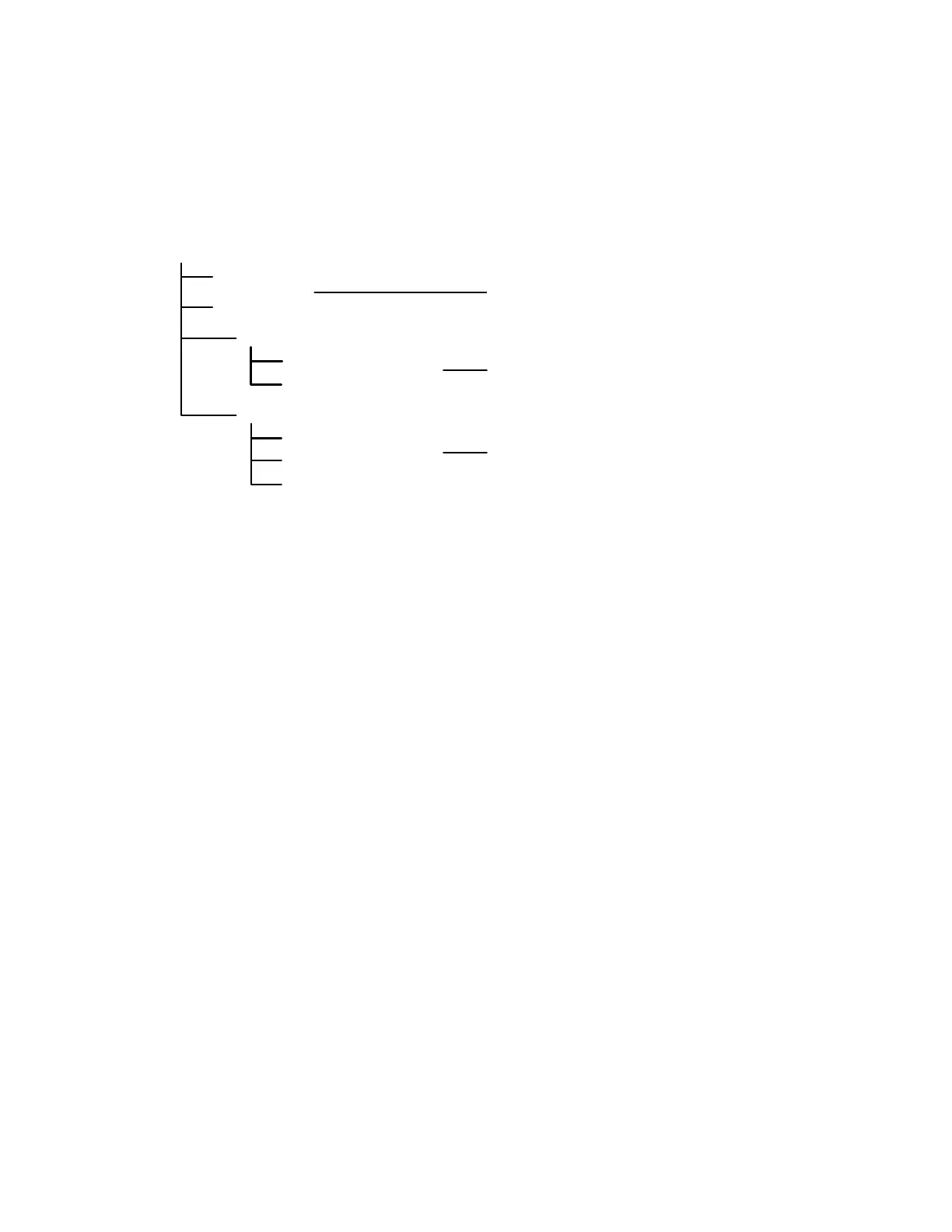
This example explains time-based datastore prepopulation. Consider the directory structure example shown in the
figure below.
To obtain the most recent files backed up, enter the following command on the AltaVault command-line interface:
datastore prepop num-days 7 retrieval-type expedited
This command fetches data that is seven days old from the cloud using Expedited retrieval.
Example 3: Prepopulating from backups
In this example, assume that:
All full backups are stored in a directory called fulls.
All full backups for Host A are stored in a subdirectory called hostA.
To prepopulate all backups for Host A that occurred for a 24-hour duration starting on 2017-01-01 (YYYY-MM0-DD),
using expedited retrieval, enter the following command:
hostname (config) # datastore prepop pattern fulls/hostA/*.img start-date 2017-01-01 end-date 2017-
01-02 retrieval-type expedited
To prepopulate all backups for Host A that occurred in the past 30 days (from the current time) using standard retrieval
(default), enter the following command:
hostname (config) # datastore prepop num-days 30 pattern fulls/hostA/*.img retrieval-type standard
To prepopulate all backups for Host A that occurred in the past 30 days (from the current time) using bulk retrieval,
enter the following command:
hostname (config) # datastore prepop num-days 30 pattern fulls/hostA/*.img retrieval-type bulk
After this process finishes, you can initiate a restore process using the restore feature of the backup application. For
details about how to restore your backups, refer to the relevant documentation for your backup application.
file4 (/smb/directory1/file4)
file2 (/smb/file2)
Directory structure
/smb
file1 (/smb/file1)
/directory1
file3 (/smb/directory1/file3)
/directory2
file5 (/smb/directory2/file5)
file6 (/smb/directory2/file6)
file7 (/smb/directory2/file7)
Backed up 30 days ago
Backed up 20 days ago
Backed up 7 days ago


 To Next Page