NGTeco Time Clock - K4 Model User Manual
Page | 20 Copyright©2021 NGTeco. All rights reserved.
4 Main Menu
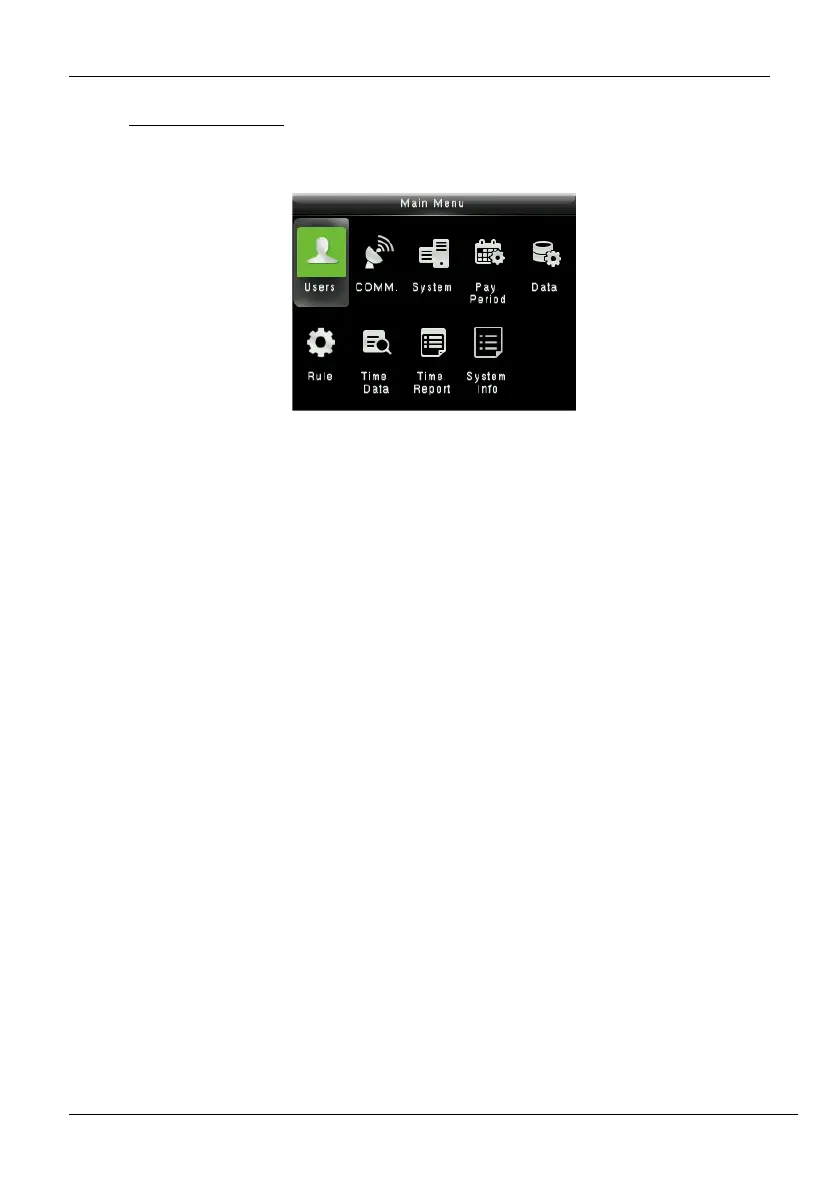
The Time Clock comprises the following menu. Long press 3s <M/OK> to enter the menu.
Figure 4-1: Main Menu
Function Definition:
Users (User Management): Add, Edit, and Delete user’s information, including User ID, Frist
Name, Last name, User role, Verification mode, Fingerprint and Password. Use the USB disk to
Upload or Download the user’s function.
Comm. (Communication Settings): Set the communication parameters between device
and PC, such as DHCP, IP Address, Subnet mask, Gateway, Wi-Fi, WIFI setup by USB, set the
App connection.
System: Set the system parameters, such as Date/Time, Fingerprint parameters, Autotest,
Reset and USB upgrade.
Pay Period: Set the Pay period type and Start day of the week.
Data (Data Management): Download Attendance Log, Delete Attendance/All Data and
Clean Permission.
Rule: Set the Attendance rule, such Maximum work hours, Day cutoff time, Duplicate punch
interval, Enable auto punch mode and View punch record.
Time Data: View the user’s Today’s attendance, History attendance, and Add missing punch.
Time Report: Select the Pay period, set the report hours format to download the time report.
System Info: Check the Device usage, Basic information, and Firmware information etc.



 To Next Page