NGTeco Time Clock - K4 Model User Manual
Page | 37 Copyright©2021 NGTeco. All rights reserved.
Note:
• Device Wi-Fi only supports 2.4GHz communication.
• It is recommended that you connect your device within approximately 15 metres of Wi-Fi.
• If the Wi-Fi connection status of your device shows not connected for a long time,
please enter the password again.
6.2.2 New Wi-Fi Connection
To add a new Wi-Fi connection, perform the following steps:
1. Go to [Comm.] then [Wireless Network].
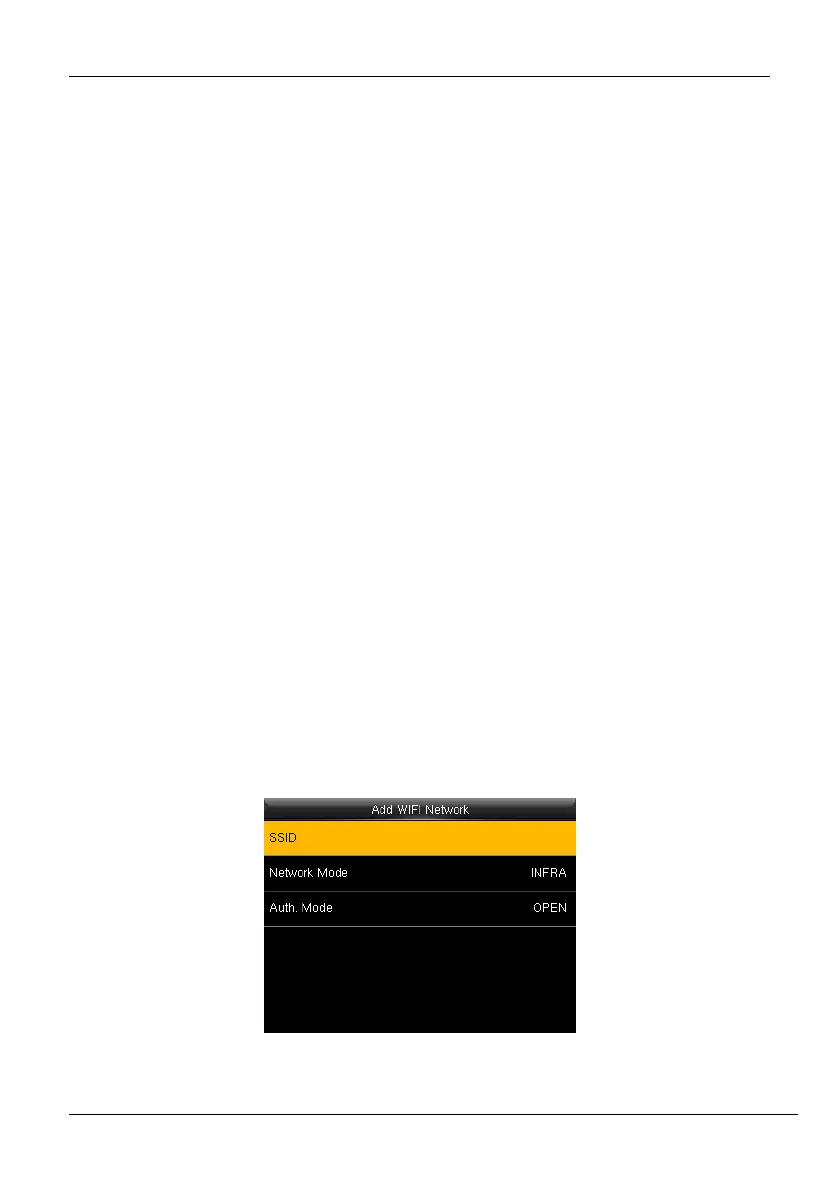
2. Press [Add WIFI Network] to add a new connection. The interface to add a new
connection will be displayed as shown below:
Figure 6-7: SSID and Password
0. ,
1. .
2. ;
3. :
4. /
5. ?
6. !
7. %
9. #
10. *
11. +
12. -
13. =
14. (
15. )
16. [
18. {
19. }
20. <
21. >
22. ~
23. "
24. `
25. \
27. &
28. _
29. |
30. $
31. (Space symbol)
32. ^



 To Next Page