148
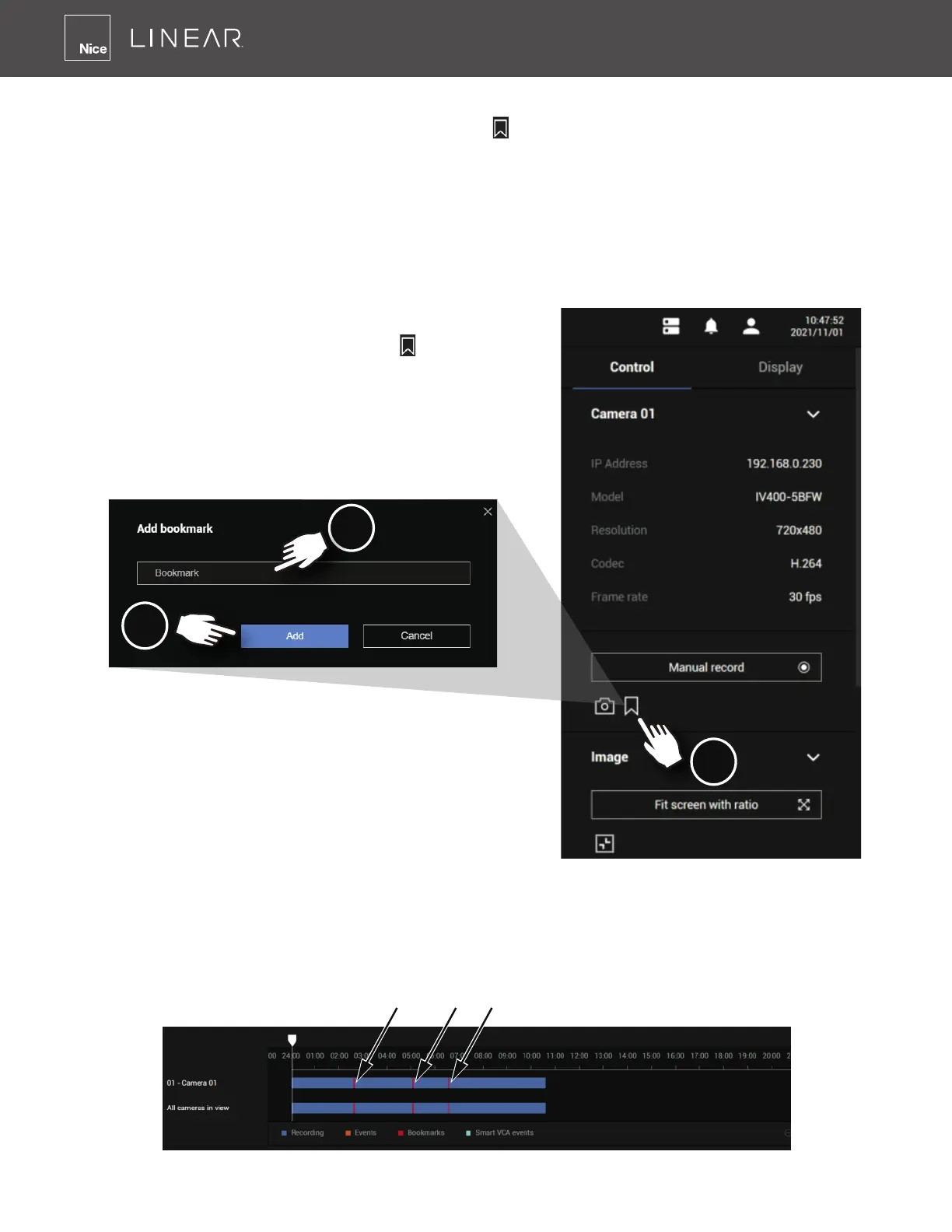
To add a bookmark:
1� Click on the Bookmark Flag button
on the
right control panel�
2� Enter a short description that can be as long as
120 characters�
3� Click on the Add button, or simply press Enter on
your keyboard�
To place bookmarks and exert screen controls:
On a focused view cell, you can place a bookmark
that saves a short description and a one-
minute footage from the current feed� The bookmark is also displayed along with the recorded
video, making it is easier to look for a specic moment in time when you need to trace back for a
scenario later�
The bookmark function can be executed on a live or recorded stream when you observe a
situation from your Live view or Playback window� The precondition of using this function is that
the video stream, while you are watching it on the view cell, must be recorded to the NVR at the
same time�
1
2
3
Note that the bookmarks inserted on the Liveview window will be listed on the Alarm panel, and
the bookmarks will also appear on the slide bar of the Playback window�
To retrieve or view the video clip tagged by the bookmark, click it to play the video that was
recorded by the time bookmark was inserted�
Bookmarks



 To Next Page