60
2-2� Operation on Camera View Cell
2-2-1� PTZ Panel
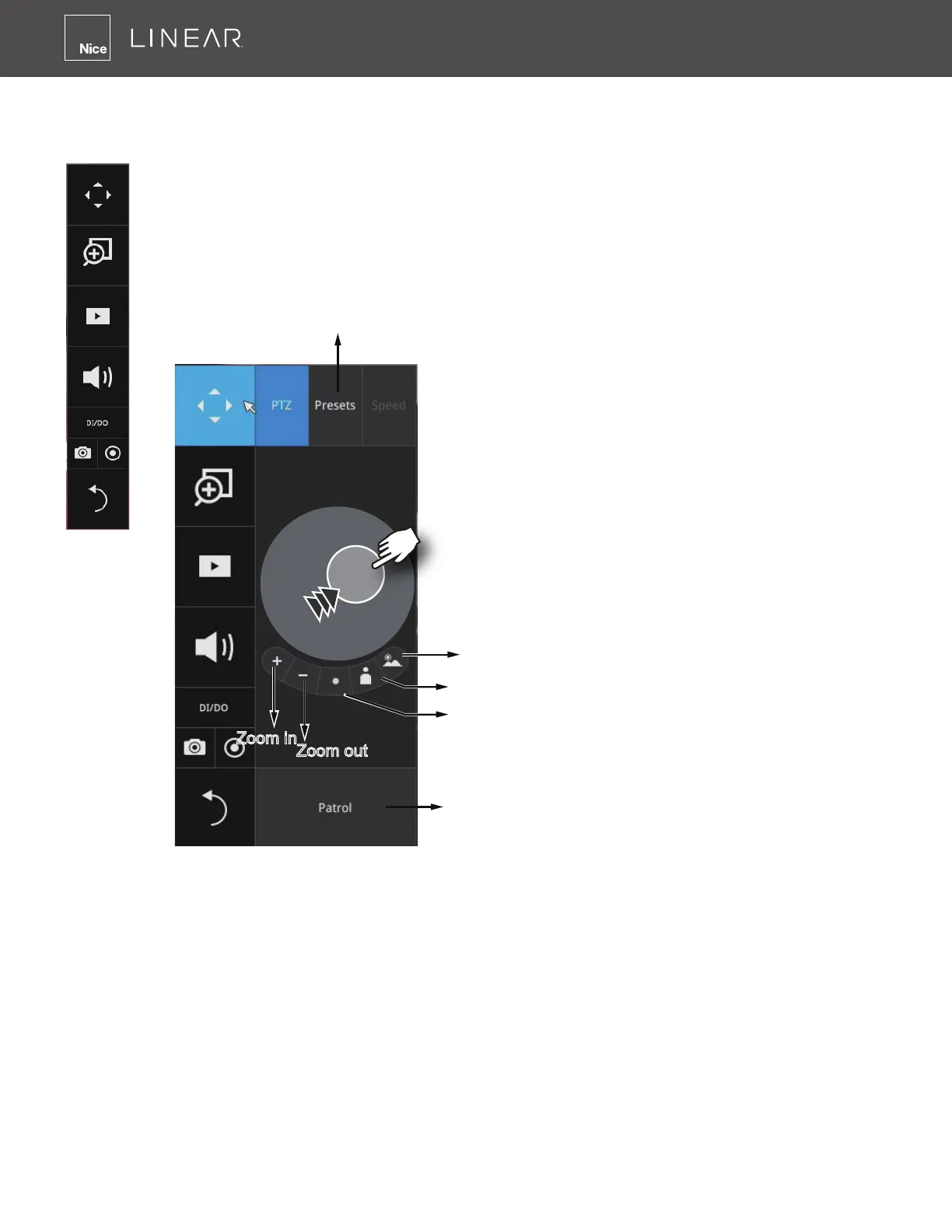
Once you selected a camera, click on the PTZ button on a camera portal�
Focus far
Focus near
Starts patrol
Home
Zoom out
Zoom in
The PTZ panel will prompt� Below are the description of its functions:
1� PTZ control: Click and drag the nudget in the center toward the direction you wish to move�
2� Focus: Click on the Focus near and Focus far buttons to adjust camera focus�
3� Home: Click to move the camera lens towards the default home position�
4� Zoom: Use the Zoom in and Zoom out buttons to adjust the camera's zoom ratio�
5� Presets: If you congured preset positions, a list of preset positions will appear�
6� Patrol: If you congured preset positions into a patrolling tour, click on this button and the
camera will proceed with patrolling through preset points�
Note that on a speed dome camera, the farther you pull the nudget away from the center, the
faster the lens moves� This works like speed control�



 To Next Page