69
Smart Surveillance
3-3� Search recording clips
3-3-1� Basic Search
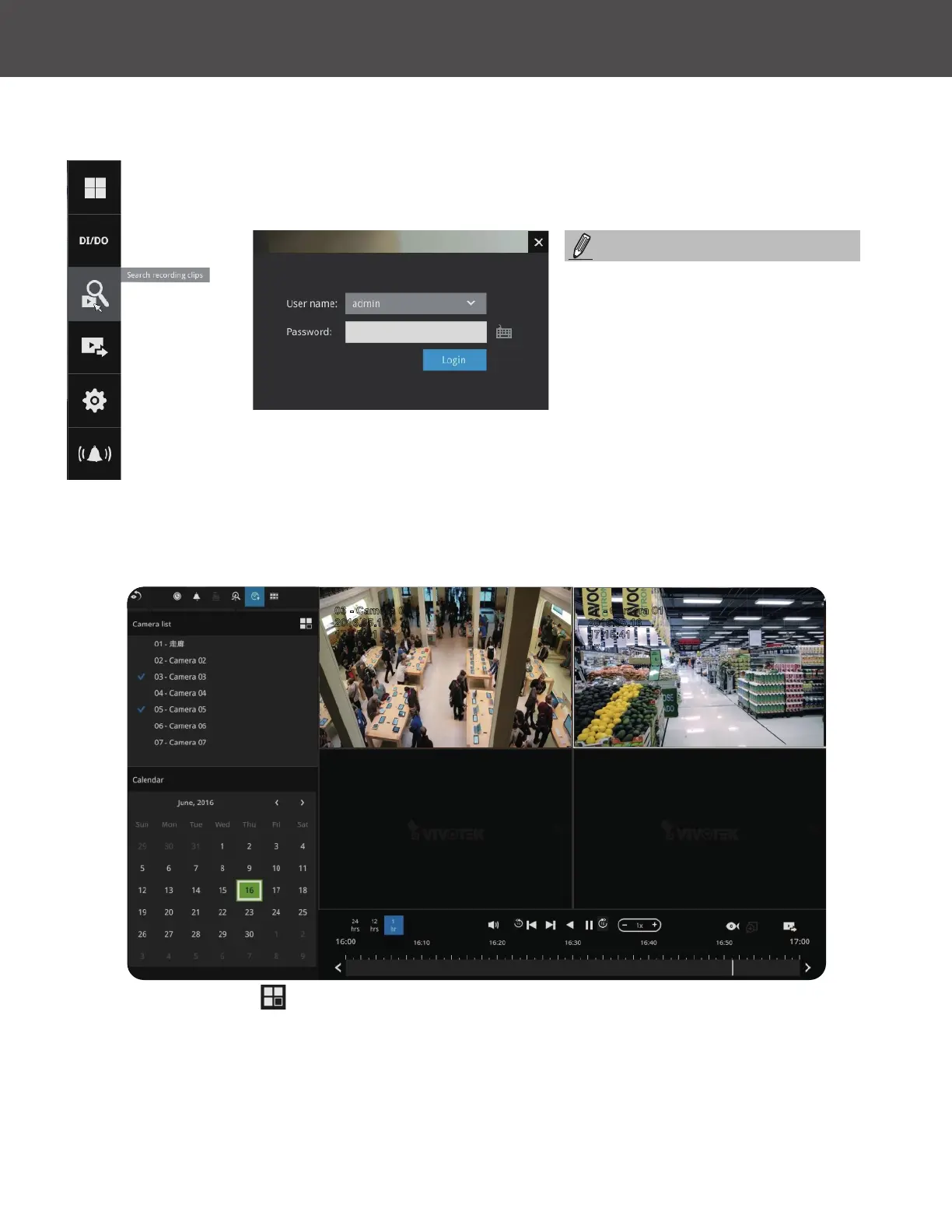
Click the button to start searching for recorded clips� A conrm box will prompt� Enter
User name and Password to proceed�
2016.05.16
03 - Camera 03
17:15:41
1x
2016.05.16
01 - Camera 01
17:15:41
1x
The search and calendar view will appear� Select a day on the calendar to select the
date when the recordings of your interest took place (the days with recorded clips will be
highlighted in blue and green)�
Double-click on a day to begin playback and search�
The date highlighted in green indicates today, and the green indicator does not necessarily
mean that there are recorded videos today�
Use the Layout button
to adjust view cell arrangement on screen� You can retrieve the
recorded videos from a maximum of 4 cameras at the same time�
Once you select to playback multiple cameras, the playback window will automatically turns into
the 2x2 layout� Up to 4 cameras' recording can be played back simultaneously� This enables the
synchronized playback of video produced by multiple cameras� Users do not need to switch from
one camera to another when searching for forensic evidences�
The Search Recording button
becomes the Smart Search II button
with cameras that come with the
Smart Motion Detection feature�
NOTE:



 To Next Page