93
Smart Surveillance
3-5-4� Settings
-
Camera
-
Recording
Recording options
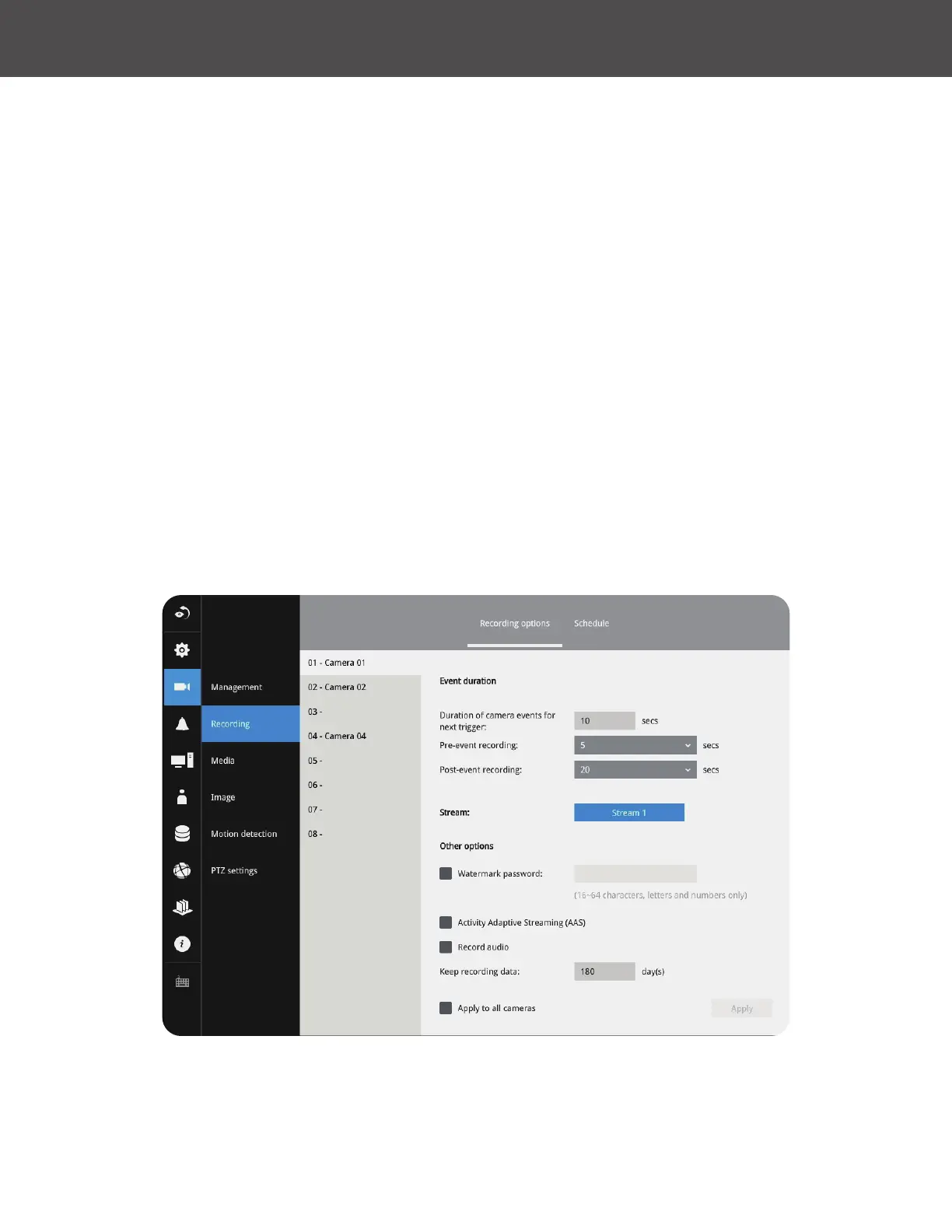
On the camera Recording page, you can congure the following:
1� Congure the duration of camera events, for the concern that camera can be too frequently
triggered�
2� Enter the Pre- and Post-event recording time� The triggering events can be DI, DO, Motion
detection, PIR or Tampering detection� A recording length of 10 seconds of pre-event and up
to 300 seconds of post-event can be congured�
3� The default recording stream is Stream 1, and the system automatically adjusts the frame
rate, resolution, etc� for optimum performance� However, you can still change the streaming
characteristics� Note that you can not assign the recording task to other video stream�
4� Enable the Activity Adaptive Streaming feature� This feature records the I-frames only when
there are no activities detected� When activities or alarm are triggered, the camera raises
the recording stream to the full frame rate� This feature can save tremendous amount of
bandwidth�
5� Enable or disable audio recording� Note that audio transmission through HDMI cable is
currently not available�
6� Change the life expectancy of the recording data�
7� You can apply a typical conguration to all cameras using the Apply to all cameras checkbox�
You can refer to the User Manuals that come with your network cameras for more discussions of
these congurable options�



 To Next Page